
- Compatible XF 2.x versions
- 2.2
- 2.3
- Additional requirements
- PHP 7.4 or later
Hampel/Monolog v5.0.1 or later - Monolog Logging Service
- License
- MIT
- Visible branding
- No
Event Logging for Monolog sends a record of what happens on your forum to your logs - one structured record per event, with a stable event name and the IDs needed to follow it back into the forum.
It is for forum owners who ship their logs to a log collector, and want the forum's activity there beside the web server's: who deleted that post, when that member was banned and why, whether that password-reset email actually went out, and every server error the moment it happens rather than when someone next opens the admin control panel.
It writes through Monolog Logging Service, which decides where the records go - a log file, a log collector, email or Slack. This add-on only produces them. It adds no tables, shows nothing to members, sends no alerts of its own, and makes no external requests.
Nothing is recorded until you turn an event group on. Installing it changes nothing about what your forum logs.
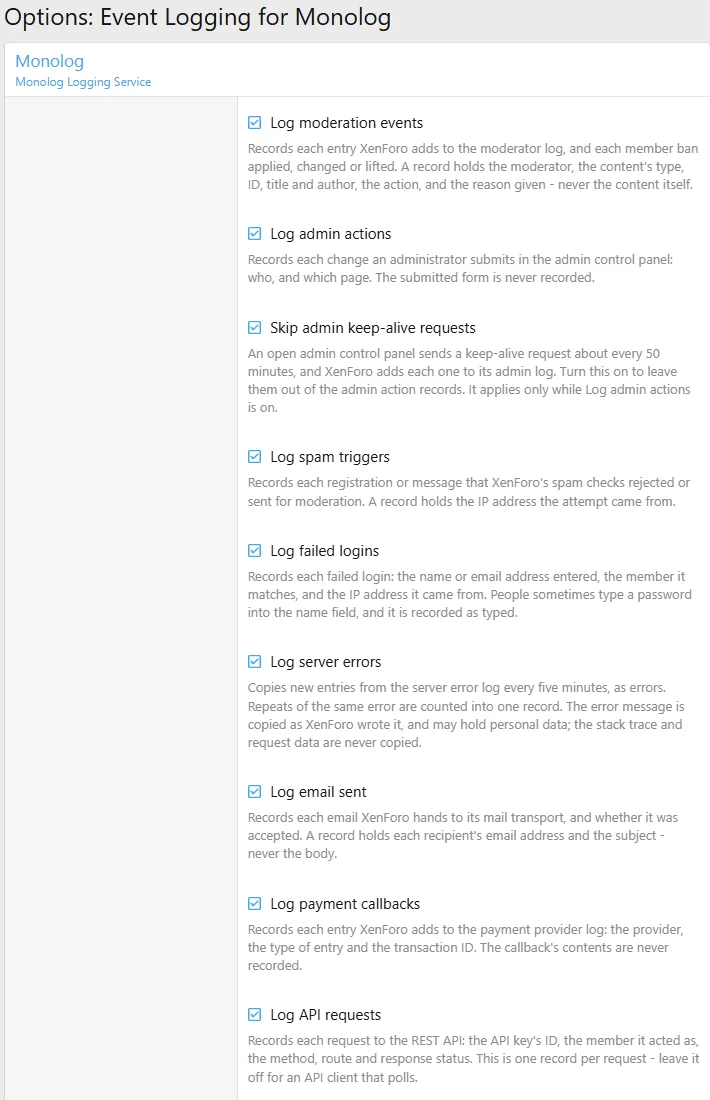
Eight event groups, each its own option, all off by default:
A ninth option, under Admin actions, leaves out the keep-alive request an open admin control panel sends about every 50 minutes.
Server errors are the reason many people will want this. An exception on your forum normally reaches nobody until someone opens the server error log. With this group on it arrives in your logs within five minutes, at Error level, so Monolog Logging Service's email or Slack output can tell you. The same error logged a thousand times between runs is one record with a count, not a thousand.
A record, in Monolog's JSON format:
Search, dashboards and alerts should match on
Turning a group on changes what your forum records about its members and staff, and where that record is kept. Whoever can read your logs can read these events, so check them against your privacy policy before you start.
Never recorded, by any event: API keys, tokens, session IDs or cookies; the content of a post, conversation, email or submitted form; a payment's details or the data a provider sent.
Recorded only by the events that are about it:
It is for forum owners who ship their logs to a log collector, and want the forum's activity there beside the web server's: who deleted that post, when that member was banned and why, whether that password-reset email actually went out, and every server error the moment it happens rather than when someone next opens the admin control panel.
It writes through Monolog Logging Service, which decides where the records go - a log file, a log collector, email or Slack. This add-on only produces them. It adds no tables, shows nothing to members, sends no alerts of its own, and makes no external requests.
Nothing is recorded until you turn an event group on. Installing it changes nothing about what your forum logs.
What it records
Eight event groups, each its own option, all off by default:
| Group | Events | From |
|---|---|---|
| Moderation | moderator.action, user.banned, user.ban_updated, user.ban_lifted | the moderator log, and every ban applied, changed or lifted |
| Admin actions | admin.action | the admin log - each change submitted in the admin control panel |
| Spam triggers | spam.triggered | registrations and messages the spam checks rejected or moderated |
| Failed logins | login.failed | each failed login, and the member it matched |
| Server errors | error.logged | the server error log, every five minutes, with repeats counted |
mail.sent, mail.failed | every email XenForo hands to its mail transport | |
| Payment callbacks | payment.callback | the payment provider log |
| API requests | api.request | each request to the REST API |
A ninth option, under Admin actions, leaves out the keep-alive request an open admin control panel sends about every 50 minutes.
Server errors are the reason many people will want this. An exception on your forum normally reaches nobody until someone opens the server error log. With this group on it arrives in your logs within five minutes, at Error level, so Monolog Logging Service's email or Slack output can tell you. The same error logged a thousand times between runs is one record with a count, not a thousand.
A record, in Monolog's JSON format:
JSON:
{
    "message": "Moderator action",
    "context": {
        "event": "moderator.action",
        "moderator_log_id": 4172,
        "actor_user_id": 1,
        "content_type": "post",
        "content_id": 90211,
        "content_user_id": 12,
        "content_username": "alice",
        "content_title": "For sale: two tickets",
        "action": "delete_soft",
        "reason": "Duplicate listing"
    },
    "level_name": "INFO",
    "channel": "events",
    "datetime": "2026-09-30T14:03:11.482+10:00"
}
Search, dashboards and alerts should match on
event, which is fixed, never on the message, which may be reworded. The README lists every field of every event.Privacy
Turning a group on changes what your forum records about its members and staff, and where that record is kept. Whoever can read your logs can read these events, so check them against your privacy policy before you start.
Never recorded, by any event: API keys, tokens, session IDs or cookies; the content of a post, conversation, email or submitted form; a payment's details or the data a provider sent.
Recorded only by the events that are about it:
- Email - each recipient's email address, and the subject. This is the group to think hardest about.
- Failed logins - what was typed as the name or email address, and the IP address. People sometimes type a password into the name field, and it is recorded as typed.
- Moderation - the title and author of the content acted on, and the reason given.
- Spam triggers - the IP address.
- Server errors - the error message, exactly as XenForo wrote it.
Requirements
- XenForo 2.2 or later
- PHP 7.4 or later
- Monolog Logging Service 5.0.1 or later
Installation
- Install Monolog Logging Service, then this add-on, as you would any other.
- Raise the level for this add-on's channel in
src/config.php. Events are logged at Info, and Monolog's log file takes Warning and above by default - so until you do this, an event is written nowhere:
PHP:$config['monolog'] = [ 'file' => [ 'format' => 'json', 'channels' => ['events' => 'info'], ], ];channelsraises this add-on's channel alone and leaves every other add-on's logging where it was.formatis optional, but a log collector can only read an event's fields from JSON. - Turn on the groups you want under Options > Monolog, where this add-on's options follow Monolog's own:
- Check the result from the XenForo root:
Bash:php cmd.php event-logging:validate
Command line
Bash:
php cmd.php event-logging:config                          # which groups are on, and the log file's level
php cmd.php event-logging:validate                        # whether an event can reach the log
php cmd.php event-logging:validate --unattended --strict  # for a monitor: a warning exits 2
event-logging:validate writes one probe record and looks for it in the log file. It exits 1 if a check failed and 0 otherwise, warnings included, so a deploy step can depend on it. With --strict a warning exits 2. That is not the monitoring-plugin numbering: 1 always means a check failed.Notes
- Turning on Server errors starts from that moment - errors already in the log are not sent.
- Licensed under the MIT licence.
- Related resources

