- Compatible XF 2.x versions
- 2.3
- Additional requirements
- AC-XenFrame
- Updates duration
- $15.00 / 12 mo. renewal
- Visible branding
- Yes, but removable without payment
Give your forum a desk to sit at. Deskspace is a warm, stationery-inspired theme pack for XenForo 2.3. Inspired by the classic OfficeSpace theme.
Demo
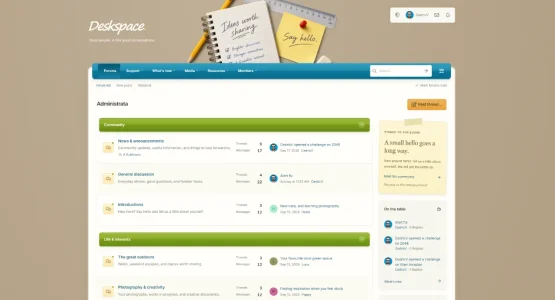
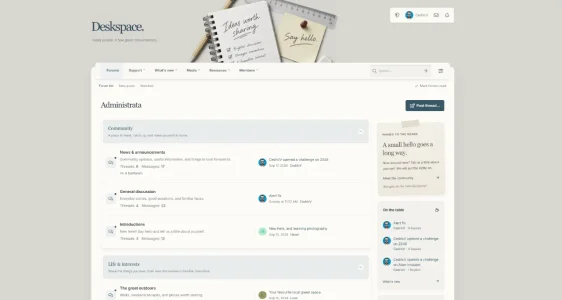
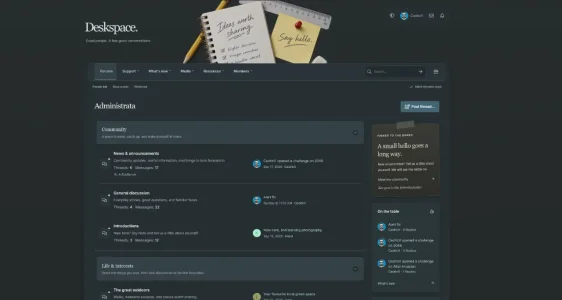
It comes as two styles. Deskspace is the pinboard one: a cork-coloured desk, a notebook, pencil and sticky note across the header, a blue navigation bar and green category headers. Deskspace Minimalistic takes the same layout and calms it right down, with porcelain and warm paper tones, blue-grey accents and a serif touch on the headings. Perfect for writing communities.Pick one, or install both and let your members choose.
Light and dark
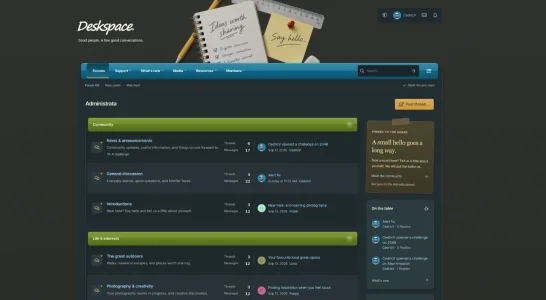
Both styles come with a native light and dark version. Members can pick light, dark or follow their device through the sliders button in the header. The choice is remembered in their browser, and XenForo's own style variation setting keeps working as normal.
The header
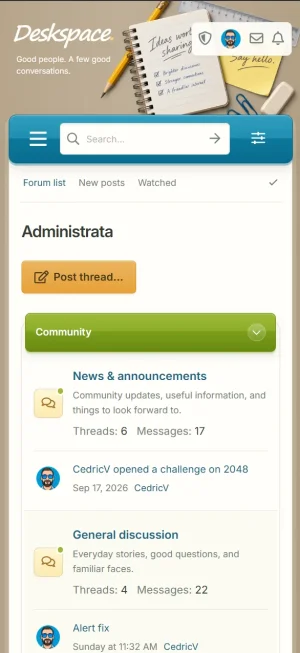
The stationery artwork sits across the top of the page, next to your logo and tagline. On phones it scales down and slides to the side so your logo and the navigation still have room. The artwork, tagline and logo can all be changed through style properties, so you're not stuck with mine.
A pinned note in the sidebar
The forum index has a paper note pinned to the sidebar. It's a nice way to welcome new members or point people somewhere. The label, heading, message, link and signature are all editable, and you can switch the note off entirely if you'd rather not have it.
Widgets that fit the desk
The sidebar uses XenForo's own New posts, Members online and Forum statistics widgets, restyled to match. The data and permissions stay native. If you'd rather use your own sidebar setup, switch off the preview arrangement and your configured widgets come back.
Collapsible categories
Every category on the forum index has a small toggle to fold it away. Handy for bigger boards where not everyone cares about every section.
A reading bar for long threads
Scroll down a thread and a small bar appears at the bottom of the page with the thread title, a bookmark button, back to top and reply.
Staff tools in one place
Moderators and admins get a single shield icon next to their avatar.
Requirements and installation
Deskspace requires:
XenForo 2.3.0 or newer
The XenFrame add-on, included in the download
Installation is two steps.
Install AC-XenFrame-1.0.0.zip through Admin CP → Add-ons → Install/upgrade from archive. Then import Deskspace.zip or Deskspace-Minimalistic.zip through Admin CP → Appearance → Styles → Import, as a new style with no parent. The images, fonts and script come along with the import, so there's nothing to upload by hand.
XenFrame is the small framework behind the appearance button, the reading bar and the staff shield. It's shared with my other themes, so if you already installed it for one of those, you can skip that step. The footer has a small "Theme by Administrata.net" credit, which can be removed with a copyright removal code under Admin CP → Options → XenFrame.
Demo
It comes as two styles. Deskspace is the pinboard one: a cork-coloured desk, a notebook, pencil and sticky note across the header, a blue navigation bar and green category headers. Deskspace Minimalistic takes the same layout and calms it right down, with porcelain and warm paper tones, blue-grey accents and a serif touch on the headings. Perfect for writing communities.Pick one, or install both and let your members choose.
Light and dark
Both styles come with a native light and dark version. Members can pick light, dark or follow their device through the sliders button in the header. The choice is remembered in their browser, and XenForo's own style variation setting keeps working as normal.
The header
The stationery artwork sits across the top of the page, next to your logo and tagline. On phones it scales down and slides to the side so your logo and the navigation still have room. The artwork, tagline and logo can all be changed through style properties, so you're not stuck with mine.
A pinned note in the sidebar
The forum index has a paper note pinned to the sidebar. It's a nice way to welcome new members or point people somewhere. The label, heading, message, link and signature are all editable, and you can switch the note off entirely if you'd rather not have it.
Widgets that fit the desk
The sidebar uses XenForo's own New posts, Members online and Forum statistics widgets, restyled to match. The data and permissions stay native. If you'd rather use your own sidebar setup, switch off the preview arrangement and your configured widgets come back.
Collapsible categories
Every category on the forum index has a small toggle to fold it away. Handy for bigger boards where not everyone cares about every section.
A reading bar for long threads
Scroll down a thread and a small bar appears at the bottom of the page with the thread title, a bookmark button, back to top and reply.
Staff tools in one place
Moderators and admins get a single shield icon next to their avatar.
Requirements and installation
Deskspace requires:
XenForo 2.3.0 or newer
The XenFrame add-on, included in the download
Installation is two steps.
Install AC-XenFrame-1.0.0.zip through Admin CP → Add-ons → Install/upgrade from archive. Then import Deskspace.zip or Deskspace-Minimalistic.zip through Admin CP → Appearance → Styles → Import, as a new style with no parent. The images, fonts and script come along with the import, so there's nothing to upload by hand.
XenFrame is the small framework behind the appearance button, the reading bar and the staff shield. It's shared with my other themes, so if you already installed it for one of those, you can skip that step. The footer has a small "Theme by Administrata.net" credit, which can be removed with a copyright removal code under Admin CP → Options → XenFrame.