
![[DD] Prefix & Label Tools - add Icons and more](/community/data/resource_icons/10/10213.jpg?1767134942)
- Compatible XF 2.x versions
- 2.3
- Additional requirements
- [DD] Core
- Visible branding
- No
[DD] Prefix Tools
[DD] Prefix Tools provides community administrators with full control over thread prefixes, resource prefixes, and user group banners in XenForo 2.3. The add-on introduces a powerful CSS-free layout system integrated directly into XenForo's style properties, along with vector icon support, quick prefix filters in forum lists, and styled HTML prefix dropdown menus.---
Key Features
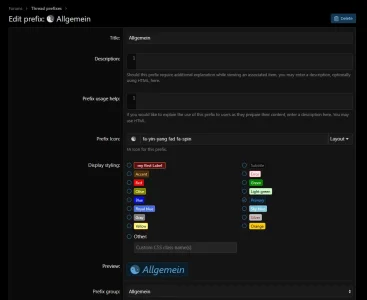
- Styled HTML Prefix Dropdown Menus: Full-width HTML prefix menus with vector icon support across thread creation, edit, and Inline Moderation dialogs (Threads and Resources).
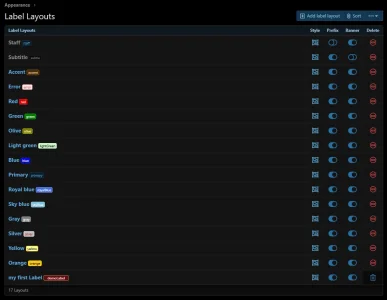
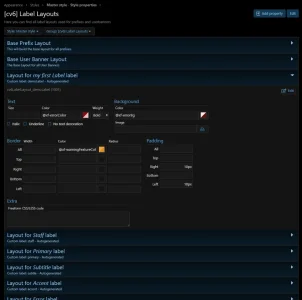
- Style-Based Layouts: Manage prefix designs via dedicated XenForo Style Properties (
cv6LabelLayout_*), allowing different looks across styles and dark/light variations without writing custom CSS. - Vector Icon Support: Assign vector icons from FontAwesome 5 or any active icon provider to thread prefixes, resource prefixes, and user banners via IconTrait.
- Advanced Icon Effects: Full support for icon animations (
fa-spin,fa-pulse), rotation and flipping (fa-rotate-*,fa-flip-*), and duotone icons. - Enhanced User Banners: Apply the unified label layout engine directly to user group titles and banners.
- Forum Prefix Filter: Quick filter dropdown in forum filter bars for rapid topic discovery by prefix.
- Multi-Content Integration: Native support for:
- Thread Prefixes (Forums, Thread View, Inline Moderation)
- Resource Prefixes (XFRM - Resource Manager, Category View, Inline Moderation)
- Live Layout Preview: Real-time visual preview of label layouts in the AdminCP while editing.
- Centralized Management: Dedicated ACP interfaces to create, sort, rebuild, or reset label layouts.
Requirements
- XenForo: 2.3.0 or higher
- PHP: 8.2.0 or higher (PHP 8.4 ready)
- Dependency: [DD] - Core Library (v1.4.2+)
- Optional: XenForo Resource Manager (XFRM) 2.3+
Installation & Upgrade
1. Upload
Extract the release ZIP archive and upload the contents of theupload/ directory into your XenForo root directory.2. Install / Upgrade
Install or upgrade the add-on via AdminCP (AdminCP ➔ Add-ons) or using the XenForo CLI:
Bash:
php cmd.php xf-addon:install cv6/Prefixphp cmd.php xf-addon:upgrade cv6/Prefix when upgrading).3. German Language Pack (Optional)
For German forums, import the included language pack fromsrc/addons/cv6/Prefix/language/Prefix-1030670-de.xml via AdminCP ➔ Appearance ➔ Languages ➔ Import a language (select overwrite on your German language).---
Configuration & Setup
1. Options (AdminCP ➔ Options ➔ [DD] Prefix and label tools)
- Prefix Columns: Configure the number of columns (1–5) used when displaying prefixes in ACP management lists.
- Staff Icon: Global icon class applied to staff user banners.
- Use Save Method: Alternative fallback method for rendering user banner icons if default template injection is constrained.
2. Label Layouts (AdminCP ➔ Forums ➔ Label Styles)
- Create custom label styles by specifying a unique tag and title.
- Each layout automatically generates a native XenForo style property under the
cv6LabelLayoutsgroup. - Customize colors, borders, background, font weight, and hover effects per style.
3. Prefix & Banner Icons
- Thread Prefixes: Configure icons under AdminCP ➔ Forums ➔ Thread prefixes.
- Resource Prefixes: Configure icons under AdminCP ➔ Resource manager ➔ Resource prefixes.
- User Group Banners: Configure icons under AdminCP ➔ Groups & permissions ➔ User groups.
Additional Icon Sets
For additional icon families (e.g. Google Material Symbols, Game Icons) compatible with the vector icon engine, visit the official download category:---
Links & Support
- Developer: Hoffi
- Support Forum: Dice Dragons Support Forum
- Resource Downloads & FAQ: Dice Dragons Downloads
- Donations: PayPal | Amazon Wishlist
More Details here: Dice & Dragons

![[DD] Node Icons & Tools](/community/data/resource_icons/5/5565.jpg?1738969921)

![[DD] Letter Index](/community/data/resource_icons/8/8839.jpg?1738176952)
![[DD] Admin Tools](/community/data/resource_icons/7/7697.jpg?1738176049)
![[DD] Core](/community/data/resource_icons/8/8826.jpg?1738175900)