
![[DD] Core](/community/data/resource_icons/8/8826.jpg?1738175900)
- Compatible XF 2.x versions
- 2.3
- License
- licensed under CC BY-ND 4.0
- Visible branding
- No
[DD] - Core Library v1.6.3
[DD] - Core Library is the foundational framework required for (nearly) all cv6 / Dice Dragons add-ons. It provides a rich set of shared resources, UI components, and developer tools to ensure stability and reduce code duplication.
[DD] - Core Library is the foundational framework required for (nearly) all cv6 / Dice Dragons add-ons. It provides a rich set of shared resources, UI components, and developer tools to ensure stability and reduce code duplication.
Features & Developer Tools
This library includes essential tools for XenForo development:Centralized Comparison Operators Subsystem
- Standardized Comparison Operators: Suite-wide centralized operator definitions, symbols (=, !=, >, >=, <, <=), and concise uppercase keywords (BETWEEN, NOT BETWEEN, IN, NOT IN, CONTAINS, NOT CONTAINS, EMPTY, NOT EMPTY, STARTS WITH, ENDS WITH).
- PHP Helper (\cv6\Core\Helper\Operator): Centralized typed constants, mathematical and logical groupings, and filter methods.
- Templater Integration: Global template functions {{ cv6_operators() }} and {{ cv6_grouped_operators() }} for <xf
 ptions source="..." />.
 - AdminCP Macros: Pre-built <xf:macro template="cv6_admin_macros" name="operator_select" ... /> and operator_select_row with optgroup grouping and filtering.
Multi-Provider Icon Framework
- Modular Icon Providers: Extensible provider architecture (IconProviderInterface, AbstractIconProvider, FontAwesomeProvider) enabling third-party icon libraries (Google Material Symbols, Game Icons, Font Awesome 6/7, etc.) to integrate seamlessly into XenForo 2.3.
- Code Event (cv6_icon_provider): Official event listener allowing external add-ons to register custom icon sets without core modifications.
- Core Extensions & Fallback Protection: Extends XF\IconRenderer and XF\CssRenderer for dynamic rendering delegation, missing-provider fallback icons, and runtime @<prefix>-var-<name> Data-URI CSS mask generation in LESS.
- 4-Step Icon Migration Wizard: Guided ACP tool (admin.php?cv6-core/migrate) for converting icons across Database, Style Properties, and Phrases between any registered providers with interactive override modals.
- Universal Multi-Provider Icon Chooser & Live Autocomplete: Enhanced cv6_inputIcon macro and cv6/core/icon.js with provider switching and live Ajax SVG previews.
- Additional Icon Sets: Further icon set add-ons (Material Symbols, Game Icons, etc.) can be downloaded at Dice Dragons Icon Interfaces.
UI Components & Templates
- Multi-Toggle & Collapsible Rows (cv6-multi-toggle): Standardized multi-target collapse handler for AdminCP tables (.dataList-row--childRow) and lists. Features synchronized table row sliding via XF.Animate, atomic cross-page state persistence in localStorage, and zero-FOUC initialization.
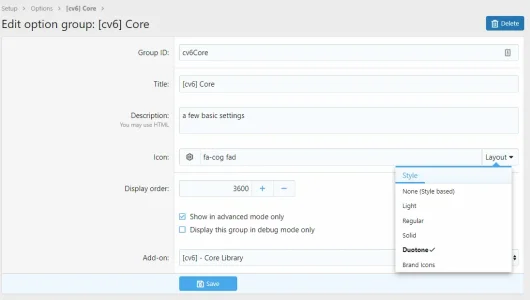
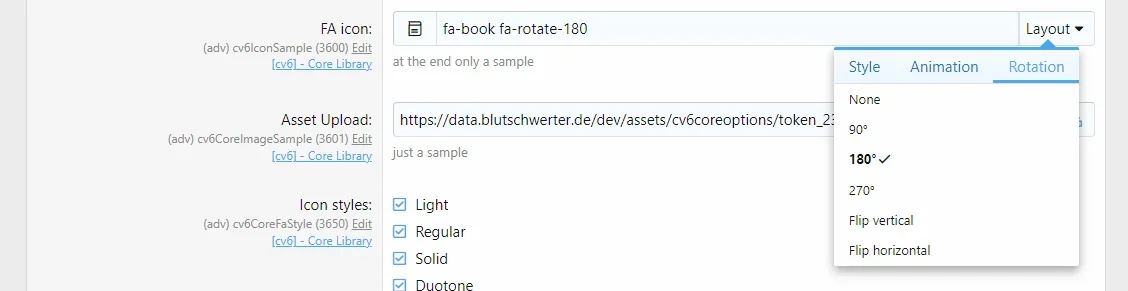
- FontAwesome Icon Auto-Completion: Interactive auto-completion dropdown (fa- + 2 characters) with live SVG mask previews inheriting current text color (currentColor), smooth XF.Animate.fadeDown/fadeUp transitions, and full support for modifier/variant classes (fas, fa-spin, fa-rotate-90). Filters suggested icons based on enabled styles in cv6CoreFaStyle (excluding Brand icons when fab is disabled). Supports autocomplete=1 in option format parameters (edit_format_params).
- FontAwesome Icon Chooser: Ready-to-use template with a menu interface for selecting icons.
- Asset Uploader (cv6_assetuploadrow): Standardized upload macro with live image preview, optional default path support, integrated Reset button (fa-undo), and smooth 180° counter-clockwise rotation animation on hover.
- Universal Integration: Specialized templates to use the Icon Chooser and Asset Uploader easily in both Style Properties and Add-on Options.
- Tabbed Interfaces: Traits and templates to quickly create tabbed index pages.
Backend & Logic
- Icon Helper Service (cv6\Core\Helper\Icon): Caches and scans native XenForo FontAwesome SVG icons (styles/fa/) into XenForo registry (cv6IconList) for fast search lookups.
- Icon Controllers: Public (cv6\Core\Pub\Controller\Icon) and Admin (cv6\Core\Admin\Controller\Icon) controllers mapped to cv6-core/auto-complete.
- Option Validators (cv6\Core\Option\Check):
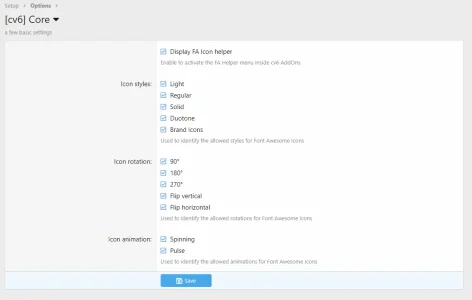
- verifyValidIconMandatory: Requires a valid icon class name. Validates format classes against enabled settings in the cv6Core group (cv6CoreFaStyle, cv6CoreFaRotation, cv6CoreFaAnimation).
- verifyValidIconOptional: Clears input field if only modifiers are entered without an icon name, while properly validating unknown or disallowed classes using native XF\Repository\IconRepository constants.
- Setup Traits (cv6\Core\Setup\SetupTrait): Reusable, idempotent traits for installation, upgrades, and schema management with bulk column creation (addColumnsIfMissing), safe drops (dropColumnIfExists, dropIndexIfExists), renames (renameTableIfExists, renameColumnIfExists), and widget cleanup (deleteWidgets).
- Multi-Alphabet Index Provider Repository (cv6\Core\Repository\Alphabet): Extensible multi-script alphabet registry (Latin, Greek, Cyrillic, Hebrew, Arabic) with RTL layout and letter variant mapping.
- JS Dependency Handler: Efficient management of JavaScript dependencies.
- Widget Framework: Base functionality for creating index widgets.
Styling & LESS
- LESS Icon Helpers: Functionality to easily render FontAwesome icons directly within .less files.
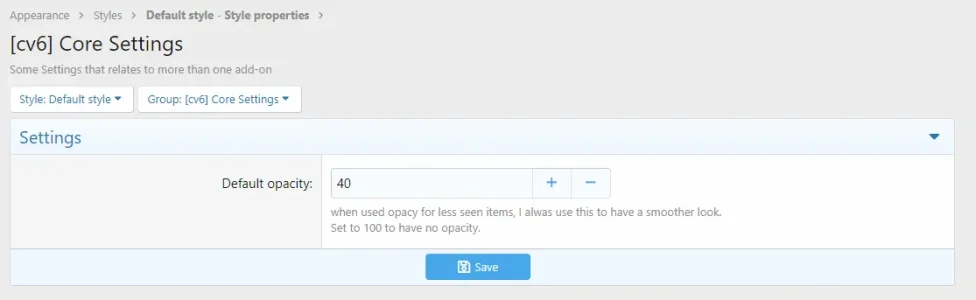
- Global Style Settings: Centralized opacity settings (standardizing the look across all cv6 add-ons).
Requirements
- XenForo: 2.3.0 or higher
- PHP: 8.2.0 or higher
- Dependency: This add-on is the required base for all cv6 extensions.
Installation
1. Upload
Upload the contents to src/addons/cv6/Core.2. Install
Install the add-on via the Admin Control Panel or per CLI:
Bash:
php cmd.php xf-addon:install cv6/CoreConfiguration
While this add-on primarily works in the background, it provides central settings:- Navigate to ACP > Options > [DD] Core Settings.
- Font Awesome Integration: Configure how icons and format styles/rotations/animations are rendered and permitted globally for dependent add-ons.
- Global Style Settings: Adjust global opacity settings.
Links & Support
- Related resources


![[DD] Node Icons & Tools](/community/data/resource_icons/5/5565.jpg?1738969921)
![[DD] Dice Roller](/community/data/resource_icons/8/8267.jpg?1738230412)
![[DD] New Post Icon](/community/data/resource_icons/7/7914.jpg?1738176613)
![[DD] Prefix & Label Tools - add Icons and more](/community/data/resource_icons/10/10213.jpg?1767134942)
![[DD] Admin Tools](/community/data/resource_icons/7/7697.jpg?1738176049)