
![[DD] Admin Tools](/community/data/resource_icons/7/7697.jpg?1738176049)
- Compatible XF 2.x versions
- 2.3
- Additional requirements
- [DD] Core
- Visible branding
- No
[DD] Admin Tools (internally cv6/CollapseAdminLists) enhances the XenForo 2.3 Admin Control Panel with essential workflow improvements. It keeps your ACP organized by allowing you to collapse long lists, filter views by add-on, and easily identify template modifications with visual icons.
Feature Showcase & Highlights
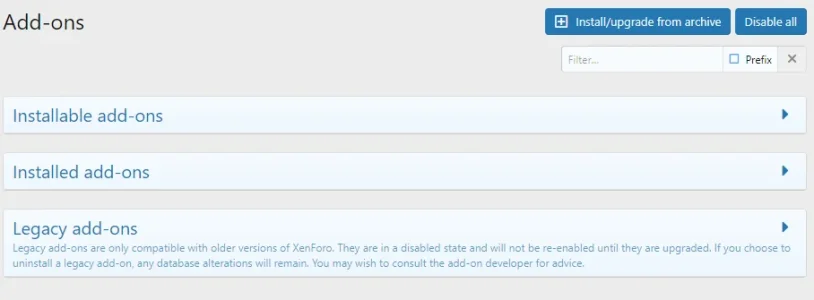
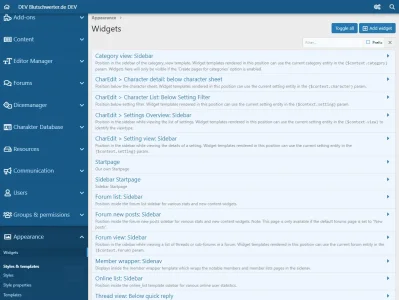
- Collapsible ACP Lists:
- Collapse and expand long lists across the Admin Control Panel to maintain focus on the items you need.
- Supported list views:
- Class Extensions
- Code Event Listeners
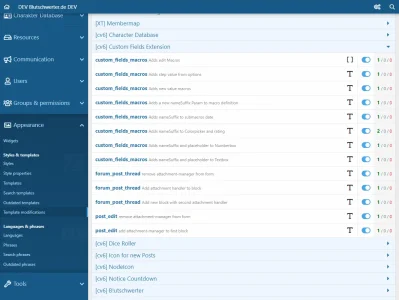
- Template Modifications
- Widgets
- Admin Permissions & Definition Lists
- Smilies (grouped by category)
- Prefixes (generic support across Thread Prefixes, Resource Prefixes, etc.)
- Powered by the standardized cv6-multi-toggle engine with smooth sliding row animation.
- Persistent local state retention: your collapsed or expanded state is preserved per administrator and browser session.
- Add-On Filter Dropdown: Quick dropdown filter on major developer and administrative lists to view only items associated with a selected add-on.
- Visual Status Indicators: Clean visual icons and highlighted rows in template modification lists for faster diagnostics.
Requirements
- XenForo: 2.3.0 or higher
- PHP: 8.2.0 or higher
- Required Add-on: [DD] Core AddOn (v1.5.1+)
Installation & Upgrade
1. Command Line (Recommended)
Bash:
php cmd.php xf-addon:install cv6/CollapseAdminLists
Bash:
php cmd.php xf-addon:upgrade cv6/CollapseAdminLists2. Manual Installation via Archive
- Download the release ZIP archive.
- Extract the contents locally and upload the upload directory to your XenForo root folder.
- Navigate in your AdminCP to Add-ons and click Install or Upgrade next to [DD] Admin Tools.
Language Pack (German)
A German language translation is included in the release package under_output/language/ or language/. Import it via CLI:
Bash:
php cmd.php cv6:language import cv6/CollapseAdminLists 6Configuration & Options
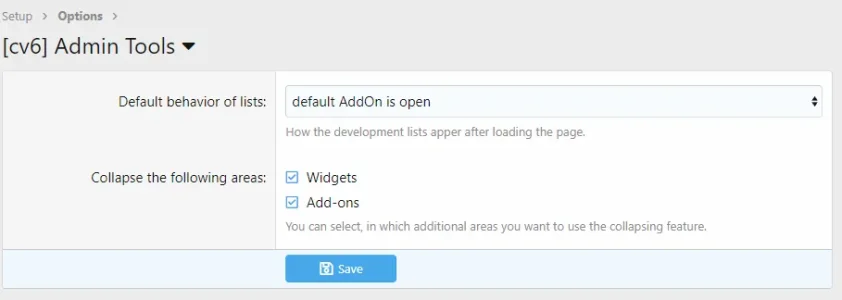
Navigate to Setup > Options > [DD] Admin Tools:- Default behavior of lists: Configure whether sections start expanded by default, collapsed, or adapt automatically.
- Collapse the following areas: Selectively enable or disable collapsing for individual areas:
- Widgets
- Add-ons
- Permissions
- Smilies
- Prefixes
Links & Support
- Developer: Hoffi
- Support Forum: Dice Dragons Support Forum
- Resource Page & FAQ: Download & FAQ
- Donation Wishlist: Amazon Wishlist


![[DD] Letter Index](/community/data/resource_icons/8/8839.jpg?1738176952)
![[DD] Prefix & Label Tools - add Icons and more](/community/data/resource_icons/10/10213.jpg?1767134942)
![[DD] Node Icons & Tools](/community/data/resource_icons/5/5565.jpg?1738969921)
![[DD] Core](/community/data/resource_icons/8/8826.jpg?1738175900)