

- Compatible XF 2.x versions
- 2.3
- Additional requirements
- PHP 8.0+
- Visible branding
- No
Overview
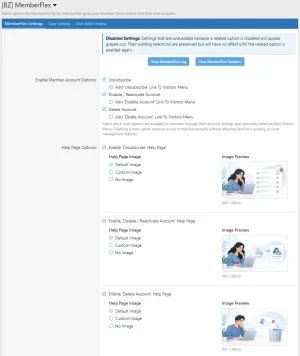
MemberFlex gives members greater flexibility and control over their XenForo accounts. Through their account settings, members can unsubscribe with a single click, temporarily disable and reactivate their accounts, or request permanent account deletion.All member-facing account-management features are disabled by default upon installation. Until an administrator enables them, your community continues to operate as if MemberFlex were not installed, with no changes to members’ account-management behavior.
Administrators have complete control over which MemberFlex features are available to their community. Each feature can be independently enabled or disabled, allowing administrators to offer only the account-management options that best suit their needs. Additional settings provide control over member eligibility through User Criteria and User Field Criteria, notifications, deletion requirements, and administrative activity logging.
Member Account Features
Unsubscribe
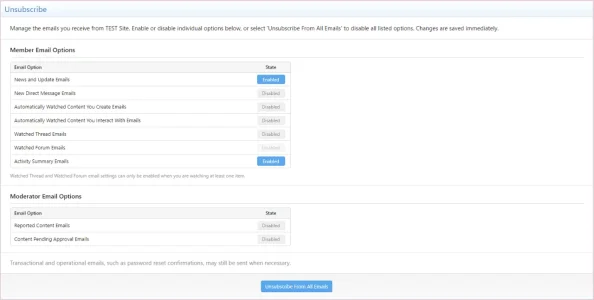
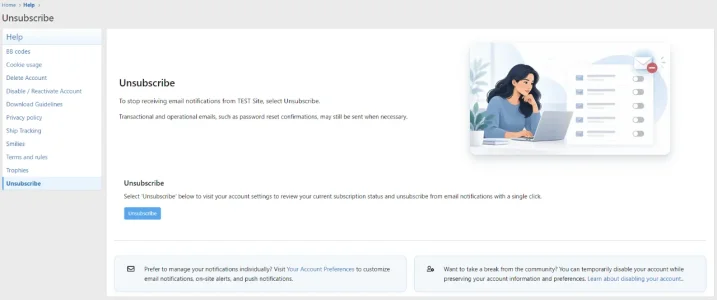
XenForo already provides email unsubscribe links and individual email preferences. MemberFlex builds upon this functionality by adding a dedicated, single-click Unsubscribe option directly within the member's account settings.Instead of requiring members to adjust multiple email preferences, MemberFlex offers a centralized action with a clear indication of whether they have already unsubscribed.
Essential account-related and transactional communications remain permitted.
Disable / Reactivate Account
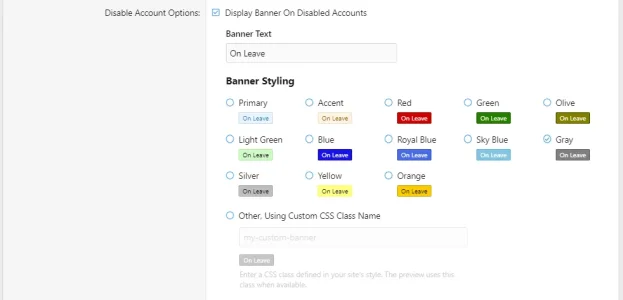
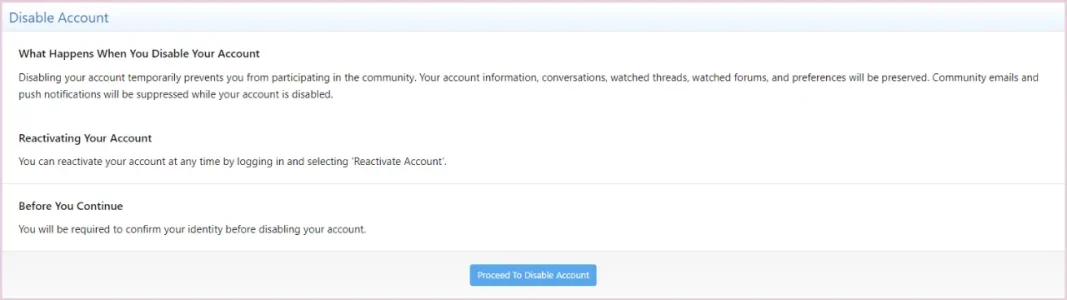
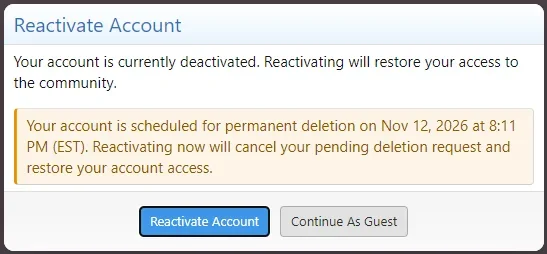
Members can temporarily disable their accounts while preserving their membership and published content. They can reactivate their accounts whenever they’re ready to return.Routine email and push notifications are suppressed while the account is disabled, with existing on-site alerts and preferences preserved. Returning members can reactivate through a new dedicated 'Reactivate Account' login option or continue browsing as a guest.
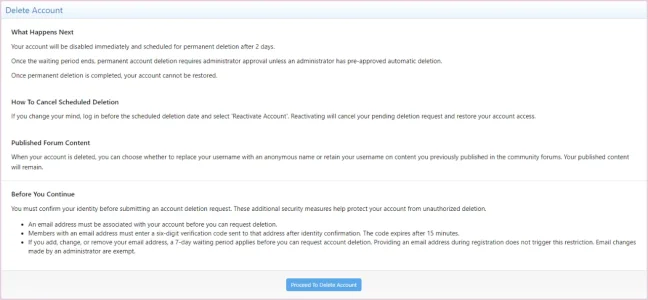
Permanent Account Deletion
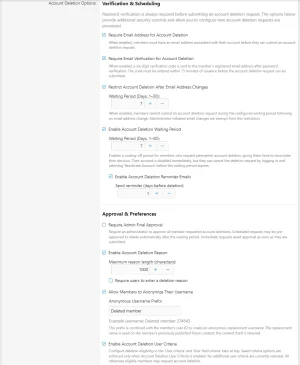
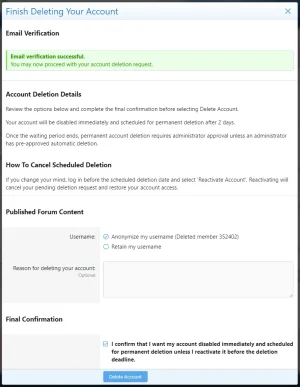
Members can request permanent account deletion immediately or following a configurable waiting period of 1–30 days.- Cancel scheduled deletion requests during the waiting period.
- Choose whether to retain or anonymize usernames associated with published forum content.
- Provide an optional or required deletion reason.
- Receive configurable deletion reminders and confirmations.
Published forum threads and posts are preserved when an account is deleted, with the username retained or anonymized according to the available deletion options.
Scheduled deletions are processed using XenForo's native account-deletion services, subject to any administrator-approval requirement. Once the scheduled deletion deadline has passed, member reactivation is no longer available, even if the deletion job has not yet completed.
Administrative Features
Flexible Configuration
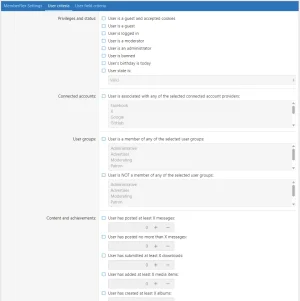
Independently enable or disable account-management features, configure member eligibility using User Criteria and User Field Criteria, and customize deletion requirements through centralized ACP settings. Dependent settings remain visible but inactive when their related features are disabled, preserving existing configuration values. Member Account Settings and the associated Help pages adapt dynamically to the enabled MemberFlex options, so the member-facing experience reflects the site's actual configuration.Notifications
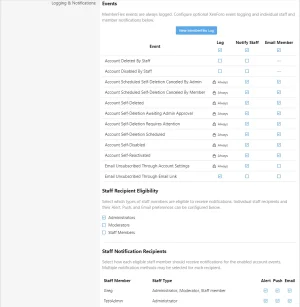
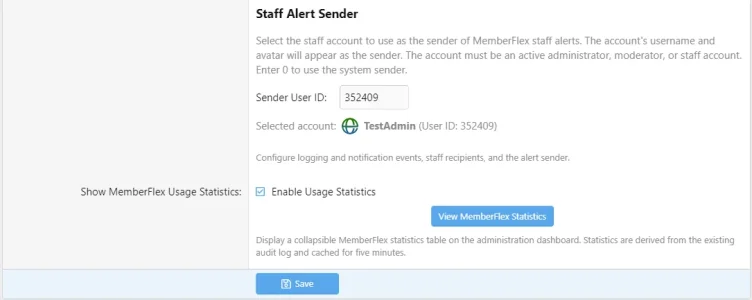
Configurable member emails and staff notifications, including supported deletion-approval notifications, selectable notification events, staff recipients, and notification sender accounts.Administrative Audit Log
A dedicated administrator-only log tracks account disabling, reactivation, deletion requests, approval-related activity, cancellations, and completed deletions, including eligible staff-initiated deletions.Records identify the responsible user and support filtering by username, numeric User ID, action, status, performing user, and date.
Historical audit records are retained following account deletion, with stored usernames updated when deletion anonymization is applied. Routine staff cleanup of accounts awaiting initial email confirmation is excluded from staff-deletion logging to prevent unnecessary records.
Manual Log Export
Administrators can export MemberFlex audit history to CSV using one of three options:- Export All History — export all available audit records.
- Export History Within Date Range — export records within a selected inclusive date range.
- Export History For Username / ID — export records associated with a specific username or numeric User ID.
Log Purge Management
Administrators can selectively purge eligible audit history, either in full or for records older than a selected date. Purging is limited to Unsubscribe, Account Self-Disabled, and Account Self-Reactivated log entries.Deletion-related records and other protected audit entries are not eligible for purging, including deletion requests and outcomes, cancellations, reminders, Requires Attention and administrator-approval records, and staff actions. This helps limit routine log growth without removing critical account-deletion history.
Customizable Help Pages
Separate Help pages for Unsubscribe, Disable / Reactivate Account, and Delete Account, featuring customizable content and optional image uploads. Their availability and individual help page content updates automatically according to MemberFlex enabled features and settings.Fully Phrased and Translation-Ready
MemberFlex is fully phrased and ready for translation. It uses XenForo's native phrase system throughout its member-facing and administrative interfaces, including dynamically displayed account-management text, allowing wording to be customized or translated without modifying source code.Uninstallation and Audit History
Uninstalling MemberFlex permanently removes its audit log and stored history. MemberFlex does not automatically create an archive during uninstall. Administrators who want to preserve audit records should use Log Export to download the desired history before uninstalling the add-on.XenForo Integration
Designed to integrate with XenForo's native account services and administrative tools, MemberFlex keeps voluntary account disabling separate from administrator-controlled account restrictions.MemberFlex puts account-management flexibility in the hands of members, while giving administrators the tools to control how that flexibility is offered.
Origins and Expanded Development
MemberFlex was inspired in part by the original [Liam W] (RIP) Member Self Delete add-on, which helped introduce member-controlled account deletion to the XenForo community.Where the original add-on centers on member-initiated account deletion, MemberFlex expands self-service account management into three independently configurable features: a single-click Unsubscribe option, temporary account disabling with member-controlled reactivation, and permanent account deletion. Temporary disabling is a separate, reversible action—members can reactivate their own accounts through the login dialog without administrator intervention. For scheduled deletion requests, reactivating during the waiting period also cancels the pending deletion and restores account access.
MemberFlex extends the administrative side as well, with configurable member eligibility, deletion choices and reminders, customizable Help pages, and selectable staff notifications. Its dedicated audit log covers account-management actions and eligible staff deletions, with searching, filtering, CSV export, and selective purging that preserves protected deletion history. Together, these features turn the original self-deletion concept into a more comprehensive account-management system for both members and administrators.
PayPal Donate
-
 memberflex-settings-1.webp
-
 memberflex-settings-2.webp
-
 memberflex-settings-3.webp
-
 memberflex-settings-4.webp
-
 memberflex-settings-5.webp
-
 memberflex-settings-6.webp
-
 memberflex-unsubscribe-account.webp
-
 memberflex-disable-account.webp
-
 memberflex-delete-account.webp
-
 memberflex-delete-account-finish.webp
-
 memberflex-reactivate-account.webp
-
 memberflex-unsubscribe-help.webp
-
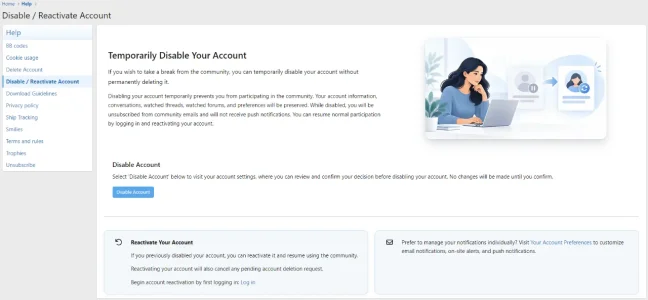 memberflex-disable-reactivate-help.webp
-
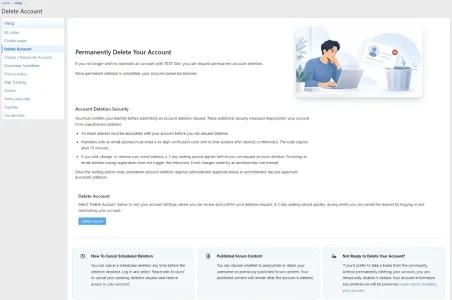 memberflex-delete-help.webp
-
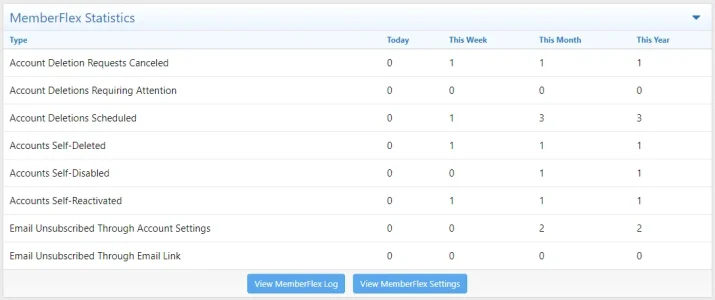 memberflex-statistics.webp
-
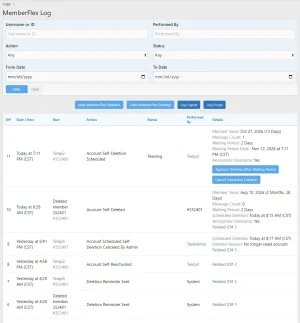 memberflex-log.webp
