- Compatible XF 2.x versions
- 2.3
- Additional requirements
- AC-XenFrame
- Updates duration
- $12.50 / 12 mo. renewal
- Visible branding
- Yes, but removable without payment
Bring a little colour back to your forum. Aurora is a fresh take on the earlier Aurora free theme.
Demo
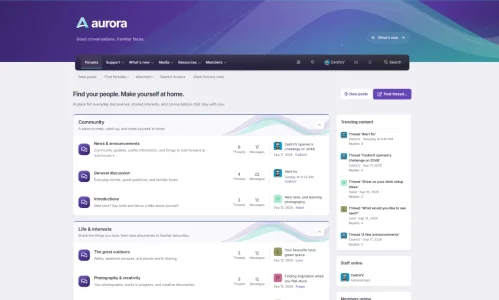
Aurora and Aurora Alternative now live in one style. Aurora gives you the full violet-to-teal banner, with fine shapes. Alternative brings a slimmer header. Members can switch between them through the sliders button in the navigation.
Light and dark
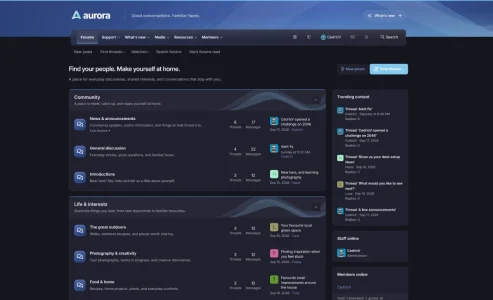
Aurora comes with light and dark versions. Members can pick light, dark or follow their device. The choice is remembered in their browser.
A colour for your community
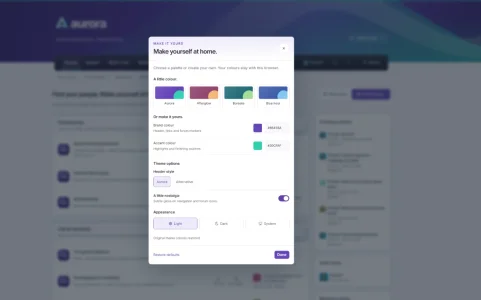
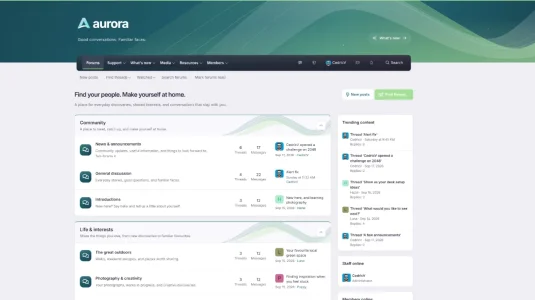
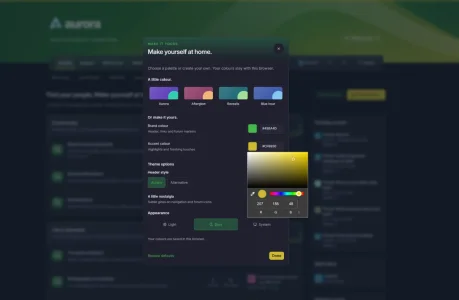
Four palettes come with the theme. Aurora is the original violet and teal. Afterglow brings warmer plum and peach tones, Borealis pairs blue-green with soft green, and Blue hour goes for blue with a pale sky accent. Pick a favourite, or use your own colours through XenFrame.
The header
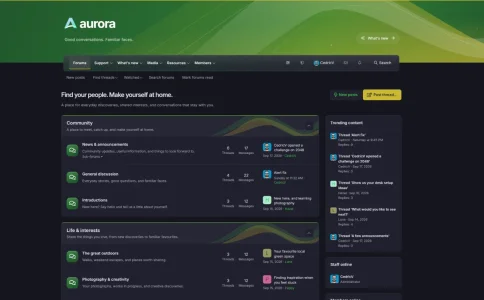
The banner gives Aurora its character, with curved shapes that carry through to the categories. A dark navigation bar sits underneath, with a little gloss. Switch the gloss off in the appearance panel if you prefer a flat finish.
A reading bar for long threads
Scroll down a thread and a small bar appears at the bottom of the page with the thread title, a bookmark button, back to top and reply.
Staff tools in one place
Moderators and admins get a single shield icon next to their avatar. It keeps the staff links together and shows the tools their permissions allow.
Requirements and installation
Aurora requires:
XenForo 2.3.0 or newer
The XenFrame add-on, included in the download
Extract the download first. Installation is then two steps.
Install AC-XenFrame-1.0.0.zip through Admin CP → Add-ons → Install/upgrade from archive. Then import Aurora.zip through Admin CP → Appearance → Styles → Import, as a new style with no parent. The logo, font and script come along with the import, so there's nothing to upload by hand.
XenFrame is the small framework behind the appearance button, the reading bar and the staff shield. It's shared with my other themes, so if you already have the same or a newer version installed, you can skip that step. The footer has a small "Theme by Administrata.net" credit, which can be removed with a copyright removal code under Admin CP → Options → XenFrame.
Demo
Aurora and Aurora Alternative now live in one style. Aurora gives you the full violet-to-teal banner, with fine shapes. Alternative brings a slimmer header. Members can switch between them through the sliders button in the navigation.
Light and dark
Aurora comes with light and dark versions. Members can pick light, dark or follow their device. The choice is remembered in their browser.
A colour for your community
Four palettes come with the theme. Aurora is the original violet and teal. Afterglow brings warmer plum and peach tones, Borealis pairs blue-green with soft green, and Blue hour goes for blue with a pale sky accent. Pick a favourite, or use your own colours through XenFrame.
The header
The banner gives Aurora its character, with curved shapes that carry through to the categories. A dark navigation bar sits underneath, with a little gloss. Switch the gloss off in the appearance panel if you prefer a flat finish.
A reading bar for long threads
Scroll down a thread and a small bar appears at the bottom of the page with the thread title, a bookmark button, back to top and reply.
Staff tools in one place
Moderators and admins get a single shield icon next to their avatar. It keeps the staff links together and shows the tools their permissions allow.
Requirements and installation
Aurora requires:
XenForo 2.3.0 or newer
The XenFrame add-on, included in the download
Extract the download first. Installation is then two steps.
Install AC-XenFrame-1.0.0.zip through Admin CP → Add-ons → Install/upgrade from archive. Then import Aurora.zip through Admin CP → Appearance → Styles → Import, as a new style with no parent. The logo, font and script come along with the import, so there's nothing to upload by hand.
XenFrame is the small framework behind the appearance button, the reading bar and the staff shield. It's shared with my other themes, so if you already have the same or a newer version installed, you can skip that step. The footer has a small "Theme by Administrata.net" credit, which can be removed with a copyright removal code under Admin CP → Options → XenFrame.