
![[Ap Yazılım] Everyone](/community/data/resource_icons/10/10965.jpg?1793340744)
- Compatible XF 2.x versions
- 2.3
- Additional requirements
- https://xenforo.com/community/resources/ap-yazilim-core-library.10374/
- Visible branding
- Yes
XenForo forumunuz için geliştirilen [Ap Yazılım] Everyone is an advanced mass-mention plugin that allows you to mention multiple forum members with a single command and automatically send notifications to selected users. Thanks to its smart autocomplete system integrated into the rich text editor, your users can easily use the @everyone command while composing messages. With its advanced administrative options, you can precisely control which users can use this feature, who receives notifications, which forums it is available in, and how notifications are processed.
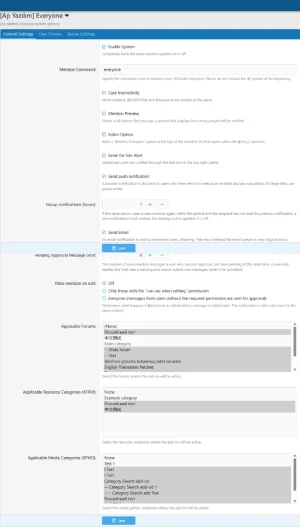
Mention a targeted group of users with a single @everyone command. The system processes the message content and automatically generates notifications for eligible users. You can customize the command through the Admin Control Panel to suit your forum's needs.
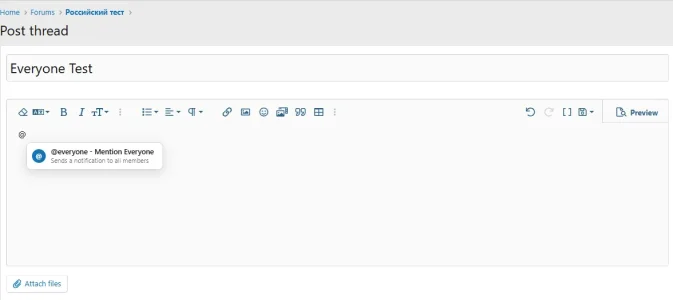
The smart autocomplete system integrates directly with XenForo's rich text editor. When users type @, a suggestion menu displays the Mass Mention option. Users can simply select this option to insert the command into their message.
Replace the default @everyone command with a custom alternative. For example, you can use @everyone or configure a different command, such as @members, to suit your forum. You can also configure whether the command is case-sensitive.
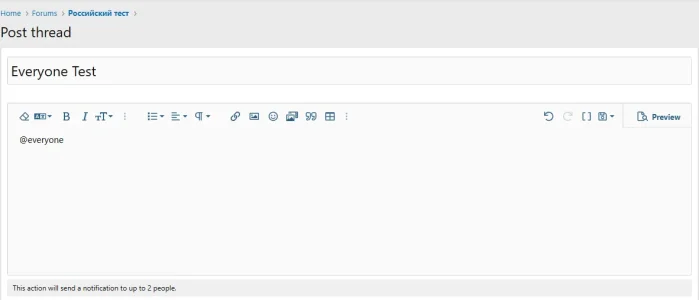
Display the number of users who will receive notifications before a mass-mention operation is processed. The informational message displayed below the editor helps users understand the scope of their action before submitting a message.
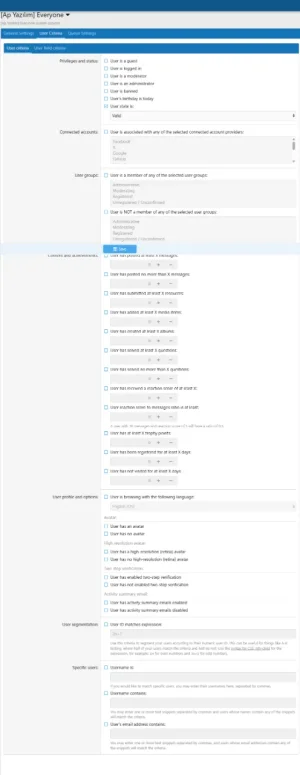
Limit mass notifications to users who meet specific criteria. For example, you can target members who have reached a certain post count or meet other configured user criteria. If no additional criteria are configured, the system can target all users who satisfy the other eligibility requirements.
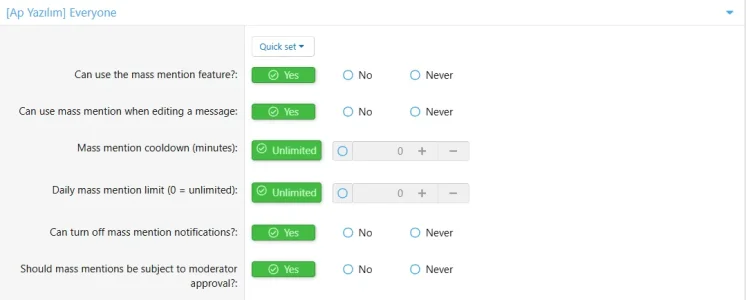
Control which user groups can use the mass-mention feature through XenForo's permission system. You can also manage permission to use mass mentions when editing existing messages separately.
Keep mass mentions under control by requiring moderator approval for selected user groups. This helps prevent unauthorized or excessive mass notifications. You can also configure the maximum number of pending mass-mention messages allowed per user.
Prevent abuse of the mass-mention feature by configuring cooldown periods and daily usage limits.
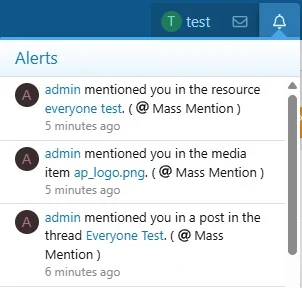
Send notifications to eligible recipients through XenForo's standard notification system. Notifications can appear in the forum's notification menu, helping members stay informed about relevant announcements and discussions.
Enable email notifications for mass-mention operations. This allows members who do not regularly visit your forum to stay informed about relevant messages.
Enable browser push notifications through XenForo's Web Push infrastructure. This feature works for users with supported browsers who have granted the necessary notification permissions and subscribed to push notifications.
Choose which forums can use the mass-mention feature. Instead of enabling it across your entire forum, you can restrict its availability to specific areas, such as announcement forums, event discussions, or selected discussion categories.
In addition to standard forum messages, the plugin can integrate with supported XenForo add-ons.
Control how the system behaves when a mass-mention command is added to an existing message during editing.
You can disable mass mentions during editing, restrict their use to users with the appropriate permissions, or allow all otherwise eligible users to use the feature. This helps prevent uncontrolled notifications from being triggered through message edits.
Configure a time interval during which a new mass-mention notification from the same sender can update an existing unread notification for the recipient. This helps reduce notification clutter when multiple mass mentions are sent within a short period.
Allow users to control whether they receive mass-mention notifications through their account preferences. This gives members greater control over their notification experience.
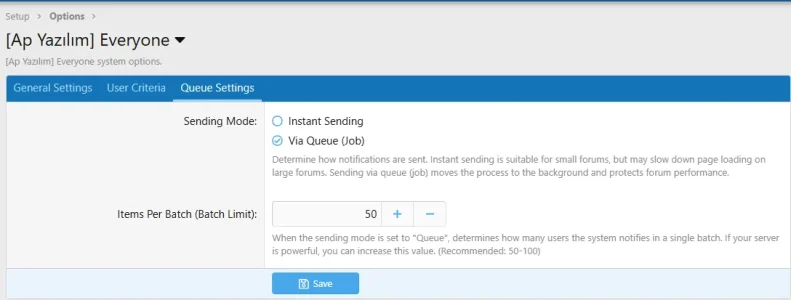
On forums with large user bases, mass notifications can be processed in the background instead of being handled entirely during the page request.
Two processing modes are available:
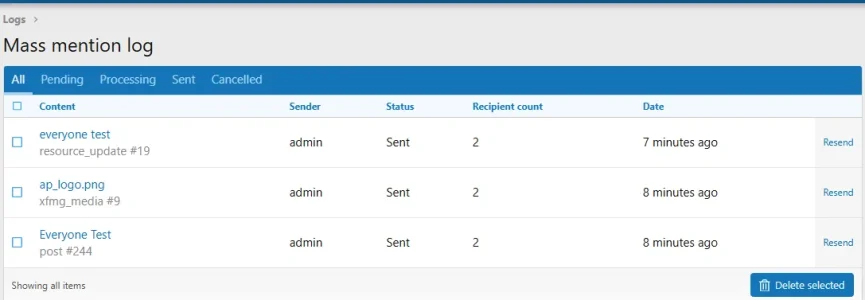
Track mass-mention operations through a dedicated administrative log.
The log includes information such as:
Once the plugin is enabled and the required user permissions have been configured, users can use the mass-mention command in supported editor areas.
Example:
The default command is everyone. If you configure a different command through the Admin Control Panel, update the example accordingly.
The command is processed only in supported content areas where the system is enabled and the user has the required permissions. Notification recipients are determined by the configured targeting criteria, user preferences, and other eligibility conditions.
Manage the plugin through the XenForo Admin Control Panel.
Admin → Options → [Ap Yazılım] Everyone
Configure the plugin's general settings and available notification options.
Admin → Groups & Permissions → User Groups
Configure which user groups can use mass mentions, manage editing permissions, control notification preferences, and define usage restrictions.
Admin → Logs → Mass Mention Log
Review mass-mention operations and monitor their status through the administrative logging interface.
 Key Features
 Mass Mention with a Single Command
Mention a targeted group of users with a single @everyone command. The system processes the message content and automatically generates notifications for eligible users. You can customize the command through the Admin Control Panel to suit your forum's needs. Smart Editor Integration
The smart autocomplete system integrates directly with XenForo's rich text editor. When users type @, a suggestion menu displays the Mass Mention option. Users can simply select this option to insert the command into their message. Customizable Mention Command
Replace the default @everyone command with a custom alternative. For example, you can use @everyone or configure a different command, such as @members, to suit your forum. You can also configure whether the command is case-sensitive. Recipient Count Preview
Display the number of users who will receive notifications before a mass-mention operation is processed. The informational message displayed below the editor helps users understand the scope of their action before submitting a message. Advanced Recipient Filtering
Limit mass notifications to users who meet specific criteria. For example, you can target members who have reached a certain post count or meet other configured user criteria. If no additional criteria are configured, the system can target all users who satisfy the other eligibility requirements. User Group Permissions
Control which user groups can use the mass-mention feature through XenForo's permission system. You can also manage permission to use mass mentions when editing existing messages separately. Moderator Approval System
Keep mass mentions under control by requiring moderator approval for selected user groups. This helps prevent unauthorized or excessive mass notifications. You can also configure the maximum number of pending mass-mention messages allowed per user. Cooldown Period and Daily Usage Limit
Prevent abuse of the mass-mention feature by configuring cooldown periods and daily usage limits.- Cooldown Period: Defines how long a user must wait between mass-mention operations.
- Daily Limit: Restricts the number of mass-mention operations a user can perform within a 24-hour period.
- Pending Message Limit: Determines how many mass-mention messages a user can have awaiting moderator approval at the same time.
 Native XenForo Notifications
Send notifications to eligible recipients through XenForo's standard notification system. Notifications can appear in the forum's notification menu, helping members stay informed about relevant announcements and discussions. Email Notifications
Enable email notifications for mass-mention operations. This allows members who do not regularly visit your forum to stay informed about relevant messages. Browser Push Notifications
Enable browser push notifications through XenForo's Web Push infrastructure. This feature works for users with supported browsers who have granted the necessary notification permissions and subscribed to push notifications. Forum-Specific Availability
Choose which forums can use the mass-mention feature. Instead of enabling it across your entire forum, you can restrict its availability to specific areas, such as announcement forums, event discussions, or selected discussion categories. Resource Manager and Media Gallery Support
In addition to standard forum messages, the plugin can integrate with supported XenForo add-ons.- XenForo Resource Manager (XFRM): Supports use in relevant resource-related content.
- XenForo Media Gallery (XFMG): Supports use in relevant media items and comments.
 Message Editing Support
Control how the system behaves when a mass-mention command is added to an existing message during editing.You can disable mass mentions during editing, restrict their use to users with the appropriate permissions, or allow all otherwise eligible users to use the feature. This helps prevent uncontrolled notifications from being triggered through message edits.
 Duplicate Notification Grouping
Configure a time interval during which a new mass-mention notification from the same sender can update an existing unread notification for the recipient. This helps reduce notification clutter when multiple mass mentions are sent within a short period. Disable Mass-Mention Notifications
Allow users to control whether they receive mass-mention notifications through their account preferences. This gives members greater control over their notification experience. Queue-Based Notification Processing
On forums with large user bases, mass notifications can be processed in the background instead of being handled entirely during the page request.Two processing modes are available:
- Immediate Processing: Notifications are processed directly during the operation. This may be suitable for smaller recipient groups.
- Queue-Based Processing: Notification tasks are added to the background job queue and processed in batches.
 Mass-Mention Activity Log
Track mass-mention operations through a dedicated administrative log.The log includes information such as:
- The associated thread, resource, media item, or comment.
- The user who initiated the mass mention.
- The current operation status.
- The number of intended notification recipients.
- The operation date.
How to Use
Once the plugin is enabled and the required user permissions have been configured, users can use the mass-mention command in supported editor areas.Example:
Code:
@everyone

Everyone, please take a moment to review our new announcement!
The default command is everyone. If you configure a different command through the Admin Control Panel, update the example accordingly.
The command is processed only in supported content areas where the system is enabled and the user has the required permissions. Notification recipients are determined by the configured targeting criteria, user preferences, and other eligibility conditions.
Settings and Configuration
Manage the plugin through the XenForo Admin Control Panel. General Settings
Admin → Options → [Ap Yazılım] EveryoneConfigure the plugin's general settings and available notification options.
User Group Permissions
Admin → Groups & Permissions → User GroupsConfigure which user groups can use mass mentions, manage editing permissions, control notification preferences, and define usage restrictions.
 Activity Log
Admin → Logs → Mass Mention LogReview mass-mention operations and monitor their status through the administrative logging interface.
 Why Choose [Ap Yazılım] Everyone?
- Mention multiple users and send notifications with a single command.
- Make mass mentions easier with rich text editor autocomplete integration.
- Restrict recipients using configurable user criteria.
- Prevent abuse with cooldown periods, daily limits, and moderator approval.
- Support site notifications, email notifications, and browser push notifications.
- Integrate with XenForo forum content, Resource Manager, and Media Gallery.
- Process large notification operations through the background job queue.
- Monitor mass-mention activity through a dedicated administrative log.
- Integrate with XenForo's user permissions and account preferences.
- Manage the plugin through an organized administrative interface.
![[Ap Yazılım] Core Library](/community/data/resource_icons/10/10374.jpg?1774796741)
![[Ap Yazılım] E-mail Provider Management](/community/data/resource_icons/10/10929.jpg?1792520678)
![[Ap Yazılım] Category Search](/community/data/resource_icons/10/10943.jpg?1792783430)
![[AP Yazılım] Category Rules](/community/data/resource_icons/10/10945.jpg?1792783611)
![[Ap Yazılım] Advertisement Areas](/community/data/resource_icons/10/10944.jpg?1792783462)