Be sure that you edit each user group and add username CSS.
## Overview
AIXF: Rich Usernames allows administrators to selectively enable or disable rich usernames (user group styling, banners, and other rich formatting) in several commonly viewed areas of XenForo:
Each location can be toggled independently from the XenForo Admin Control Panel.
This add-on uses regex-safe template modifications, making it resilient to:
---
## Features
---
## Locations Supported
| Location | Template | Option |
|--------|---------|--------|
| Forum list last post user |
| Poll voters |
| Thread starter |
| Thread last poster |
---
## Installation
1. Upload the add-on files to: src/addons/AIXF/RichUsernames/
2. In the Admin Control Panel:
---
## Configuration
Navigate to:
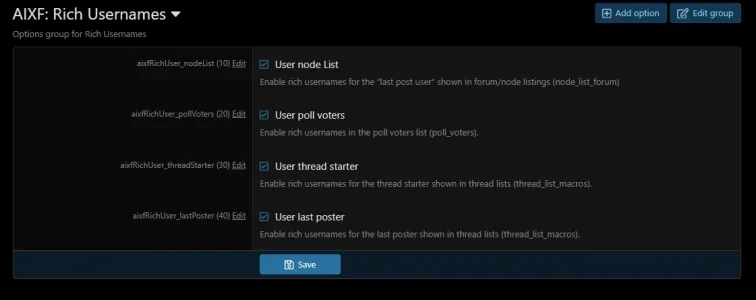
ACP → Setup → Options → AIXF: Rich Usernames
From here you can individually enable or disable rich usernames for:
Changes take effect immediately after saving.
---
## Compatibility Notes
---
## Uninstalling
Simply uninstall the add-on from the ACP.
No data is stored and no cleanup is required.
View attachment 252
## Overview
AIXF: Rich Usernames allows administrators to selectively enable or disable rich usernames (user group styling, banners, and other rich formatting) in several commonly viewed areas of XenForo:
- Forum / node listings
- Poll voter lists
- Thread lists (starter and last poster)
Each location can be toggled independently from the XenForo Admin Control Panel.
This add-on uses regex-safe template modifications, making it resilient to:
- whitespace differences
- attribute reordering
- style or add-on template edits
---
## Features
 Independent ACP toggle for each location
- Regex-safe template modifications
- Automatically overrides existing
richattributes - No database changes
- Lightweight (template-only)
- XenForo 2.3.7 compliant
- Compatible with most styles and add-ons
---
## Locations Supported
| Location | Template | Option |
|--------|---------|--------|
| Forum list last post user |
node_list_forum | Node list || Poll voters |
poll_voters | Poll voters || Thread starter |
thread_list_macros | Thread starter || Thread last poster |
thread_list_macros | Last poster |---
## Installation
1. Upload the add-on files to: src/addons/AIXF/RichUsernames/
2. In the Admin Control Panel:
- Go to→ Add-ons
- Click Add add-on
---
## Configuration
Navigate to:
ACP → Setup → Options → AIXF: Rich Usernames
From here you can individually enable or disable rich usernames for:
- Node list (last post user)
- Poll voters
- Thread starter in thread list
- Last poster in thread list
Changes take effect immediately after saving.
---
## Compatibility Notes
- Designed for XenForo 2.3.7+
- Works with most custom styles
- If another add-on also modifies the same templates, execution order may matter
- Regex matching ensures compatibility with minor template changes
---
## Uninstalling
Simply uninstall the add-on from the ACP.
No data is stored and no cleanup is required.
View attachment 252