
![[AC] XenFrame](/community/data/resource_icons/10/10842.jpg?1790668554)
- Compatible XF 2.x versions
- 2.3
XenFrame is the shared framework behind most Administrata themes. It gives every theme the same foundation, including the colour and appearance panel, the staff shield, the reading bar and now mobile bottom navigation, so features look and work the same way everywhere.
XenFrame comes bundled inside each theme download. When the framework improves, I publish the update here instead of repackaging every theme, so this page always has the latest version. A theme you downloaded a while ago may include an older copy. Often, updating XenFrame is all you need to get a fix or a new feature, with no theme reinstall.
Check your version
1. Go to Admin CP → Add-ons.
2. Find XenFrame and compare its version with the one on this page.
3. If yours is lower, update it (below).
Update
1. Download the ZIP from this page.
2. In Admin CP → Add-ons, choose "Install/upgrade from archive" and select the ZIP.
3. Confirm the upgrade.
Your themes and their settings are kept. Always update XenFrame from this page rather than re-importing an older theme package, which could put an older framework version back.
What's new in 1.1.0
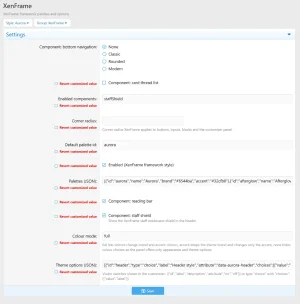
Off by default. Nothing changes on your forum until you switch it on: Appearance → Styles → your theme → Style properties → XenFrame → Component: bottom navigation.


XenFrame comes bundled inside each theme download. When the framework improves, I publish the update here instead of repackaging every theme, so this page always has the latest version. A theme you downloaded a while ago may include an older copy. Often, updating XenFrame is all you need to get a fix or a new feature, with no theme reinstall.
Check your version
1. Go to Admin CP → Add-ons.
2. Find XenFrame and compare its version with the one on this page.
3. If yours is lower, update it (below).
Update
1. Download the ZIP from this page.
2. In Admin CP → Add-ons, choose "Install/upgrade from archive" and select the ZIP.
3. Confirm the upgrade.
Your themes and their settings are kept. Always update XenFrame from this page rather than re-importing an older theme package, which could put an older framework version back.
What's new in 1.1.0
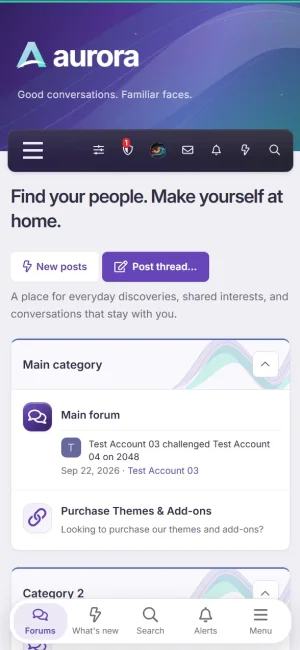
- Mobile bottom navigation. An optional bar pinned to the bottom of the screen on phones, with Forums, What's new, Search, Alerts (with a live count) and Menu. Choose from three styles:
- Classic: a tab style
- Rounded: a floating bar with rounded corners.
- Modern: icons only, with a post button that starts a thread in the current forum, replies on a thread, and lets you pick a forum anywhere else.
Off by default. Nothing changes on your forum until you switch it on: Appearance → Styles → your theme → Style properties → XenFrame → Component: bottom navigation.


