
![[AC] Community Activity](/community/data/resource_icons/10/10790.jpg?1789835318)
- Compatible XF 2.x versions
- 2.3
- Updates duration
- $12.50 / 12 mo. renewal
- Visible branding
- No
See how your community is actually doing.
Community Activity adds a public statistics and engagement dashboard to XenForo 2.3. It takes all the activity already happening across the forum and turns it into something members and staff can actually make sense of.
Members get a community overview and their own personal scorecard. Staff get a second layer showing the members, forums and discussions that may need attention.
Demo
The demo is fairly quiet, so some sections are naturally limited by the amount of available content.
Features
One place for the health of your community
The main dashboard lives at /community-activity/ and can be added directly to the XenForo navigation.
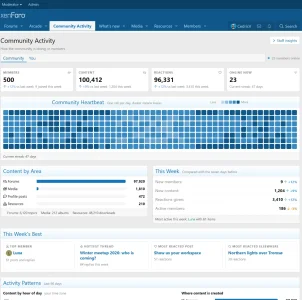
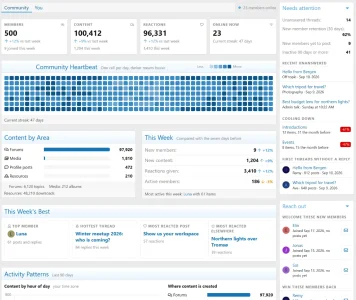
At the top are the numbers you'd expect: members, content, reactions and who's online, each compared with the previous week. From there it goes much deeper into how the community is behaving rather than simply showing lifetime totals.
A full-year Community Heartbeat
The Community Heartbeat is a 365-day activity heatmap, with one cell for every day.
It makes busy periods, quiet patches and longer activity patterns visible at a glance instead of burying them inside a chart or table.
See where the activity is coming from
Community Activity breaks content down across forums, media, profile posts and resources and compares the current week with the seven days before it.
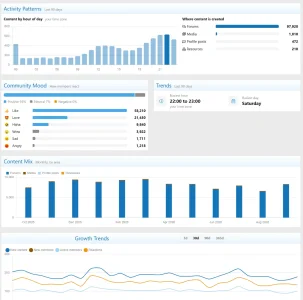
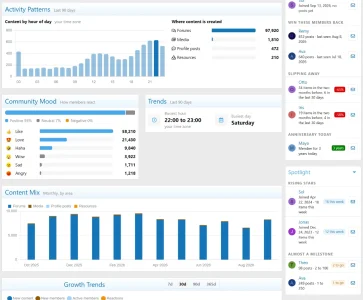
It also shows activity by hour of day in the viewer's own time zone, so you can see when the community tends to wake up and where members are actually spending their time.
This week's best
Every week gets its own small snapshot of what's standing out:
Follow the longer trend
Not everything meaningful happens in a week.
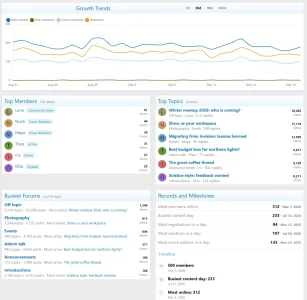
Community Activity includes monthly content mix, reaction-based community mood and growth charts covering 7, 30, 90 and 365 days, making it easier to tell the difference between a quiet couple of days and an actual change in direction.
A Year in Review
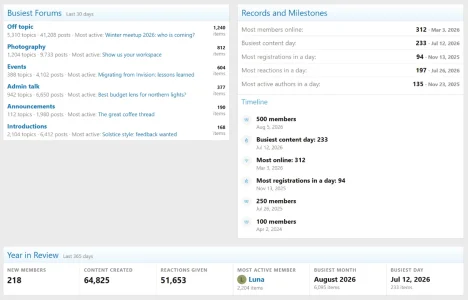
The dashboard also includes a full Year in Review, pulling the bigger moments and activity from the community together into one yearly summary.
Every member gets their own scorecard
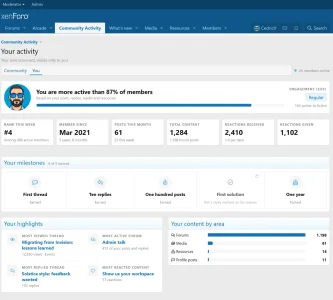
Logged-in members get a separate You tab built around their own activity.
It includes their engagement level, weekly rank, join date, posts this month, total content, reactions received and given, personal highlights and their position compared with the wider community.
Members can also work through personal milestones such as:
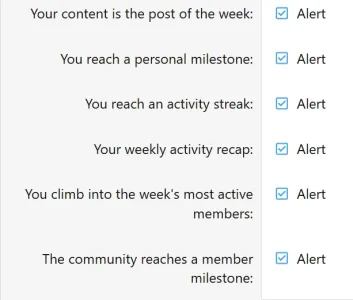
Six built-in alerts
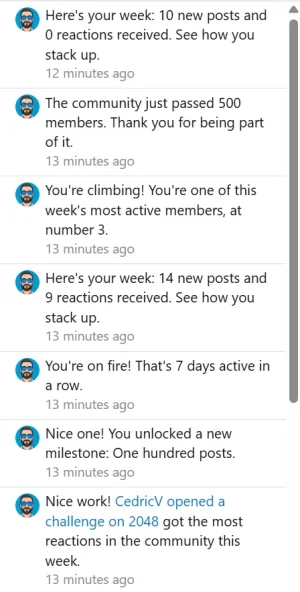
Community Activity can bring some of that information back to members without requiring them to keep checking the dashboard.
It includes alerts for:
Staff see another side of the dashboard
Members with the View staff insights permission get an additional sidebar split into three collapsible sections: Needs attention, Reach out, and Spotlight.
Regular members never see it.
Needs attention
This section looks for areas that may be slipping through the cracks, including unanswered threads, new members who have not posted yet, inactive members, cooling forums and first threads that never received a reply.
It also keeps an eye on new-member retention so staff can spot problems before they become normal.
Reach out
Some members don't need moderation. They just need somebody to say hello.
Reach out surfaces people who may be worth contacting, including new members to welcome, members who might be worth winning back, people whose activity has started dropping and members celebrating an anniversary that day.
Every result has a direct Start a conversation link.
Spotlight
Not every staff tool should be about problems.
Spotlight pulls out positive activity too, including rising members and people getting close to notable milestones, giving staff an easy way to recognize members who are contributing.
Community Activity widget
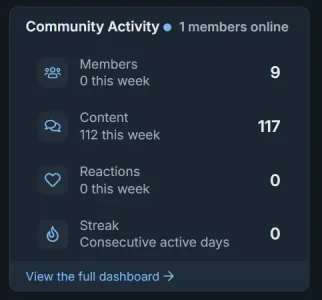
The included Community Activity overview widget brings the headline numbers outside the dashboard.
It shows member, content, reaction and online figures with a direct link to the full page, and each placement can use either a vertical or horizontal layout.
It only shows what the viewer can see
Community Activity follows XenForo permissions throughout.
Threads, forums, media, resources and profile posts only appear when the person viewing the dashboard already has permission to see them. The statistics don't become a shortcut around the normal permission system.
Built from the content you already have
Community Activity tracks:
During installation, existing content is used to build historical statistics, with one year of history generated by default.
After that, daily snapshots and cached data bundles keep the dashboard from having to rebuild everything on every page load.
A handful of options, not a control panel full of switches
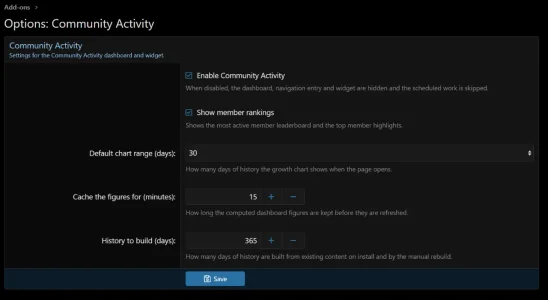
Settings live under Admin CP → Options → Community Activity.
You can enable or disable the feature, choose how many days of history should be built, control whether member rankings appear, set the default chart range and decide how long dashboard figures should be cached.
The defaults are 365 days of history, a 30-day chart range and a 15-minute cache.
Two permissions
Community Activity adds two user group permissions:
Requirements and installation
Community Activity requires:
Installation works like any normal XenForo add-on: upload the contents of the upload directory and install it through Admin CP → Add-ons, or upload the package directly through the ACP.
The historical backfill starts automatically after installation.
Community Activity adds a public statistics and engagement dashboard to XenForo 2.3. It takes all the activity already happening across the forum and turns it into something members and staff can actually make sense of.
Members get a community overview and their own personal scorecard. Staff get a second layer showing the members, forums and discussions that may need attention.
Demo
The demo is fairly quiet, so some sections are naturally limited by the amount of available content.
Features
One place for the health of your community
The main dashboard lives at /community-activity/ and can be added directly to the XenForo navigation.
At the top are the numbers you'd expect: members, content, reactions and who's online, each compared with the previous week. From there it goes much deeper into how the community is behaving rather than simply showing lifetime totals.
A full-year Community Heartbeat
The Community Heartbeat is a 365-day activity heatmap, with one cell for every day.
It makes busy periods, quiet patches and longer activity patterns visible at a glance instead of burying them inside a chart or table.
See where the activity is coming from
Community Activity breaks content down across forums, media, profile posts and resources and compares the current week with the seven days before it.
It also shows activity by hour of day in the viewer's own time zone, so you can see when the community tends to wake up and where members are actually spending their time.
This week's best
Every week gets its own small snapshot of what's standing out:
- Top member.
- Hottest thread.
- Most reacted post.
- Most reacted content elsewhere.
Follow the longer trend
Not everything meaningful happens in a week.
Community Activity includes monthly content mix, reaction-based community mood and growth charts covering 7, 30, 90 and 365 days, making it easier to tell the difference between a quiet couple of days and an actual change in direction.
A Year in Review
The dashboard also includes a full Year in Review, pulling the bigger moments and activity from the community together into one yearly summary.
Every member gets their own scorecard
Logged-in members get a separate You tab built around their own activity.
It includes their engagement level, weekly rank, join date, posts this month, total content, reactions received and given, personal highlights and their position compared with the wider community.
Members can also work through personal milestones such as:
- First thread.
- Ten replies.
- One hundred posts.
- First solution.
- One year as a member.
Six built-in alerts
Community Activity can bring some of that information back to members without requiring them to keep checking the dashboard.
It includes alerts for:
- Post of the week.
- Personal milestones.
- Activity streaks.
- Weekly recaps.
- Ranking changes.
- Community milestones.
Staff see another side of the dashboard
Members with the View staff insights permission get an additional sidebar split into three collapsible sections: Needs attention, Reach out, and Spotlight.
Regular members never see it.
Needs attention
This section looks for areas that may be slipping through the cracks, including unanswered threads, new members who have not posted yet, inactive members, cooling forums and first threads that never received a reply.
It also keeps an eye on new-member retention so staff can spot problems before they become normal.
Reach out
Some members don't need moderation. They just need somebody to say hello.
Reach out surfaces people who may be worth contacting, including new members to welcome, members who might be worth winning back, people whose activity has started dropping and members celebrating an anniversary that day.
Every result has a direct Start a conversation link.
Spotlight
Not every staff tool should be about problems.
Spotlight pulls out positive activity too, including rising members and people getting close to notable milestones, giving staff an easy way to recognize members who are contributing.
Community Activity widget
The included Community Activity overview widget brings the headline numbers outside the dashboard.
It shows member, content, reaction and online figures with a direct link to the full page, and each placement can use either a vertical or horizontal layout.
It only shows what the viewer can see
Community Activity follows XenForo permissions throughout.
Threads, forums, media, resources and profile posts only appear when the person viewing the dashboard already has permission to see them. The statistics don't become a shortcut around the normal permission system.
Built from the content you already have
Community Activity tracks:
- Threads.
- Posts.
- Profile posts.
- XenForo Media Gallery media.
- XenForo Resource Manager resources.
During installation, existing content is used to build historical statistics, with one year of history generated by default.
After that, daily snapshots and cached data bundles keep the dashboard from having to rebuild everything on every page load.
A handful of options, not a control panel full of switches
Settings live under Admin CP → Options → Community Activity.
You can enable or disable the feature, choose how many days of history should be built, control whether member rankings appear, set the default chart range and decide how long dashboard figures should be cached.
The defaults are 365 days of history, a 30-day chart range and a 15-minute cache.
Two permissions
Community Activity adds two user group permissions:
- View the Community Activity dashboard
- View staff insights on the Community Activity dashboard
Requirements and installation
Community Activity requires:
- XenForo 2.3.0 or newer.
- PHP 8.1 or newer.
Installation works like any normal XenForo add-on: upload the contents of the upload directory and install it through Admin CP → Add-ons, or upload the package directly through the ACP.
The historical backfill starts automatically after installation.
-
 Schermafbeelding 2026-09-19 112453.webp
 -
 Schermafbeelding 2026-09-19 112500.webp
 -
 Schermafbeelding 2026-09-19 112506.webp
 -
 Schermafbeelding 2026-09-19 112512.webp
 -
 Schermafbeelding 2026-09-19 112522.webp
 -
 Schermafbeelding 2026-09-19 112528.webp
 -
 Schermafbeelding 2026-09-19 112536.webp
 -
 Schermafbeelding 2026-09-19 113113.webp
 -
 Schermafbeelding 2026-09-19 114149.webp
 -
 Schermafbeelding 2026-09-19 115519.webp
 -
 Schermafbeelding 2026-09-19 115741.webp


