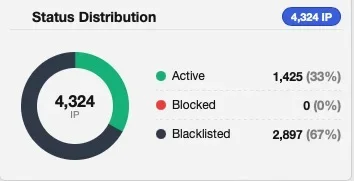
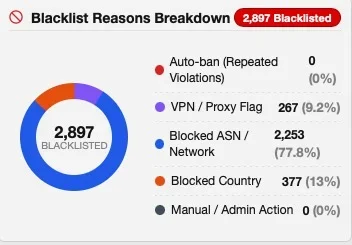
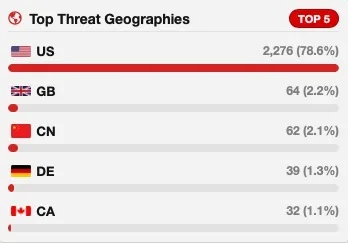
[XTR] IP Threat Monitor

[XTR] IP Threat Monitor [Paid] 1.1.1

No permission to buy ($30.00)
Question about how things work?

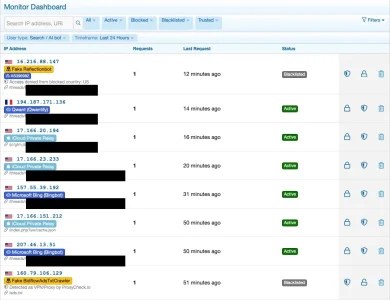
  • If I go to IP List view and click on Blocked, everything in here says blocked.
  • If I select Blocked IPs from the left menu, it show time remaining and those that have expired

IP List View - Blocked
Blocked1.webp
Blocked IPs View
Blocked2.webp

If I search the IP List view All with this address, it only returns the blocked listing

Is this how it is supposed to work? Up until 1.0.47, I've never had anything under blocked so don't know? It does seem a bit confusing to have the same info listed differently in the two places but there must be reasons?

Reporting some of this stuff makes me feel like I'm being a real pain in the butt or being super picky. Sorry.
 
Reporting some of this stuff makes me feel like I'm being a real pain in the butt or being super picky. Sorry.
Personally, I think this is very helpful. With a tool like IP Threat Monitor we have to fully trust in what it does and what it reports. While some irritations are the result from us not fully understanding how it handles things others may indeed be bugs or conceptional overlooks. @Osman wants to offer a really stunning product as I understand it and is therefor rather thankful than annoyed for reported bugs. Given the speed of fixes and development one can pretty safely assume that development is probably done with some AI support and this leads to a way faster development speed but typically also to more easily to tiny hiccups - that can most of the time be fixed fast and easily.

In your example it seems to me that we hit a bit of a conceptional grey area here: The various lists of IP Threat Manager are somewhere in between a log file and an actual status and this leads to incongruences or misunderstandings from time to time.

A log file would list every occurrence of an IP along with the action that was taken. The IP-list does, as I understand it, only list the latest occurrence of an IP together with the action that was taken on the first occurrence. Which is why your example IP is listed as blocked b/c that was the action that was taken when it showed up.
The "blocked" list on the other hand lists the actual status of a blocked IP, maintaining if it has been unblocked in the mean time due to the block being expired.
If your IP will pop up again in future it may be, that it will still be listed as "blocked" but in fact may be able to pass, as the block status has timed out. This is one of the incongruences due to the concept of the lists. It would probably be better to reflect the actual status then, so "active" in case it will pop up in future (and maybe it even will do so). As long as it does not show up again "blocked" seems right to me. However: As soon as the status changes to "active" you will, as far as I understand it, loose the information that it has been blocked in the past, as one IP is shown only once in the list with the date of it's latest occurrence. If you download the csv logs you'll see that there is are dates for "first seen" and "last seen" (but still only those two and not every occurrence).
 
@smallwheels - where is the file "403-notification of Threat Manager" page that you modified please - i think i need to do similar :)
Thanks!
 
@Osman : There might be an issue with the detection of iCloud Private Relay Clients. I was wondering for quite some time if the assumption that requests from there would deserve the genuine trust that they get or if there might possibly bots be in that traffic as well. It seemed improbable, however, I do see a relatively huge amount of iCPR connections from all over the world in IP Threat Manager which is a bit strange as my core audience is in the DACH area, genuine guests from far away countries in amounts are somewhat uncommon due to the forum being in German language and iCPR maintains it's exit points to the original geographical region of the requestor.

When digging through the logs to understand a recent bot wave better I found iCPR connections that clearly indicated bot traffic:

Now I found these in my logs and a bunch more of that kind:

Bildschirmfoto 2026-10-16 um 08.19.52.webp

Bildschirmfoto 2026-10-16 um 08.18.27.webp


So sadly, iCloud Private Relay cannot considered to be bot free.

On closer look it turned out that these IPs do not seem to belong to the iCPR range:


In fact I could not find them in Apple's official published IP Range and neither other requests labeled with iCloud private Relay in IP Threat Manager. Could you check if this labeling does work as it should?
 
@Osman : Two tiny bugs:

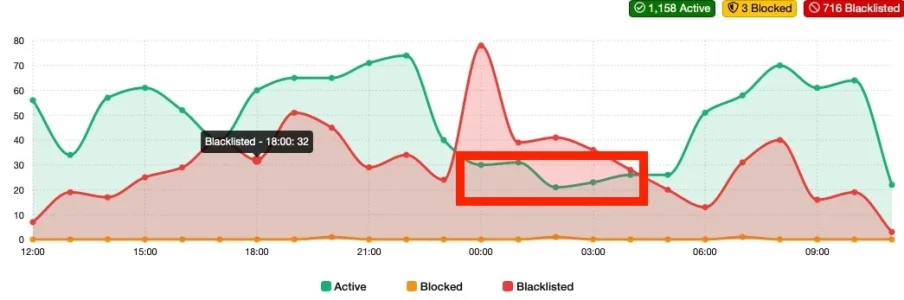
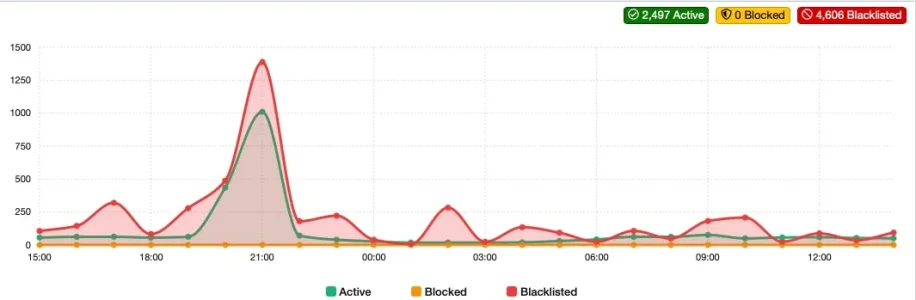
1. In the flowchart diagram mouse over on the data points shows the according value. However: This does not work with the green (active) line as soon as it is below the red (blacklisted) line. It does work for both lines when the green line is higher than the red one and also for the red one when it is higher than the green one.

Bildschirm­foto 2026-10-16 um 11.29.41.webp

2. Searching for ASNs in the IP List seems only to produce results when the ASN is mentioned in the comments field.

Example:

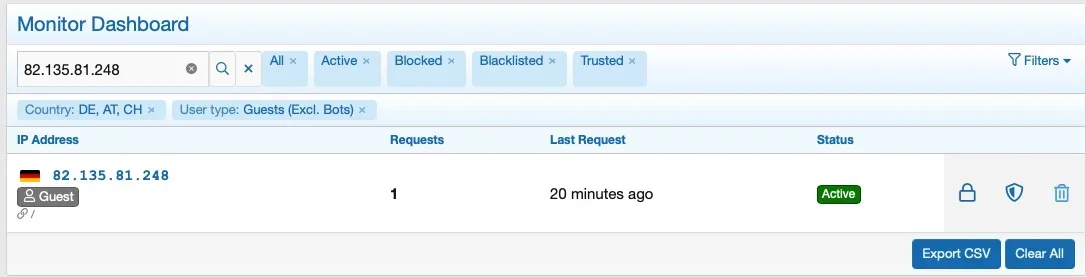
Bildschirm­foto 2026-10-16 um 11.40.28.webp

The IP belongs to AS8767, which is shown in the exported CSV:
Bildschirm­foto 2026-10-16 um 11.42.04.webp
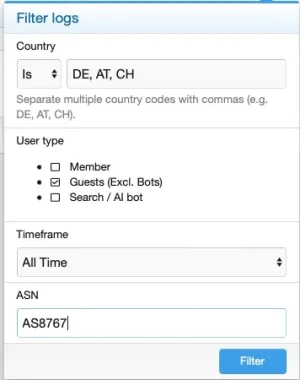
Filtering for requests with that ASN on the other hand...
Bildschirm­foto 2026-10-16 um 11.42.30.webp

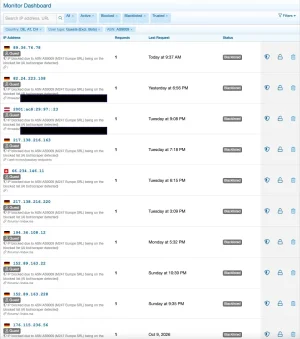
... shows no results:

Bildschirm­foto 2026-10-16 um 11.42.50.webp

while filtering for an ASN that has been blocked (and is therefor mentioned in the comment column) does produce results, i.e. here:

Bildschirm­foto 2026-10-16 um 11.49.10.webp
 
Hello everyone,

Thank you all for the great feedback! We have just released v1.0.48 addressing everything discussed here:
  1. @smallwheels: Great catch on the Linode IP (172.235.17.228)! We removed an overly broad legacy fallback range and synchronized strictly with Apple's official egress IP list. Linode and similar datacenter IPs will now be caught and blocked as expected.
  2. ASN Search: We added a dedicated, indexed asn column to the database and backfilled existing logs, so ASN searches now match detected network data accurately instead of relying on comment text.
  3. Trend Chart Hover: Resolved the SVG layer stacking so you can now smoothly hover over active (green) data points even when the red line overlaps.
  4. @Elisabeth_K: To make the distinction clearer between past history and live blocks, expired temporary blocks in the log are now labeled with a muted "Blocked (Expired)" badge.
  5. @Paul: As smallwheels kindly noted, you can customize the ban message directly via the xentr_ipt_error_403_message phrase under Appearance > Languages > Phrases.
v1.0.48 is now available in your customer area. Thank you for your support!
 
Osman updated [XTR] IP Threat Monitor with a new update entry:

1.0.48

In this update, we have made significant improvements, particularly regarding Apple privacy service verification, Autonomous System Number (ASN) lookups, and graphical visibility.

Hardened Apple iCloud Private Relay Verification
Following feedback from our community, we identified that an overly broad legacy fallback IP definition was inadvertently allowing certain cloud hosting servers (such as Linode/Akamai VPSs) to be misclassified as Apple Private Relay connections. In v1.0.48...

Read the rest of this update entry...
 
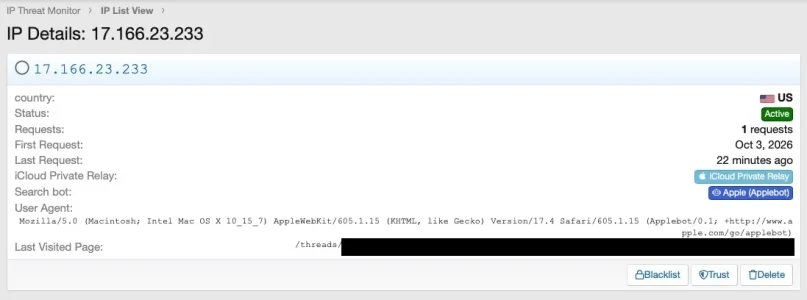
@Osman : There is another cosmetic issue: Apple Bot is now shown as iCloud Private relay and in the normal, unfiltered view looks like a normal guest request. This becomes visible when filtering for search bots:

Bildschirm­foto 2026-10-16 um 14.57.45.webp

A click on one of those entries shows: Apple bot indeed:

Bildschirm­foto 2026-10-16 um 15.00.00.webp
 
Hi @smallwheels,

Thank you for reporting this and providing the detailed feedback.

The issue has been resolved in the 1.0.48 package. Applebot operates within Apple's corporate subnet (specifically 17.166.23.0/24), which falls under Apple's 17.0.0.0/8 allocation. The template badge hierarchy and entity evaluation order have been corrected so that authenticated search bot/crawler identities (like Applebot) strictly take precedence over iCloud Private Relay detection.

We have updated the 1.0.48 download archive on our site without changing the version number. You can simply re-download version 1.0.48 and upgrade the add-on via your Admin Control Panel.
 
We can't seem to leave the poor man alone!

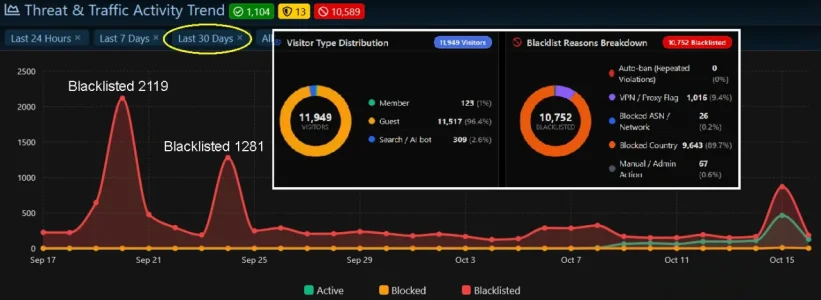
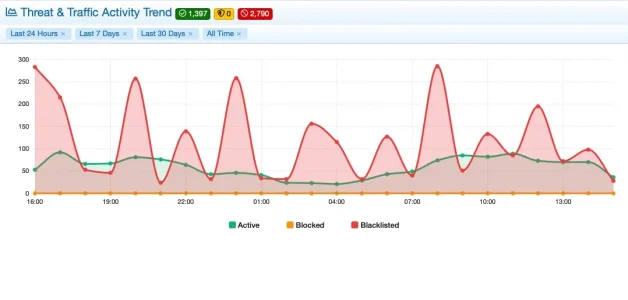
Yesterday we had our biggest "guest" wave in the last 30 days. I realize this is nothing for most of you but on a tiny new forum, a blip is pretty noticeable. It's over now. This morning we have 3 guests.

last3-days.webp

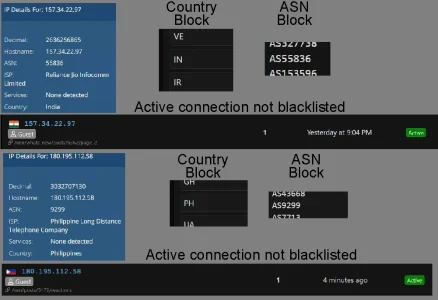
I've been keeping my eye on the active tab in the IP List View and have come across about 17 of these since yesterday afternoon. Blocked by country and ASN but still showing up as active. The luxury of having a small forum is that it is easy to look at everything and seeing an out of place flag in the active list is easy to spot.

notblacklisted.webp

As I have come across these, I have just manually blacklisted them. I don't know why they are getting through but it is reasonable to think some will because nothing is perfect all the time.

I've also come across a few flagged as residential proxies that get blacklisted instead of blocked. I don't really care. I also don't really understand what residential proxies are for or do? What happens if we just blacklist all of them?

residential.webp

I don't want my comments to ever be taken as complaints. I absolutely love IP Threat Monitor and think everything about it is fantastic.
 
Hi @Elisabeth_K,

First of all, thank you so much for the wonderful feedback and kind words! Seeing your 30-day graph handle over 10,500 threats smoothly while keeping your forum protected is fantastic!

Your observations are spot-on. Here is the exact explanation for what you are seeing:

1. Why did the Country/ASN blocked IPs appear as "Active" with 1 request?
As you noticed in your screenshots, IP Threat Monitor's built-in MaxMind GeoIP engine already correctly detected that the IPs belong to India (IN), Philippines (PH), and their respective ASNs.

However, by default, the add-on runs in Moderate mode to maximize speed and protect your ProxyCheck API quota. In Moderate mode, a visitor making only a single request is allowed through without running the pre-request block filter, and their GeoIP info is recorded to the log afterward. If they made a second request or triggered the rate limit, they would have been instantly blacklisted.

How to block them on request #1 (zero tolerance):
Go to Admin CP > Options > [XTR] IP Threat Monitor and enable:
"Force API Check for Block Lists" (or set VPN Check Mode to First Visit).

With this enabled, the pre-request filter activates on the very first hit: the moment an IP from your blocked Country or ASN list knocks on your door, the local GeoIP engine intercepts it in microseconds and blacklists them immediately.

2. Why was the Residential Proxy "Blacklisted" instead of "Blocked"?
Under standard VPN/Proxy settings, the default rule for confirmed proxies is a permanent blacklist. However, we specifically built an intelligent handling feature for residential connections:
In your add-on options, make sure "Smart Residential & Dynamic Proxy Caching" is enabled. When active, it recognizes residential proxies and applies a temporary block (with automatic expiration) instead of a lifetime blacklist.

3. What are Residential Proxies and what happens if you blacklist all of them?
  • What are they? Normal datacenter VPNs (like AWS or DigitalOcean) are easy to detect and block. To bypass this, scrapers and spam bots route their traffic through real residential home broadband connections (often compromised routers, IoT devices, or users running free bandwidth-sharing VPN apps). To your server, they look like a regular person on home Wi-Fi.
  • What happens if you blacklist them?
    Blocking them is great for forum security because the vast majority hitting your site are automated scrapers.
    The only small caveat: Residential IP addresses are dynamic (ISPs reassign them to different households over time). If you permanently blacklist a residential IP forever, there is a tiny chance that months from now a legitimate new member might inherit that IP.
  • The Best Practice: This is why enabling "Smart Residential Caching" is the ideal solution: it completely shuts down the scraper while it attacks, but automatically expires later so future innocent visitors are never locked out.

Thank you again for being such a valued part of our community and sharing your experience!

 
I've been keeping my eye on the active tab in the IP List View and have come across about 17 of these since yesterday afternoon. Blocked by country and ASN but still showing up as active.

I don't know why they are getting through but it is reasonable to think some will because nothing is perfect all the time.
I do have that effect as well from time to time but did not find a clear cause until now.

I've also come across a few flagged as residential proxies that get blacklisted instead of blocked. I don't really care. I also don't really understand what residential proxies are for or do? What happens if we just blacklist all of them?
Residential proxies in it's true meaning are normal private home internet access points (aka dial-ups via Cable or DSL) that most of us use at home and that are misused as proxy servers and rented out. The reason for that is that it is easy to block "official" proxies that reside in data centers. With proxies that cover as private internet access it is not so easy as you typically don't want to block the ASN (as there are loads or normal private users in there) and blocking the IP makes no sense either as private dialups use dynamic IPs and get a fresh ip regularly, often after 24h. So blocking a dial-up IP is a very temporary solution and after the IP has changed it will be assigned to s/o else and you block s/o innocent.

This rotating IPs and the fact that they are impossible to block sustainably plus there are many millions of them available makes them attractive for scrapers and this is where our dilemma starts. Until yesterday, an IP that had been identified as proxy was blocked as long as you kept your blacklist, so basically "for ever", despite in many cases being no longer a proxy after like 24h. So since yesterday's release proxies with the tag "residential" (which is a property of an IP adress that its owner assignes) will only be blocked temporarily and then rechecked with proxycheck. This avoids accidental overblocking, but leads to the effects you noticed. Such an IP will be rechecked when it shows up again, which rises the amount of API calls to Proxycheck to a degree. You can turn off this behavior in the settings but I requested it for good reasons.
 
Thanks for jumping in with such a spot-on and clear explanation, @smallwheels! You explained the residential proxy logic and the rationale behind temporary blocking perfectly. 👏
 
With this enabled, the pre-request filter activates on the very first hit: the moment an IP from your blocked Country or ASN list knocks on your door, the local GeoIP engine intercepts it in microseconds and blacklists them immediately.
The thing is that this is true most of the time but sometimes not and something seems to slip through. I've set the config to check on first visit, yet sometimes it happens. Sometimes the reason seems to be that Maxmind is a bit delayed after IPs have been moved to a different country or a different ASN, but for some occurrences I have no explanation yet.

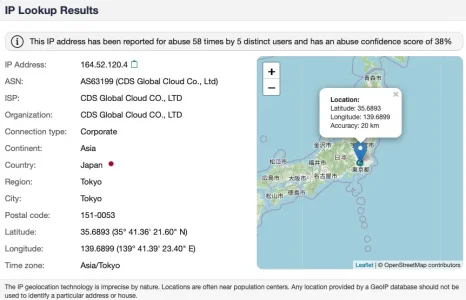
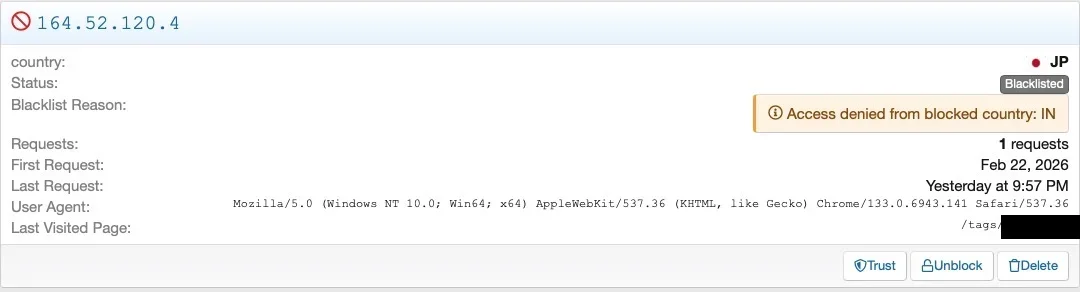
A somewhat funny one was this from yesterday: An IP that is labeled as from Japan has been blocked b/c it would be from India. :p

Bildschirmfoto 2026-10-16 um 19.09.01.webp
This is probably a classical case of a historical blacklist entry where the country of the IP has been switched since the blocking entry was created. Does not matter b/c it was still a scraper. According to IPsearch.io this IP is actually indeed located in Japan and has collected some complaints:

Bildschirm­foto 2026-10-16 um 19.18.24.webp
 
Last edited:
Thanks @smallwheels and @Osman for the information and comments.

FYI, my settings are
  • VPN Check Mode: First Visit
  • Force API Check for Block Lists - enabled
  • Smart Residential & Dynamic Proxy Caching - enabled
I appreciate the changes in 1.0.48. I'll just relax and keep an eye on things for a few days and stop causing trouble! ;)
 
Spot on analysis, @smallwheels!

That IP (164.52.120.4) belongs to CDS Global Cloud (a known hosting/VPN provider with nodes across Asia). When an IP block is dynamically rerouted between datacenters (e.g. India to Tokyo), there can be a brief sync gap between live BGP routes and weekly MaxMind GeoLite2 releases — which explains why the logged ban reason captured the Indian routing point while the flag resolved to Japan!

As for the occasional slip-through on first hit: on busy days with thousands of hits, if the remote ProxyCheck API reaches its daily rate/quota limit or experiences a latency timeout, the system fails open for a brief moment to ensure legitimate forum traffic never hangs.

Glad to see it still caught and neutralized the scraper regardless! (y)
 
That IP (164.52.120.4) belongs to CDS Global Cloud (a known hosting/VPN provider with nodes across Asia). When an IP block is dynamically rerouted between datacenters (e.g. India to Tokyo), there can be a brief sync gap between live BGP routes and weekly MaxMind GeoLite2 releases — which explains why the logged ban reason captured the Indian routing point while the flag resolved to Japan!
Almost. It is way simpler: The IP was initially caught back in February this year. At that time it was in India and I had India blocked as a country. So it ended up on the blacklist and when it showed up again now, being moved to Japan, it was blocked due to the old entry in the blacklist and the initial reason for blocking was rendered:

Bildschirmfoto 2026-10-16 um 19.28.58.webp

This did obviously not only do no harm but was very welcome this time, however, in theory it could lock out a legitimate request if the IP had changed to a new owner. With server ranges this seems not really relevant for our purposes, so I am absolutely fine with that. In another environment it would be necessary to think about how to reevaluate the blacklist regularly and when to whitelist existing entries to avoid overblocking. The simplest thing would be to cut the blacklist after xx days (which I have avoided until now).
 
I'll just relax and keep an eye on things for a few days
That's the spirit. As you are new to the proxy game a little hint: While IP Threat Monitor is incredibly useful it is, technically speaking, a static filter. It fully depends from what you configure to block and while it has a dynamic part in form of proxycheck this will catch only an unknown fraction of the resident proxies that hit your forum. So it may be a good idea to add an "intelligent" component that is able to identify scrapers on its own to a degree. I do use the free bot guard add on for this purpose and it filters out quite a bit that I cannot filter out with IP/ASN/country-blocking and that Proxycheck misses to identify. The two add ons are a bit of a dream team: IP Threat Monitor filters out the vast majority and this leaves Bot Guard the resources to do the granular stuff on the rest w/o running into load problems. I've described this setup in another thread a couple of days ago:


There are however still situations where protection is a bit lacking as it turned out:


That's why I recently asked wether we could possibly integrate a challenge/captcha for configurable countries and ASNs in bot guard. Would make life easier in some situations, ease up the need to maintain the ASN list frequently and allow to block less residential ASNs completely.
 
Spot on @smallwheels, you nailed it with that IP! It was originally caught and blacklisted back in February while it was still in India. Since it was already sitting in the blacklist table, the add-on simply fired off the old ban reason from the database while the flag showed where the IP lives today. Either way, good riddance to that scraper! :)

Your thought on having a captcha/challenge option for blocked countries and ASNs makes total sense. I completely understand the hesitation when it comes to blocking huge regions like the US — dropping a permanent 403 on an entire country always brings that nagging fear of locking out real people.

We actually already have the core captcha/turnstile engine running for our rate limit rules, so expanding that same logic to Country and ASN filters is a very natural fit.

I've added this straight to our roadmap for version 1.0.49. You'll be able to choose whether blocked countries and ASNs get an outright 403 or a captcha challenge instead. That way, bots and scrapers get stopped dead in their tracks, but any genuine human visitor can just solve the challenge and jump right into the forum.

Really appreciate the great feedback as always!
 
Back
Top Bottom