
It's working fine for me, I tested it on my Android tablet and phone.The Menu button on the mobile version of my site isn't working. How can I fix this? Site: www.lemoncloud.org


It's working fine for me, I tested it on my Android tablet and phone.The Menu button on the mobile version of my site isn't working. How can I fix this? Site: www.lemoncloud.org
Hi there glad you like the theme! Yes it's possible just need to tweak the message layout components. Makes the backgrounds darker. There are tons of style properties to choose from.


Hi there,@Mike Creuzer
We just upgraded to the latest UI.X Version from a very old version and we found the user / mod bar isn't stuck to the top:

No results with the Userbar style properties. However, I cannot locate the Header White Space settings anywhere.Hi there,
It is likely a margin in the style properties. Try checking out the UI.X Userbar style properties and make sure the container has a margin of 0. You may also need to look into the Header White Space variable under UI.X Global Settings. Try setting it to 0


You should not delete templates. You'll want to revert.@Mike Creuzer, I work with @danjb and we've managed to delete the uix_userBar template. Now when we paste the code we had saved into a new template, it isn't functioning fully as it should do and has become 'disconnected' from the U.IX settings (such as the balloon setting).
How do we do this? When I revert customization it just deletes the template.You should not delete templates. You'll want to revert.
This is because you edited UI.X directly, not with a child theme. The child theme is very important for any theme, not just Audentio Design products. I feel as though Im the only one who pushes this though. Its not your fault. @Brogan was nice enough to feature this resource: https://xenforo.com/community/resources/proper-theme-installation-upgrading-and-usage.2942/ Follow this and you'll have no issues again moving forward.How do we do this? When I revert customization it just deletes the template.
Yeah I'll make sure to use child themes for my changes but I am currently left with a broken user bar.This is because you edited UI.X directly, not with a child theme. The child theme is very important for any theme, not just Audentio Design products. I feel as though Im the only one who pushes this though. Its not your fault. @Brogan was nice enough to feature this resource: https://xenforo.com/community/resources/proper-theme-installation-upgrading-and-usage.2942/ Follow this and you'll have no issues again moving forward.


The child theme is very important for any theme, not just Audentio Design products. I feel as though Im the only one who pushes this though.

How do I move everything up so the user/mod bar is at the top?
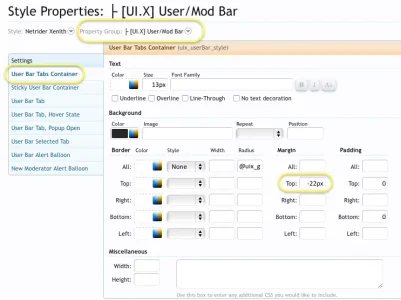


Hi.


We use essential cookies to make this site work, and optional cookies to enhance your experience.


