
[XB] Guide Threads: Structured How-To Guides & Tutorials

[XB] Guide Threads: Structured How-To Guides & Tutorials [Paid] 1.0.4

No permission to buy ($35.00)
I have guides on my forum and they use the [guide] prefix.
Suggestion: Guide threads are assigned a prefix that we can select in acp, this way when creating a guide thread the only prefix available to the user is the guide prefix (or perhaps allow a few to be selected for those that have different prefixes for guides, tutorials, DIYs, etc).

So in acp something like:

Prefixes available to users for guide threads:
[select from list]
Default prefix:
[select one]


This is already available, as the add-on adds a new forum type where you can select the available prefixes and the default prefix
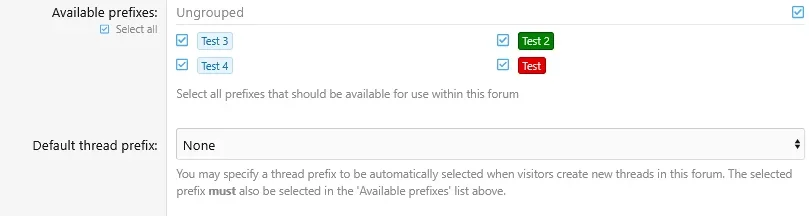

1790190241671.webp


However, if you want this for a General discussion forum with mixed thread types, I would need to add additional options for that
 
The use case would be in a mixed thread types forum where prefixes are already used, so when clicking to create a tutorial, only the prefixes for tutorials show and one is default. I would also probably remove those prefixes from the general selection of that forum so they can only be used with tutorials.
 
I think most admins will use this in a mixed forum scenario.
Yes, for example instead of a dedicated forum of guides of many subjects, the guides are in the applicable forum of that subject (that has discussions and polls, etc.)
 
Painbaker updated [XB] Guide Threads: Structured How-To Guides & Tutorials with a new update entry:

1.0.4

View attachment 345516

📖 Better Guide Creation & Step-by-Step Reading​

This update makes it much easier to turn existing threads into structured guides, while adding richer steps, per-forum configuration, interactive checklists, navigation, and new presentation options.

✨ New Features​

  • Added an editor action to move existing first-post...

Read the rest of this update entry...
 
i
The use case would be in a mixed thread types forum where prefixes are already used, so when clicking to create a tutorial, only the prefixes for tutorials show and one is default. I would also probably remove those prefixes from the general selection of that forum so they can only be used with tutorials.
Added in last update


  1. Numbers and step title are horizontally misaligned.
  2. Unfurl and embed do not work. Please add it to the conclusion template.
Fixed

  1. Starting the Guide should start with getting the requirements. i.e. Users should be able to check off the list, so its clear what they have and what they still need to acquire.
  2. At the bottom of the Guide, place a NEXT GUIDE button to send the user to the next guide in the node.
  3. Let step photos upload during "Change thread type". The permission check treats the thread as "not a guide yet" and refuses every upload, which forces a second pass through "Edit steps". One condition in the attachment handler fixes it.
  4. On conversion of a thread with list bbcode, ask if the list(s) are requirements or steps and if so convert as such.
  5. LLM suggests: Import steps from the first post. Split on numbered lines, list items and bold headings, take "You will need" lists into requirements, and attach each photo to the paragraph it sits next to. The add-on already has the reverse mapping (guide back to BB code), so the logic is half written.
  6. Each step requires both a title and a description, but often steps are just one line. Please allow us to disable this requirement.
  7. Step images need a caption.
  8. If the guide has a lot of attachments, there is a wall of attachment thumbs at the top, pushing the guide way down below the fold. Instead hide the default thumbs and add a scrollable gallery.
  9. SEO: Emit the HowTo markup on every page of the thread, not only page 1; include the result as yield; build the description from the intro paragraph instead of a raw 500-character cut.
  10. Cap the cover image. A small photo is stretched to full width and looks blurry.
  11. Per-step photo galleries. When a step has several photos, they are stacked one under the other at full width, so one step becomes a very long scroll. Suggestion: show them as a row of thumbnails that open in a lightbox.
  12. Add optional step time. i.e. bake the cake for 20 minutes.
  13. A "step 3 of 7" indicator. While reading, nothing tells you how far along you are except the timeline graphic. Suggestion: a small counter that stays visible as you scroll.

Added in last update

  1. On conversion of a thread with attachments, easily allow us to attribute attachments to steps. So that no downloading and uploading is needed.
I added a button to quickly convert a post attachment into a Step attachment

  1. Similar Guides widget.
  2. Guide index pages. A page per forum and per tag listing guides with cover, step count and rating, plus a site-wide "Guides" hub. The forum view of the Guide forum type does this only inside one forum.
I'll look into this for the next updates.

  • Add a rating comment to the guide reviews.
    We also have thread ratings. It would make sense to migrate thread ratings to guide ratings, as these are basically the same thing.

Guide ratings currently has much lighter system, while Thread Ratings has a lot of additional post associations, anonymity, moderation, etc. that can't be migrated cleanly. Since you already have Thread Ratings, you can disable ratings in Guide Threads and use the full Thread Ratings functionality, thread ratings will be displayed both in the thread and in structured data.
 
Back
Top Bottom