XF 2.3 PWA

maritimesbob

New member
Hello

I have pwa configured and working in admin (so it says), how will I know that it is working for users and myself? I have read on previous posts that is can take upto 24hrs for the icon to be available to install on a mobile or desktop.

Does a notification on the forum pop up when it is ready?

Thank you
 
I don't see the option to install 'app' or add to home screen, despite pwa showing and configured and working. I was wondering if other steps were required. I created and added the icons, it shows as ready but when I or anyone else uses the forum the option to install is not coming up.
 
Ok, it's been almost 48 hours and on Chrome browser (on an Android device) I see there is the install option coming up under the main menu, however other browsers ( I use Dolphin on my device) there is nothing. I have cleared the cache and everything else but no luck. On the laptop, Edge is showing an option, but Firefox there is nothing.

So, it seems to be a browser issue?. I wasn't sure where the install option would be, I assumed with was some kind of pop up that would appear but it was hidden away under the main menu.

I don't know anything about PWA. All I wanted was to give users the option to add an icon on their devices. Not sure what else I can do other than wait, or do certain browsers not always play ball with it and will I have to expect many users won't see this option?
 
I moved to a new Android phone and cannot for the life of me figure out how to add the PWA from the Google Mobile Browser. Sad that no one has answered your request after two weeks.
 
I moved to a new Android phone and cannot for the life of me figure out how to add the PWA from the Google Mobile Browser. Sad that no one has answered your request after two weeks.
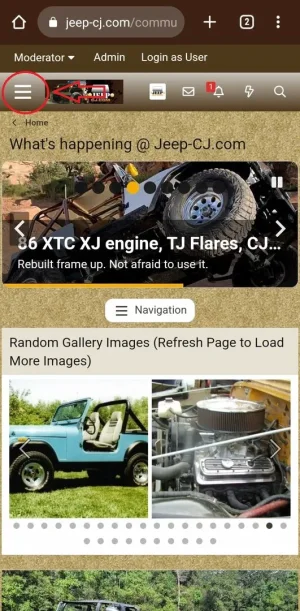
Dont know about the Dolphin browser but on Android go to the site on your phone or tablet and click the three horizontal menu bars as shown.
1.webp

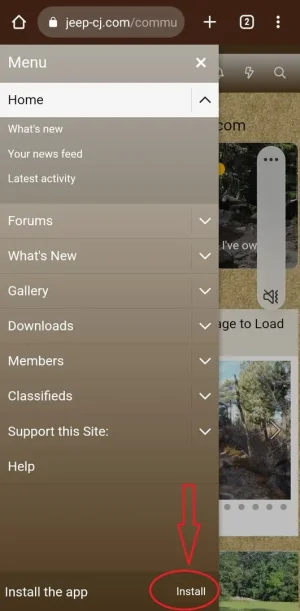
Scroll to the bottom and select Install.
2.webp

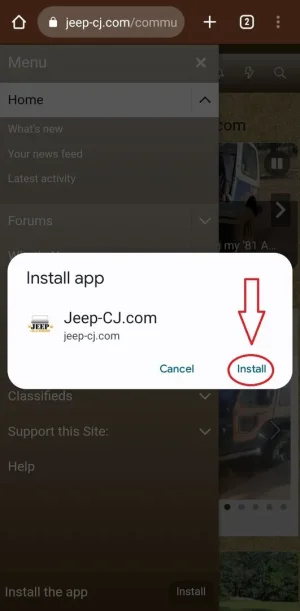
OK the installation.
3.webp

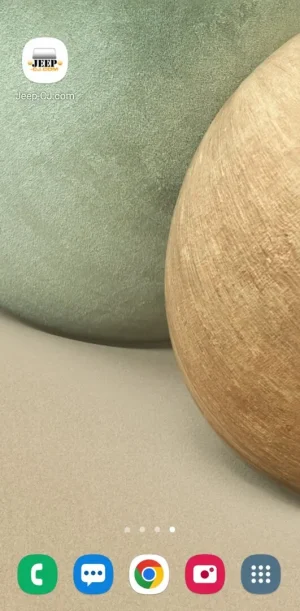
Wala!
4.webp
 
Last edited:
Dont know about the Dolphin browser but on Android go to the site on your phone or tablet and click the three horizontal menu bars as shown.
View attachment 332894

Scroll to the bottom and select Install.
View attachment 332895

OK the installation.
View attachment 332896

Wala!
View attachment 332898

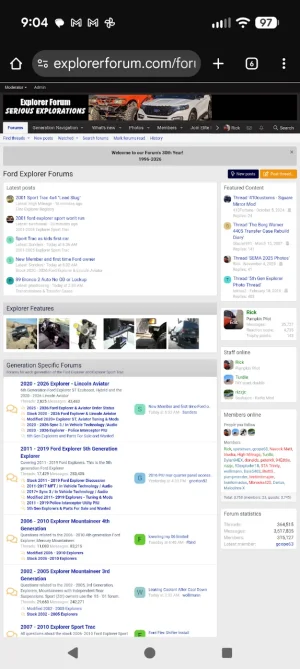
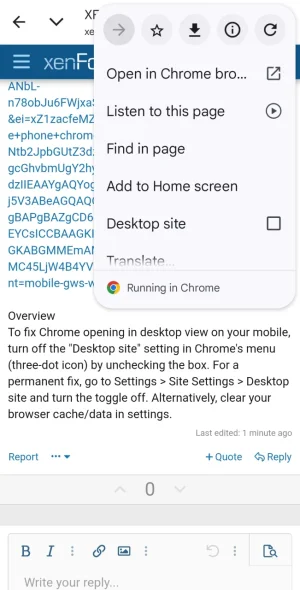
I don't see that setup at all. In Chrome I am seeing the desktop version of the site. Your screen shots show the mobile version. I don't know how to get it to switch to the mobile version.

ef.webp
 
Last edited:
Seems to be very browser dependent as to whether the install feature is there or not.

On my desktop, the install option appears in Edge and Chrome, but not Firefox which is my preferred browser. On my mobile, the install option shows on Chrome and Samsung browser, but not Dolphin.

It's been over two weeks, so I am going on the assumption some of my forum members will see this feature and some will not, depending on their browser of choice.

It's no big deal, was simply more curious about PWA than it being a must have option.
 
Seems to be very browser dependent as to whether the install feature is there or not.

On my desktop, the install option appears in Edge and Chrome, but not Firefox which is my preferred browser. On my mobile, the install option shows on Chrome and Samsung browser, but not Dolphin.

It's been over two weeks, so I am going on the assumption some of my forum members will see this feature and some will not, depending on their browser of choice.

It's no big deal, was simply more curious about PWA than it being a must have option.
Great detective work on your part. I have found that only 10% of my mobile users use the app...
 
Back
Top Bottom