Portal AI Suite Pro

Portal AI Suite Pro [Paid] 1.1.1

No permission to buy (€39.00)
Oh one more thing:
A user can post content in a node, even when they do not have the permission.
This happens when the user is using the 'Ask Box' with auto routing. It ignores permissions.

In Settings -> Portal AI Suite Pro: Auto-Routing ... included/excluded forums are also ignored. They just appear even if you excluded them.
 
Michaelb24179 updated Portal AI Suite Pro with a new update entry:

1.0.8

Bug Fixes
  • AskBox: Disambiguation overlay filters forums without thread-create permission
  • Quick Links Widget: Lazy-loaded links no longer render empty
  • Hot Tags Widget: Tag links resolve correctly (fixed link() parameter)
  • Media Carousel: Bottom scrollbar removed — navigation via arrow buttons only
  • Article Date Badge: No longer clipped on Magazine/Classic/Modern card styles
🔧 Improvements
  • Stats Bar: Compact height on portal (reduced card...

Read the rest of this update entry...
 
Still getting a few errors and Hot Articles widget is not sliding:

Code:
Error: <svg> attribute viewBox: Unexpected end of attribute. Expected number, "".

Code:
Uncaught ReferenceError: $ is not defined
    at portal.js?_v=0a6b02f5:916:5
    at portal.js?_v=0a6b02f5:1615:2

It looks like some jquery code slipped in? $(document).ready(function() { ... }(window, document);

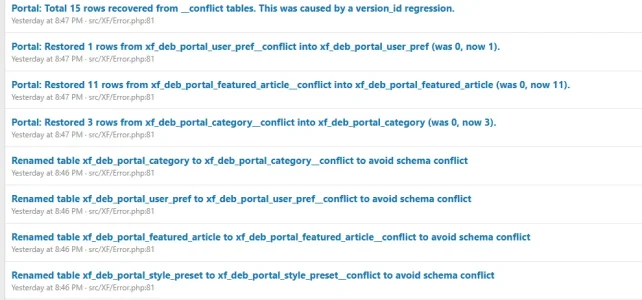
After every upgrade, schema errors:

1773992770321.webp
 
Please reinstall the add-on and make sure to select the option to overwrite all data.

After that, monitor the behavior. I just checked it on my live environment and I’m unable to reproduce the issue.

Please also clear the cache in the Portal dashboard afterward.
 
The Hot Articles problem was indeed something with caching and is solved.

The schema errors appear after every upgrade, that's something different.

Just reporting some more stuff. If you want this out of this topic, let me know where I should report this.

Ask Box -> When clicking on "I'm not sure /General" it says "Oops! We ran into some problems."

In ACP -> Hot Articles widget, disabling the 'Show statistics' option doesn't work

Quick Links widget now be working? I tried something like {"title": "Test", "url": "https://test.com", "icon": "fa-var-home", "description": "Test2"} but nothing shows up.
 
Michaelb24179 updated Portal AI Suite Pro with a new update entry:

1.0.9

New Features
  • Multi-Provider AI Support: new AiProvider abstraction layer — choose between OpenAI and OpenRouter as your AI backend
  • OpenRouter Integration: use 200+ models (Anthropic Claude, Google Gemini, Meta Llama, Mistral, etc.) via a single OpenRouter API key
  • New options: AI Provider selector, OpenRouter API Key, OpenRouter Model (with pre-configured model list)

Bug Fixes
  • Lazy Widgets not loading: .debPortal-column had...

Read the rest of this update entry...
 
Should I upgrade and over write the files next time?
Code:
Check completed on 14,912 files. The files listed below have contents different from those originally downloaded.

If you have edited these files yourself, you may ignore this message, otherwise you should investigate further as this may be evidence of corrupted or altered files.
DEB Portal AI Suite Pro
js/deb/debportal/layout-builder.js Unexpected contents
js/deb/debportal/portal.js Unexpected contents
js/deb/debportal/widget_manager.js Unexpected contents
 
Please overwrite the files once. With the new version 1.0.9, it will then be clean.
 
DEBTech updated Portal AI Suite Pro with a new update entry:

1.1.1

New Features​

Reddit-Style Article Action Bar
  • Vote (▲/▼) with green/red active colors on modern article cards
  • Views, Replies, Reactions counters inline
  • Share button opens XF share overlay (social links + embed code)
  • Hide button removes article with fade animation (server + localStorage)
  • Author overlay pill on article cover image (top-right, glassmorphism)
  • Action bar always pinned to bottom of card via flex layout

Routing Queue...

Read the rest of this update entry...
 
Back
Top Bottom