
- Affected version
- 2.1.2
Here on XenForo.com, XFMG's note tooltip 'Save' and 'Cancel' buttons have additional padding whereas the delete button has normal padding.
The same button height/padding issue was previously fixed for XFMG image editor buttons:

 xenforo.com
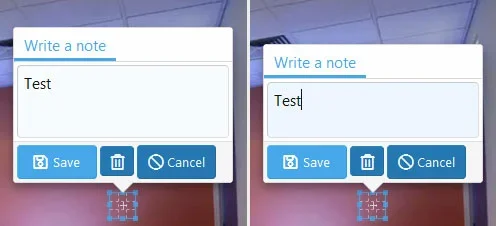
Additionally, when editing an existing note in FireFox, the textarea height shrinks once it has focus. Some inline CSS is added at this point that was not there pre-focus:
This editing note textarea height issue doesn't seem to affect Chrome.
When adding a new note, the above inline CSS is added without first giving the textarea focus.
The same button height/padding issue was previously fixed for XFMG image editor buttons:
Fixed - Edit image page: Button height inconsistency with icon+text and icon only buttons
The XFMG edit image page under XF2.1/FA5 reveals a styling issue when mixing buttons with & without text labels in button group. The two buttons with text (Move, Cancel) have a height of 33px, whereas all of the remaining buttons (without text) have a height of 30px. This issue occurs here on...
xenforo.com
Additionally, when editing an existing note in FireFox, the textarea height shrinks once it has focus. Some inline CSS is added at this point that was not there pre-focus:
CSS:
overflow: hidden; overflow-wrap: break-word; height: 56px;This editing note textarea height issue doesn't seem to affect Chrome.
When adding a new note, the above inline CSS is added without first giving the textarea focus.



