
You are using an out of date browser. It may not display this or other websites correctly.
You should upgrade or use an alternative browser.
You should upgrade or use an alternative browser.
![[MC] Discord Widget](/community/data/resource_icons/6/6146.jpg?1778311756)
[MC] Discord Widget 3.2.2
No permission to download
- Thread starter Matt C.
- Start date
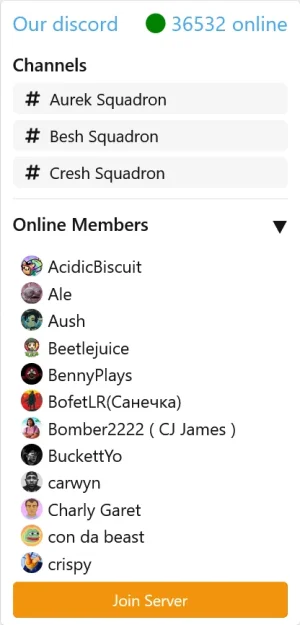
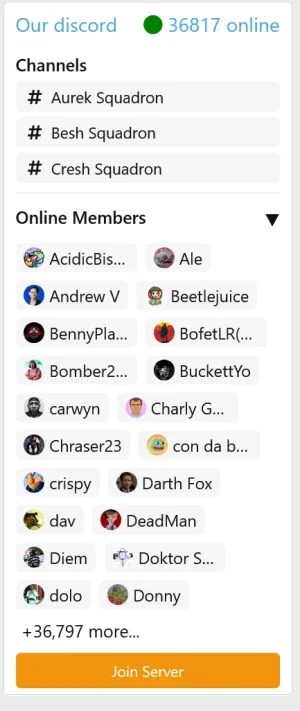
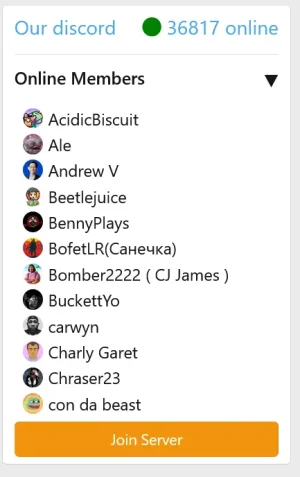
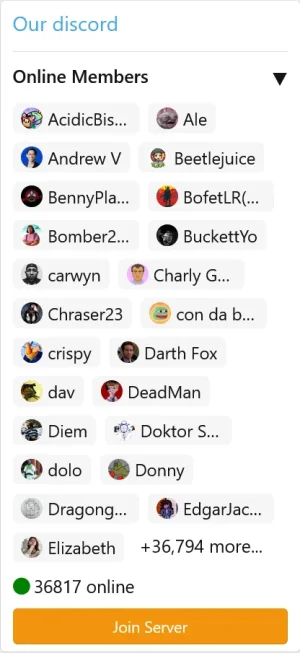
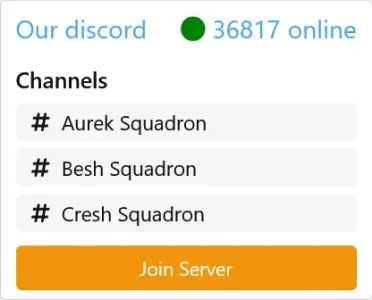
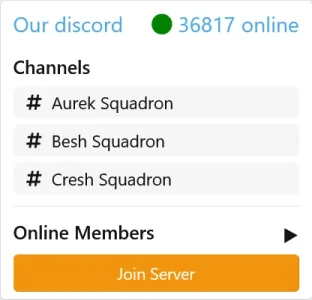



Can this plugin display when people are in the audio channel? So underneath the channel name, a list which users are in the room?
No, because Discord does not release that information in the JSON API.
Matt C. updated [AH] Discord Widget with a new update entry:
3.2.1 Released
Read the rest of this update entry...
3.2.1 Released
A new version has been released.
IMPORTANT:
- We now allow multiple discord server widgets. Server ID and invite link have been delegated to the widget options allowing for multiple servers.
- Slight styling adjustments
- Our branding helper has been integrated into this updated version. May be disabled at no cost.
FIles now live under MC/DiscordWidget. Meaning you will have to perform a fresh install and migrate settings over.
Read the rest of this update entry...
/js/mc/discordwidget/widget.js?_v=786f83de net::ERR_ABORTED 404 (Not Found)
getting this in console
on widget:
Could not load server info.
btw there is not any js file included in the zip
Missed the JS in my build release. Reuploaded. You may upload and rebuild.
Sorry about that!
Did you enable widget inside your Discord Server? You have to enable it under Engagement.Unable to display channels with the add-on
All settings have been applied (widget enabled, permissions set, server ID entered)
It seems the Discord API isn't displaying them either
Thank you for your help

Did you enable widget inside your Discord Server? You have to enable it under Engagement.
As i said above "widget enable" corresponds to the widget inside my Discord Server
I read all messages on this thread, faq and others
Applied all solutions but no channels are displayed, only members online
I don't understand ....
As i said above "widget enable" corresponds to the widget inside my Discord Server
I read all messages on this thread, faq and others
Applied all solutions but no channels are displayed, only members online
I don't understand ....
Alright, so if shows members online that means the connection is working. Just to eliminate any conflicts, you do have the "Show channels" option enabled in the addon settings?
you do have the "Show channels" option enabled in the addon settings?

Everything is ok for me

I tried using the default Discord widget and adding a widget to the forum,

but all I see are members with no channels.
Last edited:
I have two voice channels, and it's the sameDo you have any voice channels, if not create one and see if they show up.
I've tried the text channel and the voice channel, both within a category and outside of one.
Try to rebuild addon and still nothing .... Only members are displayed

Hi,
It's showing this error:
Thanks!
It's showing this error:
Code:
GuzzleHttp\Exception\ConnectException: Discord widget fetch failed: cURL error 28: Connection timed out after 5000 milliseconds (see https://curl.se/libcurl/c/libcurl-errors.html) for https://discord.com/api/servers/[DISCORD_SERVER_ID]/embed.json
src/vendor/guzzlehttp/guzzle/src/Handler/CurlFactory.php:1140

Stack trace

#0 src/vendor/guzzlehttp/guzzle/src/Handler/CurlFactory.php(1077): GuzzleHttp\Handler\CurlFactory::createRejection(Object(GuzzleHttp\Handler\EasyHandle), Array)
#1 src/vendor/guzzlehttp/guzzle/src/Handler/CurlFactory.php(1014): GuzzleHttp\Handler\CurlFactory::finishError(Object(GuzzleHttp\Handler\CurlHandler), Object(GuzzleHttp\Handler\EasyHandle), Object(GuzzleHttp\Handler\CurlFactory))
#2 src/vendor/guzzlehttp/guzzle/src/Handler/CurlHandler.php(86): GuzzleHttp\Handler\CurlFactory::finish(Object(GuzzleHttp\Handler\CurlHandler), Object(GuzzleHttp\Handler\EasyHandle), Object(GuzzleHttp\Handler\CurlFactory))
#3 src/vendor/guzzlehttp/guzzle/src/Handler/Proxy.php(28): GuzzleHttp\Handler\CurlHandler->__invoke(Object(GuzzleHttp\Psr7\Request), Array)
#4 src/vendor/guzzlehttp/guzzle/src/Handler/Proxy.php(68): GuzzleHttp\Handler\Proxy::GuzzleHttp\Handler\{closure}(Object(GuzzleHttp\Psr7\Request), Array)
#5 src/vendor/guzzlehttp/guzzle/src/Handler/Proxy.php(48): GuzzleHttp\Handler\Proxy::GuzzleHttp\Handler\{closure}(Object(GuzzleHttp\Psr7\Request), Array)
#6 src/vendor/guzzlehttp/guzzle/src/PrepareBodyMiddleware.php(35): GuzzleHttp\Handler\Proxy::GuzzleHttp\Handler\{closure}(Object(GuzzleHttp\Psr7\Request), Array)
#7 src/vendor/guzzlehttp/guzzle/src/Middleware.php(31): GuzzleHttp\PrepareBodyMiddleware->__invoke(Object(GuzzleHttp\Psr7\Request), Array)
#8 src/vendor/guzzlehttp/guzzle/src/RedirectMiddleware.php(72): GuzzleHttp\Middleware::GuzzleHttp\{closure}(Object(GuzzleHttp\Psr7\Request), Array)
#9 src/vendor/guzzlehttp/guzzle/src/Middleware.php(63): GuzzleHttp\RedirectMiddleware->__invoke(Object(GuzzleHttp\Psr7\Request), Array)
#10 src/vendor/guzzlehttp/guzzle/src/HandlerStack.php(75): GuzzleHttp\Middleware::GuzzleHttp\{closure}(Object(GuzzleHttp\Psr7\Request), Array)
#11 src/vendor/guzzlehttp/guzzle/src/Client.php(1085): GuzzleHttp\HandlerStack->__invoke(Object(GuzzleHttp\Psr7\Request), Array)
#12 src/vendor/guzzlehttp/guzzle/src/Client.php(243): GuzzleHttp\Client->transfer(Object(GuzzleHttp\Psr7\Request), Array)
#13 src/vendor/guzzlehttp/guzzle/src/Client.php(273): GuzzleHttp\Client->requestAsync('GET', Object(GuzzleHttp\Psr7\Uri), Array)
#14 src/vendor/guzzlehttp/guzzle/src/ClientTrait.php(44): GuzzleHttp\Client->request('GET', 'https://discord...', Array)
#15 src/addons/MC/DiscordWidget/Discord/Client.php(100): GuzzleHttp\Client->get('https://discord...', Array)
#16 src/addons/MC/DiscordWidget/Discord/Client.php(38): MC\DiscordWidget\Discord\Client->fetchFromDiscord('[DISCORD_SERVER_ID]')
#17 src/addons/MC/DiscordWidget/Widget/DiscordWidget.php(34): MC\DiscordWidget\Discord\Client->getEmbedData('[DISCORD_SERVER_ID]')
#18 internal_data/code_cache/widgets/[WIDGET_CACHE_FILE].php(5): MC\DiscordWidget\Widget\DiscordWidget->render()
#19 src/XF/Template/Templater.php(8297): XF\SubContainer\Widget->{closure}(Object(XF\Template\Templater), Array, Array)
#20 src/XF/SubContainer/Widget.php(176): XF\Template\Templater->renderWidgetClosure(Object(Closure), Array)
#21 src/XF/Template/Templater.php(2196): XF\SubContainer\Widget->getCompiledWidget(Array, Array)
#22 internal_data/code_cache/templates/[TEMPLATE_CACHE_FILE].php(138): XF\Template\Templater->renderWidget('[WIDGET_KEY]', Array, Array)
#23 src/XF/Template/Templater.php(1821): XF\Template\Templater->{closure}(Object(XF\Template\Templater), Array, NULL)
#24 src/XF/Template/Templater.php(1896): XF\Template\Templater->renderTemplate('[PAGE_TEMPLATE]', Array)
#25 internal_data/code_cache/templates/[PAGE_VIEW_CACHE].php(76): XF\Template\Templater->includeTemplate('public:[PAGE_TEMPLATE]', Array)
#26 src/XF/Template/Templater.php(1821): XF\Template\Templater->{closure}(Object(XF\Template\Templater), Array, NULL)
#27 src/XF/Template/Template.php(24): XF\Template\Templater->renderTemplate('page_view', Array)
#28 src/XF/Mvc/Renderer/Html.php(50): XF\Template\Template->render()
#29 src/XF/Mvc/Dispatcher.php(473): XF\Mvc\Renderer\Html->renderView('XF:Page\View', 'public:page_view', Array)
#30 src/XF/Mvc/Dispatcher.php(455): XF\Mvc\Dispatcher->renderView(Object(XF\Mvc\Renderer\Html), Object(XF\Mvc\Reply\View))
#31 src/XF/Mvc/Dispatcher.php(414): XF\Mvc\Dispatcher->renderReply(Object(XF\Mvc\Renderer\Html), Object(XF\Mvc\Reply\View))
#32 src/XF/Mvc/Dispatcher.php(66): XF\Mvc\Dispatcher->render(Object(XF\Mvc\Reply\View), 'html')
#33 src/XF/App.php(2840): XF\Mvc\Dispatcher->run()
#34 src/XF.php(850): XF\App->run()
#35 index.php(23): XF::runApp('XF\Pub\App')
#36 {main}

Request state

array(4) {
  ["url"] => string(1) "/"
  ["referrer"] => bool(false)
  ["_GET"] => array(0) {
  }
  ["_POST"] => array(0) {
  }
}
Thanks!
Hi,
It's showing this error:
Code:GuzzleHttp\Exception\ConnectException: Discord widget fetch failed: cURL error 28: Connection timed out after 5000 milliseconds (see https://curl.se/libcurl/c/libcurl-errors.html) for https://discord.com/api/servers/[DISCORD_SERVER_ID]/embed.json src/vendor/guzzlehttp/guzzle/src/Handler/CurlFactory.php:1140 Stack trace #0 src/vendor/guzzlehttp/guzzle/src/Handler/CurlFactory.php(1077): GuzzleHttp\Handler\CurlFactory::createRejection(Object(GuzzleHttp\Handler\EasyHandle), Array) #1 src/vendor/guzzlehttp/guzzle/src/Handler/CurlFactory.php(1014): GuzzleHttp\Handler\CurlFactory::finishError(Object(GuzzleHttp\Handler\CurlHandler), Object(GuzzleHttp\Handler\EasyHandle), Object(GuzzleHttp\Handler\CurlFactory)) #2 src/vendor/guzzlehttp/guzzle/src/Handler/CurlHandler.php(86): GuzzleHttp\Handler\CurlFactory::finish(Object(GuzzleHttp\Handler\CurlHandler), Object(GuzzleHttp\Handler\EasyHandle), Object(GuzzleHttp\Handler\CurlFactory)) #3 src/vendor/guzzlehttp/guzzle/src/Handler/Proxy.php(28): GuzzleHttp\Handler\CurlHandler->__invoke(Object(GuzzleHttp\Psr7\Request), Array) #4 src/vendor/guzzlehttp/guzzle/src/Handler/Proxy.php(68): GuzzleHttp\Handler\Proxy::GuzzleHttp\Handler\{closure}(Object(GuzzleHttp\Psr7\Request), Array) #5 src/vendor/guzzlehttp/guzzle/src/Handler/Proxy.php(48): GuzzleHttp\Handler\Proxy::GuzzleHttp\Handler\{closure}(Object(GuzzleHttp\Psr7\Request), Array) #6 src/vendor/guzzlehttp/guzzle/src/PrepareBodyMiddleware.php(35): GuzzleHttp\Handler\Proxy::GuzzleHttp\Handler\{closure}(Object(GuzzleHttp\Psr7\Request), Array) #7 src/vendor/guzzlehttp/guzzle/src/Middleware.php(31): GuzzleHttp\PrepareBodyMiddleware->__invoke(Object(GuzzleHttp\Psr7\Request), Array) #8 src/vendor/guzzlehttp/guzzle/src/RedirectMiddleware.php(72): GuzzleHttp\Middleware::GuzzleHttp\{closure}(Object(GuzzleHttp\Psr7\Request), Array) #9 src/vendor/guzzlehttp/guzzle/src/Middleware.php(63): GuzzleHttp\RedirectMiddleware->__invoke(Object(GuzzleHttp\Psr7\Request), Array) #10 src/vendor/guzzlehttp/guzzle/src/HandlerStack.php(75): GuzzleHttp\Middleware::GuzzleHttp\{closure}(Object(GuzzleHttp\Psr7\Request), Array) #11 src/vendor/guzzlehttp/guzzle/src/Client.php(1085): GuzzleHttp\HandlerStack->__invoke(Object(GuzzleHttp\Psr7\Request), Array) #12 src/vendor/guzzlehttp/guzzle/src/Client.php(243): GuzzleHttp\Client->transfer(Object(GuzzleHttp\Psr7\Request), Array) #13 src/vendor/guzzlehttp/guzzle/src/Client.php(273): GuzzleHttp\Client->requestAsync('GET', Object(GuzzleHttp\Psr7\Uri), Array) #14 src/vendor/guzzlehttp/guzzle/src/ClientTrait.php(44): GuzzleHttp\Client->request('GET', 'https://discord...', Array) #15 src/addons/MC/DiscordWidget/Discord/Client.php(100): GuzzleHttp\Client->get('https://discord...', Array) #16 src/addons/MC/DiscordWidget/Discord/Client.php(38): MC\DiscordWidget\Discord\Client->fetchFromDiscord('[DISCORD_SERVER_ID]') #17 src/addons/MC/DiscordWidget/Widget/DiscordWidget.php(34): MC\DiscordWidget\Discord\Client->getEmbedData('[DISCORD_SERVER_ID]') #18 internal_data/code_cache/widgets/[WIDGET_CACHE_FILE].php(5): MC\DiscordWidget\Widget\DiscordWidget->render() #19 src/XF/Template/Templater.php(8297): XF\SubContainer\Widget->{closure}(Object(XF\Template\Templater), Array, Array) #20 src/XF/SubContainer/Widget.php(176): XF\Template\Templater->renderWidgetClosure(Object(Closure), Array) #21 src/XF/Template/Templater.php(2196): XF\SubContainer\Widget->getCompiledWidget(Array, Array) #22 internal_data/code_cache/templates/[TEMPLATE_CACHE_FILE].php(138): XF\Template\Templater->renderWidget('[WIDGET_KEY]', Array, Array) #23 src/XF/Template/Templater.php(1821): XF\Template\Templater->{closure}(Object(XF\Template\Templater), Array, NULL) #24 src/XF/Template/Templater.php(1896): XF\Template\Templater->renderTemplate('[PAGE_TEMPLATE]', Array) #25 internal_data/code_cache/templates/[PAGE_VIEW_CACHE].php(76): XF\Template\Templater->includeTemplate('public:[PAGE_TEMPLATE]', Array) #26 src/XF/Template/Templater.php(1821): XF\Template\Templater->{closure}(Object(XF\Template\Templater), Array, NULL) #27 src/XF/Template/Template.php(24): XF\Template\Templater->renderTemplate('page_view', Array) #28 src/XF/Mvc/Renderer/Html.php(50): XF\Template\Template->render() #29 src/XF/Mvc/Dispatcher.php(473): XF\Mvc\Renderer\Html->renderView('XF:Page\View', 'public:page_view', Array) #30 src/XF/Mvc/Dispatcher.php(455): XF\Mvc\Dispatcher->renderView(Object(XF\Mvc\Renderer\Html), Object(XF\Mvc\Reply\View)) #31 src/XF/Mvc/Dispatcher.php(414): XF\Mvc\Dispatcher->renderReply(Object(XF\Mvc\Renderer\Html), Object(XF\Mvc\Reply\View)) #32 src/XF/Mvc/Dispatcher.php(66): XF\Mvc\Dispatcher->render(Object(XF\Mvc\Reply\View), 'html') #33 src/XF/App.php(2840): XF\Mvc\Dispatcher->run() #34 src/XF.php(850): XF\App->run() #35 index.php(23): XF::runApp('XF\Pub\App') #36 {main} Request state array(4) { ["url"] => string(1) "/" ["referrer"] => bool(false) ["_GET"] => array(0) { } ["_POST"] => array(0) { } }
Thanks!
That's just an outbound network failure. I'll cache the failure so it doesn't flood the error log.
Matt C. updated [MC] Discord Widget with a new update entry:
3.2.2 Released
Read the rest of this update entry...
3.2.2 Released
- This update caches an outbound failure error to prevent flooding the error log.
Read the rest of this update entry...
Similar threads


- Question
- Replies
- 15
- Views
- 2K


- Replies
- 0
- Views
- 549

- Replies
- 2
- Views
- 647