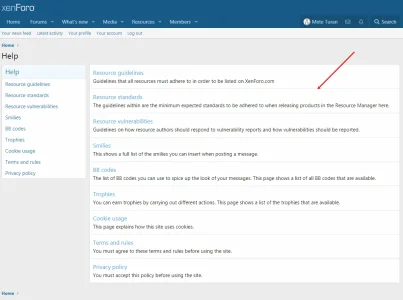
Y Yunus88 Active member Licensed customer Oct 12, 2020 #1 How do I add the horizontal line I show in the picture to the page I create on my site? Does this have code?
How do I add the horizontal line I show in the picture to the page I create on my site? Does this have code?
P Paul B XenForo moderator Staff member Licensed customer Oct 12, 2020 #2 If it's a page node just use standard <hr> html code. Upvote 0 Downvote
Y Yunus88 Active member Licensed customer Oct 12, 2020 #3 I have tried but a thick line comes out. It's not as thin as the help page and doesn't cover the whole line. Upvote 0 Downvote
I have tried but a thick line comes out. It's not as thin as the help page and doesn't cover the whole line.
P Paul B XenForo moderator Staff member Licensed customer Oct 12, 2020 #5 Impossible to guess what the issue is without a link to the page. HTML elements can be styled. I recommend reading up on this site: How To Style the HR Element with CSS Learn how to style an hr element with CSS. www.w3schools.com Upvote 0 Downvote
Impossible to guess what the issue is without a link to the page. HTML elements can be styled. I recommend reading up on this site: How To Style the HR Element with CSS Learn how to style an hr element with CSS. www.w3schools.com
Y Yunus88 Active member Licensed customer Oct 12, 2020 #6 It happened. But it didn't stick aside. There was a gap in between. Is it possible to stick it to the edge? Upvote 0 Downvote
It happened. But it didn't stick aside. There was a gap in between. Is it possible to stick it to the edge?
P Paul B XenForo moderator Staff member Licensed customer Oct 12, 2020 #7 That will be due to padding/margin on the container element. You will need to customise the css for that. Upvote 0 Downvote
That will be due to padding/margin on the container element. You will need to customise the css for that.