
You are using an out of date browser. It may not display this or other websites correctly.
You should upgrade or use an alternative browser.
You should upgrade or use an alternative browser.
Do you allow "Video" uploads? What is your max file size allowed?
- Thread starter rdn
- Start date


There is so much extra information needed to upload files that it wouldn't be practical to do it through an interface in XF. I never look forward to uploading because I usually forget something and have to go back and edit the details. Fortunately not many of our members create their own videos that they would want to upload, so it's not a big deal either way.

We do not. We only have 400gb on the server we're moving to, and that will include both our personal sites (a friend and I) and our company site on the dedi.

this is a great ideaI’ve thought about making an addon that allows videos to be uploaded, but then the backend sends them to the site’s YouTube for transcoding and hosting. Then the site controls the video but also doesn’t have the overhead of hosting/transcoding. Then I remembered I don’t have a site that needs video.

Or make the problem even worse. You could have a channel with 10,000 videos and then someone comes along and uploads 3 copyright videos that get hard-struck and all 10,000 videos are gone.I'd like that for others reasons also, ie it would take care of copyright issues.
It'd be best to handle a DMCA request (if it's not obvious copyright infringement like a full-length feature film) and delete the video yourself if you're looking at the long-term.
There is, for XF 2.1 and 2.2, built into 2.3:YouTube has become an annoyance with advertisements, embed blocking, required login, etc. I wish there were an easy way to host videos.


The same concepts can be applied to other adapters too.
I use Vultr and it's $6 for 1 TB storage/1TB bandwidth.
Something like this, as you only pay for what you use, would only be $24 more, provided bandwidth stays below 1TB, else it's $10 per TB more.21.5TB (5 TB used)

Go to admincpYouTube has become an annoyance with advertisements, embed blocking, required login, etc. I wish there were an easy way to host videos.
Options > attachments
Tick video

Hello everyone. I understand there's a problem with adding videos to posts.
For example, my forum is used only for internal work. Even user registration is disabled. But I need to post short videos recorded on an iPhone for the archive.
Maybe there's a ready-made module that compresses videos for more compact storage, like Viber or WhatsApp do?
The video quality requirement is low, as the focus is on content and resource conservation.
For example, my forum is used only for internal work. Even user registration is disabled. But I need to post short videos recorded on an iPhone for the archive.
Maybe there's a ready-made module that compresses videos for more compact storage, like Viber or WhatsApp do?
The video quality requirement is low, as the focus is on content and resource conservation.
Unfortunately, no built-in feature or add-on can compress uploaded videos.Maybe there's a ready-made module that compresses videos for more compact storage, like Viber or WhatsApp do?
IMO, the easiest way to do this without getting into crazy modding of attachments is to let the big file upload normally. set your limits accordingly.
each night, run a custom cron script that compresses each file from that day and use the exact same file name (compressed keeps the original file name) with ffmpeg like the details that can be found at a search like: https://www.google.com/search?q=ffmpeg+compress+video+from+php&rlz=1C1RXQR_enUS1127US1127&sca_esv=1b397ad422a0ef0a&biw=1536&bih=695&sxsrf=ANbL-n6LoWzyBnJem6L2p_sGjsovsteWZA:1770946074508&ei=Gn6OadbaHofZ5NoPttmW2AM&ved=2ahUKEwjWz7-dqNWSAxWHLFkFHbasBTsQ4dUDegQIBRAP&uact=5&oq=ffmpeg+compress+video+from+php&gs_lp=Egxnd3Mtd2l6LXNlcnAiHmZmbXBlZyBjb21wcmVzcyB2aWRlbyBmcm9tIHBocDIFECEYoAEyBRAhGKABMgUQIRigATIFECEYoAEyBRAhGKABMgUQIRifBUj3ClC2AlifCXABeAGQAQCYAXagAbUHqgEDNC41uAEDyAEA-AEBmAIKoALYB8ICChAAGLADGNYEGEfCAg0QABiABBiwAxhDGIoFwgIKEAAYgAQYFBiHAsICBRAAGIAEwgIGEAAYFhgewgIFECEYqwLCAgsQABiABBiGAxiKBcICBRAAGO8FmAMAiAYBkAYKkgcDMy43oAf7OLIHAzIuN7gH1QfCBwQwLjEwyAcWgAgA&sclient=gws-wiz-serp
execute the cron from xf once a day at 12:00:01 and make sure your script is set to get date(yesterday) only uploads.
use -y to allow overwrite.
if it misses one, no big deal. it's just big.
you'll need ffmpeg installed and allow php exec() on the server.
If you get a lot of videos a day, this will fail. it doesn't scale.
if you don't get any visitors at 12:00, the cron may miss something.
but if you get a handful of uploads a day, you can spend a few min in a cron updating/compressing them.
Things i didn't consider may be hashes or things that are built as a result of the file. might need to do some db updates here, i'm not sure. just spitballing a potential easy solution to do it 'lazy' after the fact.
if the script fails with -y, you may lose your source video.
There's far more elegant solutions, but this is quick and easy to buy space for vids that aren't really 'that important'.
each night, run a custom cron script that compresses each file from that day and use the exact same file name (compressed keeps the original file name) with ffmpeg like the details that can be found at a search like: https://www.google.com/search?q=ffmpeg+compress+video+from+php&rlz=1C1RXQR_enUS1127US1127&sca_esv=1b397ad422a0ef0a&biw=1536&bih=695&sxsrf=ANbL-n6LoWzyBnJem6L2p_sGjsovsteWZA:1770946074508&ei=Gn6OadbaHofZ5NoPttmW2AM&ved=2ahUKEwjWz7-dqNWSAxWHLFkFHbasBTsQ4dUDegQIBRAP&uact=5&oq=ffmpeg+compress+video+from+php&gs_lp=Egxnd3Mtd2l6LXNlcnAiHmZmbXBlZyBjb21wcmVzcyB2aWRlbyBmcm9tIHBocDIFECEYoAEyBRAhGKABMgUQIRigATIFECEYoAEyBRAhGKABMgUQIRifBUj3ClC2AlifCXABeAGQAQCYAXagAbUHqgEDNC41uAEDyAEA-AEBmAIKoALYB8ICChAAGLADGNYEGEfCAg0QABiABBiwAxhDGIoFwgIKEAAYgAQYFBiHAsICBRAAGIAEwgIGEAAYFhgewgIFECEYqwLCAgsQABiABBiGAxiKBcICBRAAGO8FmAMAiAYBkAYKkgcDMy43oAf7OLIHAzIuN7gH1QfCBwQwLjEwyAcWgAgA&sclient=gws-wiz-serp
execute the cron from xf once a day at 12:00:01 and make sure your script is set to get date(yesterday) only uploads.
use -y to allow overwrite.
if it misses one, no big deal. it's just big.
you'll need ffmpeg installed and allow php exec() on the server.
If you get a lot of videos a day, this will fail. it doesn't scale.
if you don't get any visitors at 12:00, the cron may miss something.
but if you get a handful of uploads a day, you can spend a few min in a cron updating/compressing them.
Things i didn't consider may be hashes or things that are built as a result of the file. might need to do some db updates here, i'm not sure. just spitballing a potential easy solution to do it 'lazy' after the fact.
if the script fails with -y, you may lose your source video.
There's far more elegant solutions, but this is quick and easy to buy space for vids that aren't really 'that important'.
You could use the media gallery with FFmpeg and force transcoding of all videos.
And this add-on could make the file size even smaller.
Or compress those in posts after.
And this add-on could make the file size even smaller.


Gives XFMG additional parameters for ffmpeg
- Yodrak
- ffmpeg shrink videos xfmg
- Add-ons [2.x]
Or compress those in posts after.

I have over 98,000 videos uploaded into threads/posts so I wanted to see if I can make any savings with ffmpeg, long story short, yes. I compressed 70,000 odd videos (mp4) and saved 154GB, for a 18% reduction of the total of 853GB. No loss in quality. So I'll leave it here. Probaly wouldn't hurt to chmod 600 the log file if you do it in /video.
Set your video path and run the bash script. Run it every now and then.
Set your video path and run the bash script. Run it every now and then.
- will create a temp video file.
- if temp video file is smaller, replace original video.
- if bigger, delete temp video file.
- log result/check log on next run and...
- D.O.A.
- Replies: 3
- Forum: Server configuration and hosting

And this is sooooo bad(Unfortunately, no built-in feature or add-on can compress uploaded videos.
Thank you for such a detailed answer. It's difficult for me to create such scripts, but your idea works. So, my employees upload video reports during the day, and at night the server compresses them and archives them.IMO, the easiest way to do this without getting into crazy modding of attachments is to let the big file upload normally. set your limits accordingly.
each night, run a custom cron script that compresses each file from that day and use the exact same file name (compressed keeps the original file name) with ffmpeg like the details that can be found at a search like: https://www.google.com/search?q=ffmpeg+compress+video+from+php&rlz=1C1RXQR_enUS1127US1127&sca_esv=1b397ad422a0ef0a&biw=1536&bih=695&sxsrf=ANbL-n6LoWzyBnJem6L2p_sGjsovsteWZA:1770946074508&ei=Gn6OadbaHofZ5NoPttmW2AM&ved=2ahUKEwjWz7-dqNWSAxWHLFkFHbasBTsQ4dUDegQIBRAP&uact=5&oq=ffmpeg+compress+video+from+php&gs_lp=Egxnd3Mtd2l6LXNlcnAiHmZmbXBlZyBjb21wcmVzcyB2aWRlbyBmcm9tIHBocDIFECEYoAEyBRAhGKABMgUQIRigATIFECEYoAEyBRAhGKABMgUQIRifBUj3ClC2AlifCXABeAGQAQCYAXagAbUHqgEDNC41uAEDyAEA-AEBmAIKoALYB8ICChAAGLADGNYEGEfCAg0QABiABBiwAxhDGIoFwgIKEAAYgAQYFBiHAsICBRAAGIAEwgIGEAAYFhgewgIFECEYqwLCAgsQABiABBiGAxiKBcICBRAAGO8FmAMAiAYBkAYKkgcDMy43oAf7OLIHAzIuN7gH1QfCBwQwLjEwyAcWgAgA&sclient=gws-wiz-serp
execute the cron from xf once a day at 12:00:01 and make sure your script is set to get date(yesterday) only uploads.
use -y to allow overwrite.
if it misses one, no big deal. it's just big.
you'll need ffmpeg installed and allow php exec() on the server.
If you get a lot of videos a day, this will fail. it doesn't scale.
if you don't get any visitors at 12:00, the cron may miss something.
but if you get a handful of uploads a day, you can spend a few min in a cron updating/compressing them.
Things i didn't consider may be hashes or things that are built as a result of the file. might need to do some db updates here, i'm not sure. just spitballing a potential easy solution to do it 'lazy' after the fact.
if the script fails with -y, you may lose your source video.
There's far more elegant solutions, but this is quick and easy to buy space for vids that aren't really 'that important'.
This is an option for someone who sits at a PC. These video reports should be made by mechanics; they don't really like to figure things out.You could use the media gallery with FFmpeg and force transcoding of all videos.
And this add-on could make the file size even smaller.
Gives XFMG additional parameters for ffmpeg
- Yodrak
- ffmpeg shrink videos xfmg
- Add-ons [2.x]
Or compress those in posts after.
I have over 98,000 videos uploaded into threads/posts so I wanted to see if I can make any savings with ffmpeg, long story short, yes. I compressed 70,000 odd videos (mp4) and saved 154GB, for a 18% reduction of the total of 853GB. No loss in quality. So I'll leave it here. Probaly wouldn't hurt to chmod 600 the log file if you do it in /video.
Set your video path and run the bash script. Run it every now and then.
- will create a temp video file.
- if temp video file is smaller, replace original video.
- if bigger, delete temp video file.
- log result/check log on next run and...
- D.O.A.
- Replies: 3
- Forum: Server configuration and hosting

I know it's crazy but I allow 3.5g. Just because so many members do not know how to edit videos.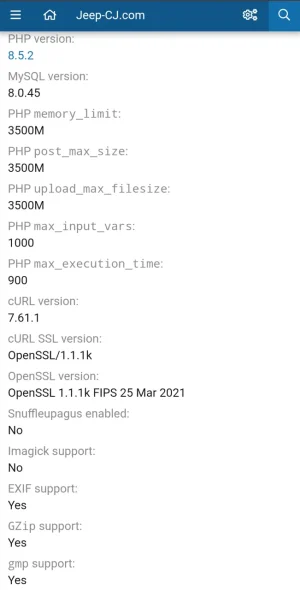
Imagine having that maximum file size with this many attachments, maybe 1 PB or more.I allow 3.5g

Nope, i do monitor every post ..