
Advanced Traffic Statistics: Live Radar, WAF & AI Security

Advanced Traffic Statistics: Live Radar, WAF & AI Security 1.8.4

No permission to download
Apologies for being so dense but I am not sure what location in the admin area you mean. Are both of the checkboxes in the Usergroup permissions listing? We do not have a group called Members. We have "Registered Users" and "NAWCC Members" who are dues paying members of the association.

I am not sure what you mean by widget since Advanced Statistics did not create a widget in the Appearance area of Admin.

I looked in the templates for any templates associated with Advanced Traffic Statistics but there are none there.

There are none in my widgets list either.

Does your addon make changes in the setup Public Navigation area? That has been heavily modified on our system for compatibility with our parent organization web site so if you changed some content it may not be visible in the Admin controls for the Public Menu.

I am hoping to substantially improve our performance by getting control of bad bots. We have 5,901 "guests" on the system at this moment with 70 registered users. We have had 520 new users register in the last 30 days with 359 NAWCC members and another 1447 who are registered but do not pay dues. If you subtract the newly registered from the total non members we have about a 2:1 ratio of registered only to paid members.
The first option is visible in Setup>Options>Advanced Statistics (www.yoursite.com/admin.php?options/groups/statistiche_config/)

The second one can be found in all your user groups. Group&Permission>Usergroup>Admin or Supermod, Mod, Registered etc..
(www.yoursite.com/admin.php?user-groups/)

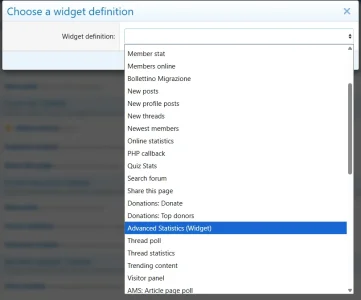
You can create the widget on: Widget>Add Widget
You choose: Advanced Statistics (Widget)

(www.yoursite.com//admin.php?widgets/)
1774482859321.webp

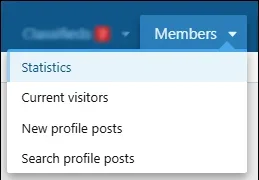
The page, if enabled in the settings, is visible on Members>Statistics But you can move it wherever you like via Setup>Public Navigation

Direct link to the page: (www.yoursite.com/statistiche/Basic)
1774482961588.webp
 
Last edited:
I have it working.

I will be doing more tweaking as I try to figure out the best permissions to use.

Thank you for the patience. I severely abused the User Menu a few years ago when we were charged with making our XF System and our HQ WP system took like a single entity. It took me most of today to figure out how to edit it The value of blank for the parent to appear navigation bar of the forum was almost too subtle for me.
 
My system was down this morning. It came back as soon as I looked for the database from the back end. I found this error message in the log.
Server error log
Code:
XF\Db\Exception: MySQL server has gone away src/XF/Db/Mysqli/Adapter.php:172
Generated by: Unknown account Mar 28, 2026 at 8:10 AM
Stack trace
#0 src/XF/Db/Mysqli/Adapter.php(31): XF\Db\Mysqli\Adapter->makeConnection(Array)
#1 src/XF/Db/AbstractAdapter.php(62): XF\Db\Mysqli\Adapter->getConnection()
#2 src/XF/Db/AbstractAdapter.php(85): XF\Db\AbstractAdapter->connect()
#3 src/XF/Db/AbstractAdapter.php(152): XF\Db\AbstractAdapter->query('SELECT cache_ke...', Array)
#4 src/addons/Statistiche/Listener.php(33): XF\Db\AbstractAdapter->fetchOne('SELECT cache_ke...', Array)
#5 src/XF/Extension.php(86): Statistiche\Listener::appPubStart(Object(XF\Pub\App))
#6 src/XF/App.php(3366): XF\Extension->fire('app_pub_start_b...', Array, NULL)
#7 src/XF/Pub/App.php(138): XF\App->fire('app_pub_start_b...', Array)
#8 src/XF/App.php(2820): XF\Pub\App->start(true)
#9 src/XF.php(814): XF\App->run()
#10 index.php(23): XF::runApp('XF\\Pub\\App')
#11 {main}
Request state
array(4) {
  ["url"] => string(32) "/index.php?sam-item/2/track-view"
  ["referrer"] => string(61) "https://mb.nawcc.org/threads/tissot-sport-chronograph.175381/"
  ["_GET"] => array(1) {
    ["sam-item/2/track-view"] => string(0) ""
  }
  ["_POST"] => array(0) {
  }
}
 
My system was down this morning. It came back as soon as I looked for the database from the back end. I found this error message in the log.
Server error log
Code:
XF\Db\Exception: MySQL server has gone away src/XF/Db/Mysqli/Adapter.php:172
Generated by: Unknown account Mar 28, 2026 at 8:10 AM
Stack trace
#0 src/XF/Db/Mysqli/Adapter.php(31): XF\Db\Mysqli\Adapter->makeConnection(Array)
#1 src/XF/Db/AbstractAdapter.php(62): XF\Db\Mysqli\Adapter->getConnection()
#2 src/XF/Db/AbstractAdapter.php(85): XF\Db\AbstractAdapter->connect()
#3 src/XF/Db/AbstractAdapter.php(152): XF\Db\AbstractAdapter->query('SELECT cache_ke...', Array)
#4 src/addons/Statistiche/Listener.php(33): XF\Db\AbstractAdapter->fetchOne('SELECT cache_ke...', Array)
#5 src/XF/Extension.php(86): Statistiche\Listener::appPubStart(Object(XF\Pub\App))
#6 src/XF/App.php(3366): XF\Extension->fire('app_pub_start_b...', Array, NULL)
#7 src/XF/Pub/App.php(138): XF\App->fire('app_pub_start_b...', Array)
#8 src/XF/App.php(2820): XF\Pub\App->start(true)
#9 src/XF.php(814): XF\App->run()
#10 index.php(23): XF::runApp('XF\\Pub\\App')
#11 {main}
Request state
array(4) {
  ["url"] => string(32) "/index.php?sam-item/2/track-view"
  ["referrer"] => string(61) "https://mb.nawcc.org/threads/tissot-sport-chronograph.175381/"
  ["_GET"] => array(1) {
    ["sam-item/2/track-view"] => string(0) ""
  }
  ["_POST"] => array(0) {
  }
}
Hi Tom,

I have analyzed the stack trace you provided. The MySQL server has gone away exception is a server-level issue, not a bug within the add-on's code.

Because our add-on logs traffic at the very beginning of the page load process (app_pub_start), it is often the first to communicate with the database. If your MySQL server drops the connection, times out, or restarts due to resource limits, our add-on simply catches the resulting error.

To fix this instability, you or your server administrator should check the following settings in your MySQL configuration file (my.cnf or my.ini):

  1. wait_timeout and interactive_timeout:If these values are set too low, MySQL kills connections that are briefly idle. Try increasing both values to 600 or 3600.
  2. max_allowed_packet:If the server receives a packet larger than this limit, it drops the connection. Ensure this is set to at least 64M or 128M.
  3. Server Resources (RAM/OOM Killer):Check your server's system logs (e.g., /var/log/syslog or /var/log/messages). Often, MySQL "goes away" because the server runs out of RAM and the operating system automatically kills and restarts the MySQL service.
  4. Persistent Connections:If you are using persistent database connections in your XenForo src/config.php, try disabling them, as they can sometimes become stale and cause this exact error.
Adjusting these server limits should stabilize your database and resolve the error across your entire forum.

Let me know if your hosting provider is able to track down the bottleneck!
 
@Supergatto

Having had uninstalled this addon for a week while I attempt to figure out my cron stalls, I noted that my crons stalled again this morning. After careful review I noted this stall today was rooted to my Better Analytics addon may have been the culprit.

I am in the process of reinstalling your stats addon and I will run it without the Better Analytics or Cloudflare addon and give it a wait and see what happens.
 
Recently notice that there is an error in the browser console
Code:
(индекс):13303 Uncaught SyntaxError: Invalid or unexpected token

and complains about the line
Code:
<script>(function(){var id='xftc-copyright-16';var n=function(r){3ar w=document.querySelector('[data-widget-key="statistiche_visite"] .block-body');if(w&&!w.querySelector('.stat-alert-box')){w.innerHTML='<div class="stat-alert-box" style="padding:20px;background:#e74c3c;color:#fff;text-align:center;font-weight:bold;border-radius:4px;">⚠ COPYRIGHT PROTECTION TRIGGERED ⚠<br><span style="font-size:12px;font-weight:normal">Security Violation: '+r+'</span></div>';}var p=document.querySelector('.statHeader-container');if(p){if(document.getElementById('stat-lock-overlay'))return;var o=document.createElement('div');o.id='stat-lock-overlay';o.style.cssText='position:fixed;top:0;left:0;width:100%;height:100%;background:rgba(5,5,5,0.96);backdrop-filter:blur(20px);z-index:2147483647;display:flex;justify-content:center;align-items:center;flex-direction:column;font-family:system-ui,-apple-system,sans-serif;';var b=document.createElement('div');b.style.cssText='background:#fff;padding:50px;border-radius:12px;box-shadow:0 0 50px rgba(255,0,0,0.6);text-align:center;max-width:550px;width:90%;border-top:6px solid #d32f2f;animation:statShake 0.82s cubic-bezier(.36,.07,.19,.97) both;transform:translate3d(0,0,0);';b.innerHTML='<div style="font-size:64px;color:#d32f2f;margin-bottom:20px">⚣</div><h1 style="margin:0 0 15px;color:#d32f2f;font-size:32px;font-weight:800;text-transform:uppercase">Security Violation</h1><p style="font-size:18px;color:#333;line-height:1.5;margin:0">'+r+'</p><style>@keyframes statShake{10%,90%{transform:translate3d(-1px,0,0)}20%,80%{transform:translate3d(2px,0,0)}30%,50%,70%{transform:translate3d(-4px,0,0)}40%,60%{transform:translate3d(4px,0,0)}}</style>';o.appendChild(b);document.body.appendChild(o);document.body.style.overflow='hidden';};getChl();};var c=function(){var e=document.getElementById(id);if(!e||e.offsetParent===null||window.getComputedStyle(e).visibility==='hidden'||window.getComputedStyle(e).display==='none'){n('Copyright Missing');return;}var cb=document.querySelector('[data-stat-check="1"]');if(cb){var lic=cb.getAttribute('data-lic');if(!lic){var proCont=document.getElementById('stat-pro-container');if(proCont&&!proCont.classList.contains('stat-pro-blur')){n('Pro Feature Tampering');return;}var l=document.getElementById('stat-protection-lock');if(!l||l.offsetParent===null||window.getComputedStyle(l).visibility==='hidden'||window.getComputedStyle(l).display==='none'||window.getComputedStyle(l).opacity=='0'){n('Illegal Unlock Attempt');}}}};setInterval(c,2000);window.addEventListener('load',c);})();</script>
 
Supergatto updated Advanced Traffic Statistics: Live Radar, WAF & AI Security with a new update entry:

Update 1.8.4 - Bot Signatures Update & Stability

This release focuses on significantly expanding the Radar's ability to recognize the newest web crawlers, particularly those related to AI training, while improving overall add-on stability.

🛡️ SECURITY & DETECTION ENHANCEMENTS
  • Massive Bot Definitions Update: Added over 40 new signatures to the default configurations. The Live Radar can now flawlessly detect and categorize the latest AI data scrapers (such as GPTBot, ClaudeBot, OAI-SearchBot, Bytespider), modern SEO...

Read the rest of this update entry...
 
Recently notice that there is an error in the browser console
Code:
(индекс):13303 Uncaught SyntaxError: Invalid or unexpected token
Hi! Thank you so much for the sharp eye and for reporting this.

You caught a minor typo/glitch that slipped into the script during the build process of the previous version. It was completely harmless to the forum's functionality, but definitely annoying to see in the developer console!

I have just released Version 1.8.4 which fixes this specific bug and also includes a massive update to the AI and Scraper bot definitions.
Please update to 1.8.4 and the console error will disappear.
 
It seems that my admins and moderators do not want to see the bots and other advanced statistics. It had been disabled when I lgged in after a busy day elsewhere. I re-enabled the addon and removed the permissions for the other admins and the moderators. I gave myself personal permissions for the advanced stats. That does not seem to work since I cannot see the threat information, etc.

Do you not treat personal permissions the same as usergroup permissions? I would rather not create another usergroup just for me.
 
It seems that my admins and moderators do not want to see the bots and other advanced statistics.
Since I just only recently re-installed I haven't revisited this yet. But I had added a couple conditionals to the report template that allowed me to see everything as an admin (or just for an individual account) that gave an output of the charts and data that was filtered down to what was desired.

I wanted to allow members to see some of the basic charts, staff to see certain additional charts, and admins (or just my account) to see everything. Just be diligent in considering your template changes. It takes some trial and error for me to perfect the output.
 
@Supergatto

Well the stats addon is working flawlessly since I have disabled the Better Analytics and Cloudflare addons. I do not know if there was a conflict? Or just the Better Analytics was frapping out on its own randomly. But I do not really need either on my board, but I do want to use the stats.

So far so good, no stalls or errors.

Thanks again for your support.
 
Back
Top Bottom