
![[XTR] Day Night Mode](/community/data/resource_icons/10/10230.jpg?1768230024)
- Compatible XF 2.x versions
- 2.3
- Additional requirements
- XenForo 2.3.0+
PHP 8.0+
- Visible branding
- No
Enhance your community's user experience with a sleek and native Day/Night mode toggler. This add-on integrates directly with XenForo 2.3's powerful Style Variations system, allowing your users to switch between Light and Dark modes with a single click from the navigation bar.
Unlike complex style switchers or heavy JavaScript solutions, [XTR] Day Night Mode is lightweight and smart. It respects the user's operating system preferences upon first visit and remembers their manual choice for future visits.
Key Features
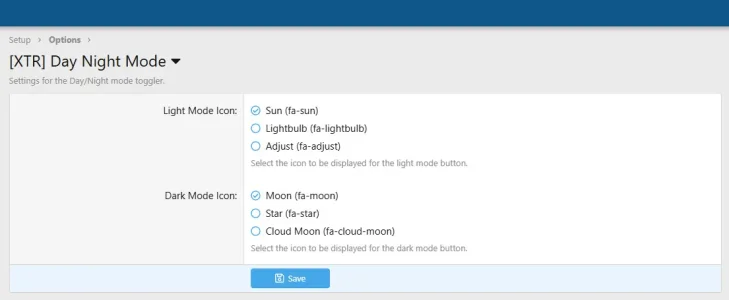
You can easily configure the look and feel from Setup > Options > [XTR] Day Night Mode:
Unlike complex style switchers or heavy JavaScript solutions, [XTR] Day Night Mode is lightweight and smart. It respects the user's operating system preferences upon first visit and remembers their manual choice for future visits.
Key Features
- Native XF 2.3 Support: Built strictly on XenForo's new
style-variationarchitecture. No external libraries or complex JavaScript logic. - Smart Detection: On the first load (without cookies), the system automatically detects the user's OS preference (Dark/Light mode) via CSS
prefers-color-scheme. - Context-Aware Toggle:
- If the system/site is Dark, the button allows switching to Light.
- If the system/site is Light, the button allows switching to Dark.
- Customizable Icons: Choose from a variety of predefined FontAwesome icons (Sun, Moon, Star, Lightbulb, etc.) directly from the Admin Panel.
- Lightweight: Uses CSS for visibility logic, ensuring zero layout shift and blazing fast performance.
- Robust Implementation: Uses Regex-based template modifications to ensure compatibility even if your theme has minor whitespace changes.
You can easily configure the look and feel from Setup > Options > [XTR] Day Night Mode:
- Select specific icons for the Light Mode button via radio buttons.
- Select specific icons for the Dark Mode button via radio buttons.


![[XTR] Watermark Pro](/community/data/resource_icons/10/10108.jpg?1761751010)
![[XTR] Similar Thread Suggestions](/community/data/resource_icons/10/10130.jpg?1763405723)
![[XTR] Smart Customization](/community/data/resource_icons/10/10009.jpg?1752877374)

![[XTR] Dynamic Welcome Panel](/community/data/resource_icons/10/10081.jpg?1759543877)