
![[Xenro] Shield](/community/data/resource_icons/10/10832.jpg?1790546561)
- Compatible XF 2.x versions
- 2.3
- Additional requirements
- XenForo 2.3.0 or later within the 2.3 series.
PHP 8.2 or later with OpenSSL.
A working XenForo database and normal scheduled job processing.
- License
- https://xenro.biz/help/license/
- Updates duration
- Lifetime
Shield works as a standalone add-on. It does not add a CAPTCHA or replace your existing XenForo spam settings.
Separate limits for each activity
Control forum browsing, search, sign-in, registration, posting, resource browsing and downloads separately.
For example, repeated searches can be limited while the same visitor continues reading threads. Posts containing several links from a new account can be sent to XenForo’s moderation queue when its native spam checks run.
Member request limits follow the account. Guest limits use the IP address. Rules can also use shared-IP and existing-session request counts.
Configure protection without editing code
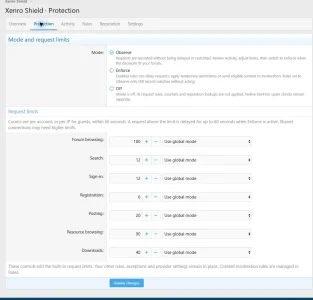
The Protection screen brings the global mode and seven built-in request limits together. Each limit can follow the global mode, remain in observation, or be disabled.
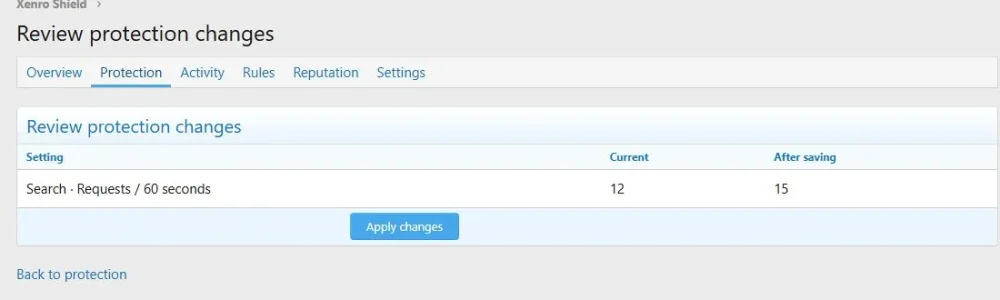
Before saving, Shield shows the current and proposed values. If another administrator has changed the settings, an outdated form cannot overwrite those changes.
The admin area is organised into six sections:
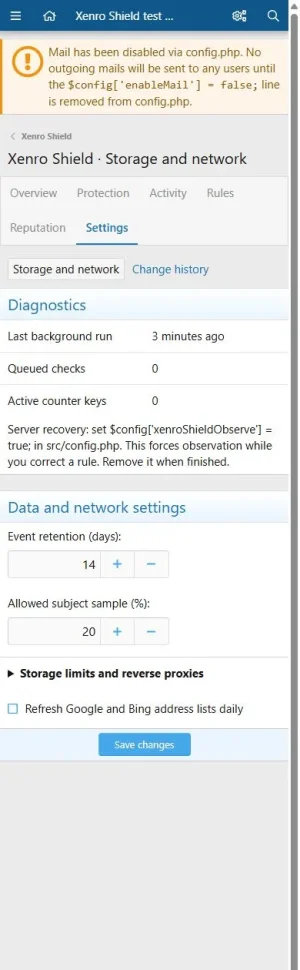
The interface uses native XenForo forms, tables and style settings. It supports light and dark admin variations and adapts to narrow screens.
Observe before enforcing
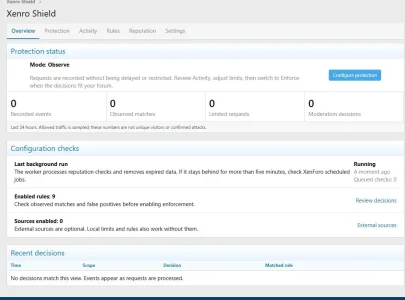
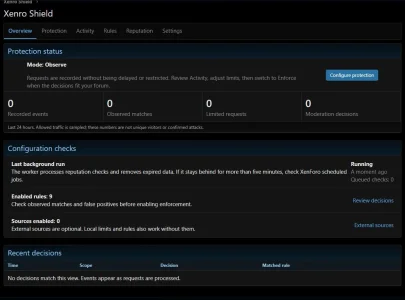
New installations start in Observe mode. Rules record matches without delaying or restricting visitors.
Review the event log, inspect the facts behind a decision, mark false positives and try sample requests in the simulator. Switch to Enforce when the rules suit your forum’s traffic. Individual rules can remain in observation.
Each event identifies the relevant activity, matching rule and recorded facts. Dashboard figures represent recorded events, not unique visitors or confirmed attacks.
Build rules for your community
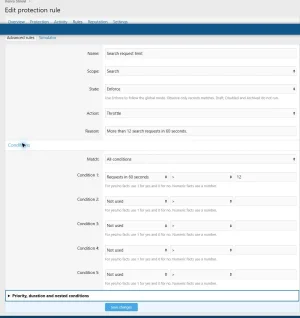
Combine conditions using ALL or ANY. Available conditions include:
Choose whether a matching rule records an event, delays a request, temporarily restricts an activity or sends eligible content to native moderation.
Advanced rules retain their own priorities, duration and conditions. The simple limit editor does not overwrite customised compound rules.
Export rules as JSON, preview imports before adding them as drafts, and restore previous rules in Observe mode from the administrative change history.
Local lists and exceptions
Manage IP addresses, CIDR ranges, email domains and link domains from the admin panel. Give each entry a reason, an activity scope and an optional expiry.
Bulk import lets you review a pasted list before applying it. Exceptions apply only to Shield and do not grant additional XenForo permissions.
Optional Google and Bing address lists help identify search crawlers without trusting the User-Agent alone.
Optional reputation sources
Connect your own accounts for:
Each source has separate activity scopes, a daily request budget and a cache lifetime. Checks run in the background and repeated lookups are deduplicated.
Connecting a source supplies facts to your rules; it does not automatically create a blocking rule. The first request without a cached result has no provider verdict.
Errors, unknown results and exhausted quotas are kept separate from positive listings. Spamhaus PBL policy listings do not classify forum visitors as abusive.
StopForumSpam and Akismet remain configured through XenForo’s existing settings. Shield does not duplicate their checks or submit public abuse reports.
External connections and privacy
All additional reputation sources are disabled until configured. They require your own accounts. Provider subscriptions, fees and quotas are separate from this add-on.
When a selected activity requires a lookup without a fresh cached result:
DNS queries pass through your server’s resolver, which can see the lookup name and service key. The DNS connectors support IPv4 in this release; unsupported IPv6 results are not treated as clean results.
An explicit or scheduled crawler refresh contacts Google and Bing to download their published address lists. These requests send normal server connection metadata, not visitor details.
Shield’s additional connectors do not transmit message text, private conversations, usernames or email addresses. Event logs omit raw IP addresses and message bodies. The bounded reputation queue temporarily stores IP addresses required for lookups.
Provider keys are encrypted on the server and excluded from rule exports. Event retention and storage limits are configurable.
Shield sends no telemetry to Xenro. Installation and removal do not depend on an external license server.
Requirements and compatibility
Local verification was performed with XenForo 2.3.13 and Resource Manager 2.3.13, including installation, removal and upgrading from Shield 1.0.0 to 1.1.0 with settings preserved.
External provider responses were tested with controlled fixtures. Live account credentials and provider availability must be checked for your installation.
Scope of protection
Shield controls activity handled by XenForo and assists with spam moderation. Shared-IP guest limits should be reviewed carefully on mobile and corporate networks.
It does not replace network-level DDoS protection or guarantee detection of every bot. Slow, distributed clients may remain below individual request limits. This release does not install CDN or firewall rules.
License and support
A paid license covers one production forum and one private test installation for that forum. You may modify the code for your licensed installations. Redistribution, resale and sublicensing require written permission from Xenro.
Separate limits for each activity
Control forum browsing, search, sign-in, registration, posting, resource browsing and downloads separately.
For example, repeated searches can be limited while the same visitor continues reading threads. Posts containing several links from a new account can be sent to XenForo’s moderation queue when its native spam checks run.
Member request limits follow the account. Guest limits use the IP address. Rules can also use shared-IP and existing-session request counts.
Configure protection without editing code
The Protection screen brings the global mode and seven built-in request limits together. Each limit can follow the global mode, remain in observation, or be disabled.
Before saving, Shield shows the current and proposed values. If another administrator has changed the settings, an outdated form cannot overwrite those changes.
The admin area is organised into six sections:
- Overview: current mode, recorded decisions and background processing status.
- Protection: request limits and global operating mode.
- Activity: event details, filters and related events.
- Rules: advanced conditions, rule import/export and the simulator.
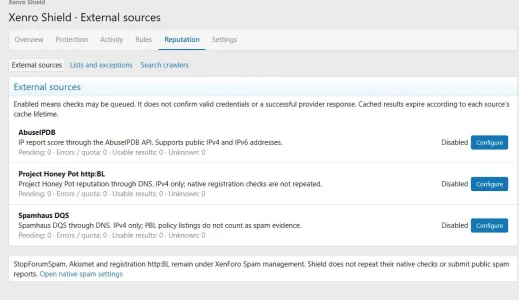
- Reputation: external sources, local lists and search crawler verification.
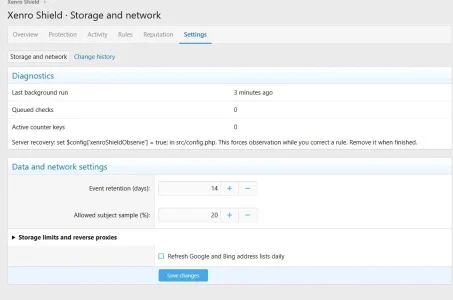
- Settings: data retention, storage limits, proxy settings and change history.
The interface uses native XenForo forms, tables and style settings. It supports light and dark admin variations and adapts to narrow screens.
Observe before enforcing
New installations start in Observe mode. Rules record matches without delaying or restricting visitors.
Review the event log, inspect the facts behind a decision, mark false positives and try sample requests in the simulator. Switch to Enforce when the rules suit your forum’s traffic. Individual rules can remain in observation.
Each event identifies the relevant activity, matching rule and recorded facts. Dashboard figures represent recorded events, not unique visitors or confirmed attacks.
Build rules for your community
Combine conditions using ALL or ANY. Available conditions include:
- Request counts over 60 seconds or 10 minutes.
- Account age, user groups and message count.
- Guest status and email confirmation.
- Links and repeated content.
- Verified crawler addresses.
- Cached reputation results and AbuseIPDB scores.
Choose whether a matching rule records an event, delays a request, temporarily restricts an activity or sends eligible content to native moderation.
Advanced rules retain their own priorities, duration and conditions. The simple limit editor does not overwrite customised compound rules.
Export rules as JSON, preview imports before adding them as drafts, and restore previous rules in Observe mode from the administrative change history.
Local lists and exceptions
Manage IP addresses, CIDR ranges, email domains and link domains from the admin panel. Give each entry a reason, an activity scope and an optional expiry.
Bulk import lets you review a pasted list before applying it. Exceptions apply only to Shield and do not grant additional XenForo permissions.
Optional Google and Bing address lists help identify search crawlers without trusting the User-Agent alone.
Optional reputation sources
Connect your own accounts for:
- AbuseIPDB.
- Project Honey Pot http:BL.
- Spamhaus DQS.
Each source has separate activity scopes, a daily request budget and a cache lifetime. Checks run in the background and repeated lookups are deduplicated.
Connecting a source supplies facts to your rules; it does not automatically create a blocking rule. The first request without a cached result has no provider verdict.
Errors, unknown results and exhausted quotas are kept separate from positive listings. Spamhaus PBL policy listings do not classify forum visitors as abusive.
StopForumSpam and Akismet remain configured through XenForo’s existing settings. Shield does not duplicate their checks or submit public abuse reports.
External connections and privacy
All additional reputation sources are disabled until configured. They require your own accounts. Provider subscriptions, fees and quotas are separate from this add-on.
When a selected activity requires a lookup without a fresh cached result:
- AbuseIPDB receives the public visitor IP address and report-age setting over HTTPS at api.abuseipdb.com. Your API key is sent in a request header.
- Project Honey Pot receives the IPv4 address and service key through a DNS lookup under dnsbl.httpbl.org.
- Spamhaus DQS receives the IPv4 address and service key through a DNS lookup under zen.dq.spamhaus.net.
DNS queries pass through your server’s resolver, which can see the lookup name and service key. The DNS connectors support IPv4 in this release; unsupported IPv6 results are not treated as clean results.
An explicit or scheduled crawler refresh contacts Google and Bing to download their published address lists. These requests send normal server connection metadata, not visitor details.
Shield’s additional connectors do not transmit message text, private conversations, usernames or email addresses. Event logs omit raw IP addresses and message bodies. The bounded reputation queue temporarily stores IP addresses required for lookups.
Provider keys are encrypted on the server and excluded from rule exports. Event retention and storage limits are configurable.
Shield sends no telemetry to Xenro. Installation and removal do not depend on an external license server.
Requirements and compatibility
- XenForo 2.3.0 or later within the 2.3 series.
- PHP 8.2 or later with OpenSSL.
- A working XenForo database and normal scheduled job processing.
- Resource Manager is optional.
- Redis is not required.
Local verification was performed with XenForo 2.3.13 and Resource Manager 2.3.13, including installation, removal and upgrading from Shield 1.0.0 to 1.1.0 with settings preserved.
External provider responses were tested with controlled fixtures. Live account credentials and provider availability must be checked for your installation.
Scope of protection
Shield controls activity handled by XenForo and assists with spam moderation. Shared-IP guest limits should be reviewed carefully on mobile and corporate networks.
It does not replace network-level DDoS protection or guarantee detection of every bot. Slow, distributed clients may remain below individual request limits. This release does not install CDN or firewall rules.
License and support
A paid license covers one production forum and one private test installation for that forum. You may modify the code for your licensed installations. Redistribution, resale and sublicensing require written permission from Xenro.
-
 01-overview-light.webp
 -
 02-protection-light.webp
 -
 03-reputation-light.webp
 -
 04-settings-light.webp
 -
 05-rule-editor-light.webp
 -
 06-review-light.webp
 -
 07-settings-mobile.webp
 -
 08-overview-dark.webp
 -
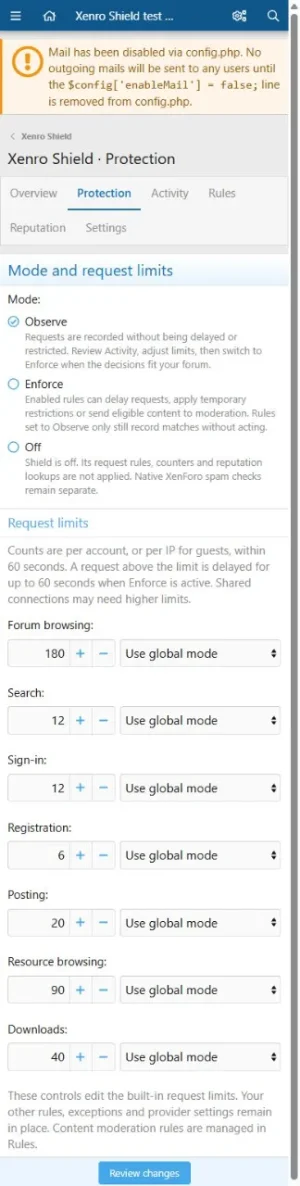 09-protection-mobile.webp
![[Xenro] Postmark Email](/community/data/resource_icons/10/10858.jpg?1790967183)
![[Xenro] CryptoPay](/community/data/resource_icons/10/10855.jpg?1790883822)
![[Xenro] Serials – Films, Series & Anime](/community/data/resource_icons/10/10854.jpg?1790875725)
![[Xenro] Neon](/community/data/resource_icons/10/10844.jpg?1790678555)
![[Xenro] Auth Pages](/community/data/resource_icons/10/10829.jpg?1790521761)