
![[Tobirama] Poll Pro](/community/data/resource_icons/10/10873.jpg?1791311488)
- Compatible XF 2.x versions
- 2.3
- Additional requirements
- PHP 7.2 or later. No other add-ons or third-party libraries required
- License
- One license covers one forum. The license includes updates and support for the add-on. Modifying, reselling, sharing or redistributing the add-on, in whole or in part, is not permitted.
Poll Pro turns polls into a complete voting system: six poll types, results and voter privacy you decide per poll, voting rules and requirements, scheduling, alerts and statistics, all set up from one popup editor with a live preview.
It runs alongside XenForo's built-in polls without changing them.
Six poll types
- Single choice and multiple choice, with a minimum and maximum number of choices.
- Ranked choice: members drag the options into order, points are counted automatically, and you decide how many positions count.
- Star rating: members rate each item on a 3, 5 or 10 point scale, and the results show the average for each one.
- Quiz: one or several correct answers, revealed with your explanation and the share of members who answered correctly.
- Image choice: every option is a picture with its own votes, ideal for contests.
One popup to set up everything
- Create a poll while posting a thread, add one to an existing thread, or publish a standalone poll.
- A live preview shows the poll exactly as members will see it.
- Settings are grouped into four focused popups, each summarised on its own card, so nothing needs scrolling.
- Give each option its own color.
Results and voter privacy, decided per poll
- Show results always, after voting, after the poll closes, on a date you choose, or to staff only.
- Make voter names public (avatars beside each option), visible to staff only, or completely secret. Secret votes are never shown or exported to anyone, staff included.
- Once voting has started, privacy can only be made stricter, never weaker.
- Animated bars or a donut chart, with percentages, vote counts or both.
Rules, requirements and scheduling
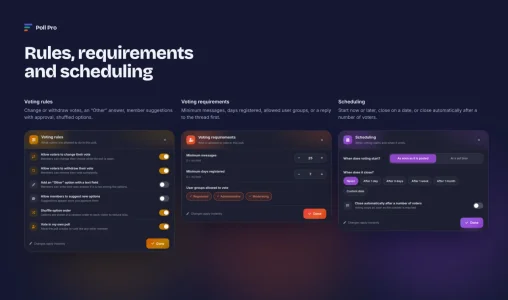
- Voting rules: change or withdraw votes, an "Other" answer with a text field, options suggested by members with your approval, shuffled option order, and whether the poll creator may vote.
- Who can vote: a minimum number of messages, a minimum number of days registered, specific user groups, or a reply to the thread first.
- Timing: start immediately or at a set time with a live countdown; close after a day, a week, a month or on a custom date, or automatically once a number of voters is reached.
Voting forms and results built for each type
- Clear hints, a live choice counter, and limits enforced before a vote is sent.
- The leading option is marked, and members always see their own choice highlighted.
- Rankings with points, ratings with star averages, and quizzes with the correct answer and your explanation.
Tools for staff
- Close, reopen, edit or reset any poll, and approve or reject suggested options.
- Statistics for every poll: votes over time, participation rate, daily average and a breakdown by user group, plus CSV export.
- View and manage every poll from the admin control panel.
Polls everywhere on your forum
- Several polls in one thread, up to the limit you set.
- A poll directory with filters by type and status, search and sorting.
- Embed any poll in a post with
[TBPOLL=ID]. - A widget that lists polls or shows a featured poll members can vote on directly.
- A poll icon in thread lists.
- Alerts when a poll closes, when results are revealed, when a poll reaches a voter milestone, and when a member suggests an option.
Permissions
- Set per forum: view, vote, create, advanced poll types, image options, edit or delete own polls, suggest options, and the maximum number of options.
- Separate moderator permissions for managing polls, approving suggestions, viewing hidden results and voters, and statistics.
- Administrators and moderators receive their permissions automatically on install.
Looks right on every forum
- Takes its colors from your style, in light and dark styles alike.
- Designed for phones: the editor fills the screen and settings open as bottom sheets.
- Full right-to-left support, with English and Arabic editions.
- Keyboard accessible, and respects the reduced motion setting.
Requirements
Add a poll to any existing thread at any time from the thread tools menuXenForo 2.3.0 or later, PHP 7.2 or later.
![[Tobirama] Facebook Auto Publisher](/community/data/resource_icons/10/10910.jpg?1792144510)
![[Tobirama] Image Watermark](/community/data/resource_icons/10/10852.jpg?1790801966)
![[Tobirama] Story](/community/data/resource_icons/10/10814.jpg?1790242532)
![[Tobirama] Account Guard](/community/data/resource_icons/10/10636.jpg?1785679931)