- Compatible XF 2.x versions
- 2.3
- Updates duration
- a year
- Visible branding
- No
Special Guest Threads lets you designate registered members as special guests in individual XenForo threads. It is ideal for interviews, Q&A sessions, expert discussions, and other events where invited participants interact with your community while moderators manage the conversation.
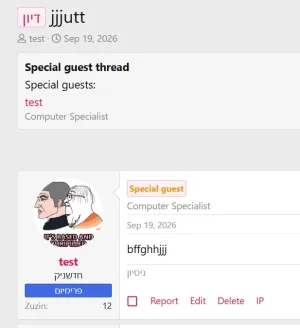
Guests can be clearly identified through a thread banner, special guest badges, optional post highlighting, and descriptions that explain who they are. Each guest’s description is specific to the thread, allowing the same member to participate in different discussions with different roles or introductions.
Separate reply and approval settings for guests and other participants help you shape each discussion. For example, an interviewee can reply directly while community questions pass through XenForo’s native approval queue before appearing publicly. These settings work alongside existing forum permissions, reply bans, closed-thread rules, and moderation requirements.
The add-on includes:
Guests can be clearly identified through a thread banner, special guest badges, optional post highlighting, and descriptions that explain who they are. Each guest’s description is specific to the thread, allowing the same member to participate in different discussions with different roles or introductions.
Separate reply and approval settings for guests and other participants help you shape each discussion. For example, an interviewee can reply directly while community questions pass through XenForo’s native approval queue before appearing publicly. These settings work alongside existing forum permissions, reply bans, closed-thread rules, and moderation requirements.
The add-on includes:
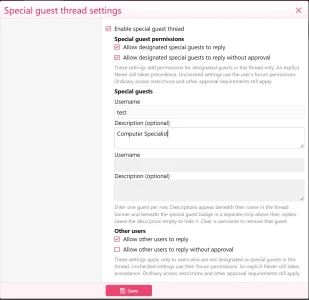
- Multiple guests per thread: Select registered members using XenForo’s native username picker.
- Guest descriptions: Add introductions, credentials, or roles, with support for plain text and line breaks.
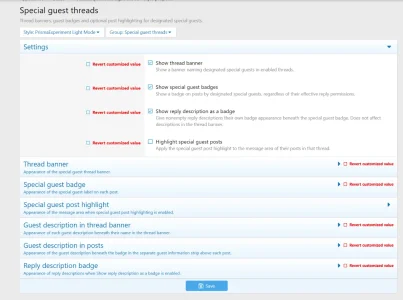
- Customizable presentation: Style the thread banner, guest badges, descriptions, and optional post highlighting through XenForo style properties.
- Separate participation controls: Configure reply access and the add-on’s approval requirement independently for guests and other participants.
- Native moderation integration: Pending replies use XenForo’s existing approval queue.
- Permission-based management: Control who can manage special guest settings through forum permissions, including per-forum overrides.
- Thread-specific designation: Guest status applies within the selected thread without changing the member’s global user groups.
- Flexible activation: Enable or disable the feature globally or per thread while retaining saved guest settings.