
![[SC] Sticky Resources](/community/data/resource_icons/10/10809.jpg?1790192444)
- Compatible XF 2.x versions
- 2.3
- Additional requirements
- PHP 8.1+
- License
- Creative Commons license
- Updates duration
- 3 Months Free Updates // $5 Renewal
- Visible branding
- No
Pin your most important resources to the top of Resource Manager.
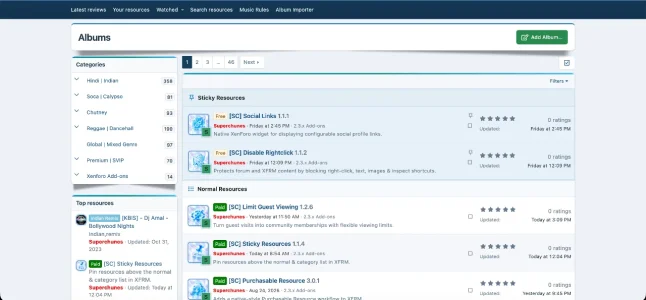
[SC] Sticky Resources adds true "sticky" support to XenForo Resource Manager, the same way sticky threads work in forums. Pinned resources appear in their own highlighted block above the normal list, so your best downloads, official releases and must-have files are the first thing members see. Pin them within a category, and optionally on the main Resources page too.
It's lightweight and built on native XenForo systems (permissions, inline moderation, the moderator log, options and style properties), so it looks and behaves like it shipped with XFRM.
Features
Pinned resource block
- Stuck resources show in a dedicated "Sticky Resources" block at the top of the category, with a pin icon header
- The regular list follows under its own "Normal Resources" heading
- Optional setting to also show pinned resources at the top of the main Resources page, drawn from every category the member can view
- A pin status icon appears next to stuck resources in resource lists
- Works with XFRM's filters (prefix, free/paid, creator, featured) and sort order
- Pagination stays accurate: pinned resources aren't counted in the page totals and never show up twice
- One-click "Stick resource" / "Unstick resource" option in the resource tools menu
- Toggles instantly without a page reload
- Bulk stick and unstick through XFRM inline moderation
- New "Stick / unstick resource" moderator permission, set globally or per category
- Granted automatically on install to groups that can already feature resources, so it works right away
- Every stick and unstick is recorded in the moderator log
- Its own "[SC] Sticky Resources" options group in the Admin CP
- Turn main Resources page pinning on or off with a single switch (off by default)
- Styled entirely with your style's own colour properties, so it matches any XenForo style, light or dark
- Keeps XenForo's moderated and deleted highlights visible on pinned resources
- No core file edits, built only with class extensions and template modifications
- Adds one column to the resources table and removes it on uninstall
- Full file health check support
This add-on requires a valid license and may contact Superchunes to verify activation. Please review the license terms before purchase.
Requirements
- XenForo 2.3+
- XenForo Resource Manager 2.3+
- PHP 8.1+
- Upload the contents of the upload folder to your XenForo root
- Go to Admin CP > Add-ons and install [SC] Sticky Resources
- Optional: go to Admin CP > Setup > Options > [SC] Sticky Resources to show pinned resources on the main Resources page
- Optional: adjust the "Stick / unstick resource" permission under your user group or moderator permissions
How to use
Open any resource, click the tools menu and choose Stick resource. To pin several at once, tick them in the resource list and pick Stick resources from the inline moderation menu.
![[SC] Chatbox](/community/data/resource_icons/10/10698.jpg?1790193989)
![[SC] Redacted](/community/data/resource_icons/10/10921.jpg?1792339641)
![[SC] Forum Statistics](/community/data/resource_icons/10/10756.jpg?1789066236)
![[SC] DBTech eCommerce QoL Improvements](/community/data/resource_icons/10/10863.jpg?1791054840)
![[SC] Disable Rightclick](/community/data/resource_icons/10/10812.jpg?1790195753)