
![[SC] Project Boards](/community/data/resource_icons/10/10735.jpg?1790194242)
- Compatible XF 2.x versions
- 2.3
- Additional requirements
- PHP 8.0 or newer
- License
- Creative Commons license
- Updates duration
- 3 Months Free Updates // $10 Renewal
- Visible branding
- No
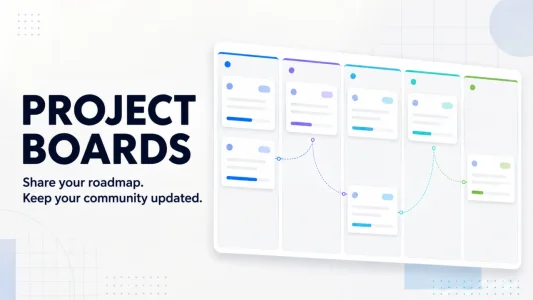
Transform your XenForo community into a polished product-development hub with public roadmaps, draggable Kanban boards, changelogs, release tracking, feature suggestions, voting, compatibility details, automated add-on synchronization, and much more.
[SC] Project Boards is a complete roadmap and release-management solution built specifically for XenForo developers, add-on publishers, designers, and community owners.
Instead of managing development updates across scattered forum threads, spreadsheets, and external project-management services, Project Boards gives you one professional portal where customers can see what is planned, currently in development, being tested, ready for release, released, or temporarily on hold.
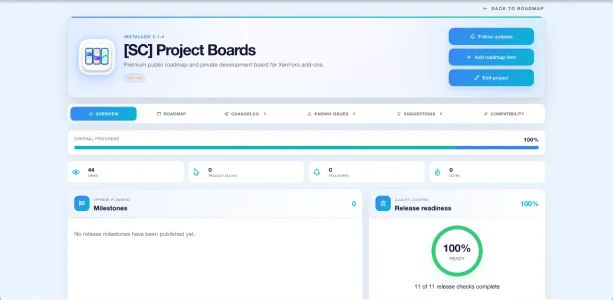
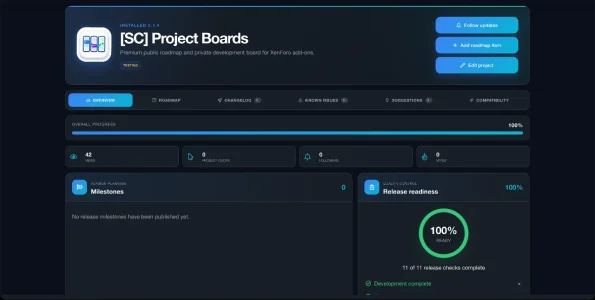
Each product receives its own detailed project area with a roadmap, changelog, known-issue tracker, suggestions, compatibility information, release milestones, screenshots, dependencies, progress tracking, and community interaction.
The interface uses a premium glassmorphism design, smooth animations, responsive layouts, native XenForo styling, and ten coordinated brand-gradient presets. It automatically adapts to light and dark styles.
Your public roadmap remains clean and white-label, with no forced “Powered by” footer, public vendor watermark, or unwanted promotional links.
Give customers a professional development experience
Show customers that your products are actively maintained with a polished, organized roadmap instead of scattered status posts and vague release announcements.
Reduce repetitive support questions
Customers can immediately see what is planned, being developed, tested, fixed, or released—reducing questions such as:
- Is this feature planned?
- Is this bug being fixed?
- When is the next version coming?
- Does this add-on support my XenForo or PHP version?
- What changed in the latest release?
Keep your community involved
Allow members to vote on roadmap items, submit feature suggestions, comment on planned work, and follow the projects that matter to them.
Manage everything directly inside XenForo
There is no separate SaaS dashboard, external project-management account, or disconnected user system. Project Boards uses your existing XenForo accounts, permissions, styles, database, alerts, and installed add-on information.
Automate repetitive product maintenance
Project Boards can discover installed add-ons, synchronize their versions and active state, read compatibility requirements from addon.json, and optionally generate release entries when released products are upgraded.
Protect private development work
Individual projects and roadmap cards can remain private. Planned products can be hidden until you are ready to announce them, while authorized staff can continue managing everything behind the scenes.
Present every release properly
Publish structured changelogs, compatibility details, release links, breaking-change notices, known issues, target dates, milestones, and readiness information from one centralized portal.
Premium public roadmap
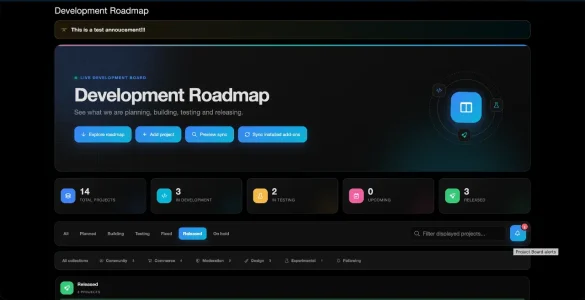
- Professional public roadmap at /roadmap/.
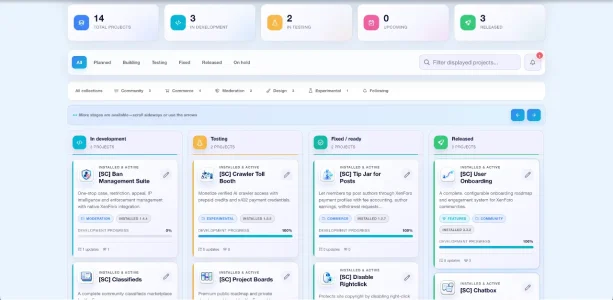
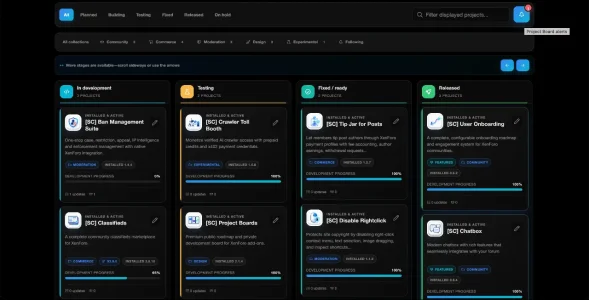
- Six development stages:
- Planned
- In development
- Testing
- Fixed / ready
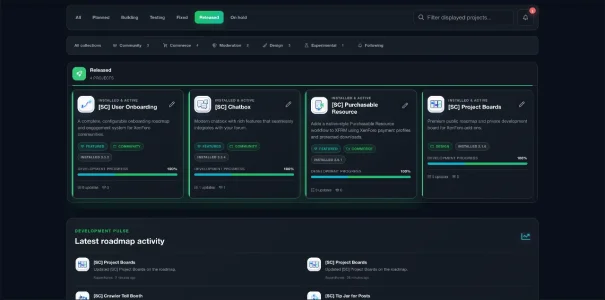
- Released
- On hold
- Responsive Kanban-style layout.
- Four development lanes fit cleanly across supported desktop widths.
- Horizontal navigation for additional stages.
- Native scrollbar and arrow navigation.
- Mobile lane snapping.
- Draggable roadmap cards for authorized managers.
- Move cards directly between development stages.
- Automatically saves the new status, position, completion state, and activity entry.
- Configurable maximum cards per lane.
- Accurate pre-limit project and card totals.
- Search, status, collection, and followed-project filters.
- Clean roadmap links reset filters to All statuses and All collections.
- Optional public announcement with scheduled start and expiration times.
- Empty-state designs for projects and stages without content.
Dedicated project portals
Every project receives its own detailed product area with:
- Overview
- Roadmap
- Changelog
- Known issues
- Suggestions
- Compatibility
- Dependencies
- Release milestones
- Readiness checklist
- Activity history
- Community engagement statistics
Project management
- Create installed or future products manually.
- Link projects to installed XenForo add-ons.
- Separate installed and target version tracking.
- Installed version displayed directly from XenForo when available.
- Manual installed-version fallback.
- Target release version.
- Development progress percentage.
- Planned release date.
- Flexible release-date confidence:
- Confirmed
- Estimated
- Quarterly/general
- When ready
- Automatic delayed indicators for overdue projects.
- Assign owners or developers.
- Add private staff notes.
- Feature important projects.
- Control public visibility per project.
- Select project icons and accent colors.
- Add product and release URLs.
- Track installed, active, disabled, or removed states.
Roadmap cards
- Create individual features, improvements, fixes, and other work items.
- Public descriptions.
- Private development notes.
- Priority levels.
- Individual progress tracking.
- Target versions.
- Assigned developers.
- Public or private visibility.
- Drag-and-drop stage movement.
- Independent progress for released projects.
- Detailed responsive card overlays.
- Voting and commenting.
- Staff editing and deletion.
- Complete card activity history.
Community voting
- “I need this” voting.
- “Nice to have” voting.
- Configurable active-vote allowance per member.
- Transaction-safe vote handling.
- Vote totals displayed on roadmap items.
- Members can remove or change their votes.
- Voting can be disabled globally.
- Controlled through XenForo user-group permissions.
Comments and discussions
- Public roadmap-card discussions.
- XenForo flood-control protection.
- Guest or member access through permissions.
- Staff notification entries for new comments.
- Direct alert links to the exact comment.
- Formatting-safe public comment display.
Community suggestions
- Dedicated suggestion area for every project.
- Members can submit product and feature ideas.
- Optional guest suggestions through XenForo permissions.
- Suggestion workflow statuses.
- Staff responses.
- Approve, reject, reconsider, edit, or delete suggestions.
- Members can edit or delete their own pending suggestions.
- Convert approved suggestions into roadmap cards.
- Converted suggestions retain their roadmap-card relationship.
- Status changes never silently destroy linked cards, votes, comments, or history.
- Restored suggestions can reuse their original roadmap items.
- Private visibility for pending and rejected submissions.
Staff notification center
- Dedicated notification bell on the roadmap.
- Unread alert counter.
- Animated bell when unread activity exists.
- Per-staff read state.
- Mark all alerts as read.
- Alerts for new suggestions.
- Alerts for roadmap comments.
- Direct links to the relevant project, suggestion, card, or comment.
- Reduced-motion accessibility support.
Changelog and releases
- Complete project changelog.
- Structured release sections:
- Added
- Improved
- Fixed
- Removed
- Release titles and version numbers.
- Release dates.
- Download or product links.
- Compatibility notes.
- Breaking-change notices.
- Public or private releases.
- Latest-releases section on the main roadmap.
- Only the newest visible release from each released project is shown.
- Development or testing projects are excluded from Latest releases.
- Optional automatic changelog entries when synchronization detects an upgrade.
Release milestones
- Create version milestones.
- Set milestone target dates.
- Track milestone completion.
- Supported milestone stages:
- Planned
- Development
- Testing
- Fixed / ready
- Released
- On hold
- Calculated completion percentages.
- Link work items to planned versions.
Release-readiness checklist
- Built-in quality-control checklist.
- Eleven useful default readiness checks.
- Per-project checklist tracking.
- Staff-only checklist controls.
- Public release-readiness percentage.
- Globally enable or disable public readiness.
- Automatically seeds checklist defaults for existing and new projects.
Known-issue tracker
- Publish confirmed product issues.
- Issue title and description.
- Severity levels.
- Affected versions.
- Target fix version.
- Workarounds.
- Resolution tracking.
- Five issue states.
- Public or private issue visibility.
- Update issue status without creating separate forum threads.
Compatibility and dependencies
- XenForo compatibility matrix.
- PHP requirements.
- Product dependencies.
- Project-to-project relationships.
- Installed add-on requirements can be read automatically from addon.json.
- Automatically adds missing compatibility information.
- Preserves staff-customized compatibility entries.
- Safe add-on metadata path validation.
- Prevents path traversal and unsafe manifest access.
Installed add-on synchronization
- Discover installed XenForo add-ons.
- Optional vendor-prefix filtering.
- Leave the prefix empty to discover all installed add-ons.
- Preview synchronization before making changes.
- Manual synchronization.
- Scheduled automatic synchronization.
- Synchronize:
- Add-on title
- Installed version
- Active or disabled state
- Installation state
- XenForo requirements
- PHP requirements
- Per-project automatic or manual synchronization mode.
- Manual projects remain completely untouched.
- Staff edits can claim automatically created projects.
- Customized projects are protected from synchronization cleanup.
- Projects outside a changed prefix are preserved.
- Removed installations are detected safely.
- Project Boards excludes itself from automatic discovery.
- Synchronization history and audit log.
- Cron failures are written to XenForo’s server error log.
- Disabled automatic synchronization exits before database work begins.
Project artwork and media
- Native paperclip-style file upload controls.
- Upload a custom project icon.
- Upload a hero cover image.
- Upload multiple gallery images.
- Upload previews before saving.
- Remove or replace existing artwork.
- Uploaded icons appear in:
- Project cards
- Widgets
- Project headers
- Embedded cards
- Roadmap details
- Activity summaries
- Release summaries
- Font Awesome icon fallback.
- Supports JPG, PNG, GIF, and supported WebP images.
- Maximum 5 MB per file.
- Up to 20 gallery images.
- Maximum 16 megapixels.
- Maximum 8,192 pixels per side.
- Icons are reduced to fit 512 pixels.
- Covers and gallery images are reduced to fit 2,400 pixels.
- Images are validated and re-encoded through XenForo’s image processor.
- Files are stored through XenForo’s configured data filesystem.
- Replaced uploads are safely cleaned up when no project references them.
- External image URLs remain untouched.
- URL scheme validation prevents unsafe media links.
Project collections
- Organize products into custom collections.
- Collection name and description.
- Font Awesome collection icons.
- Custom collection colors.
- Public or private collections.
- Collection-filtered roadmap views.
- Create, edit, and delete collections.
- Default collections included for:
- Community
- Commerce
- Moderation
- Design
- Experimental
Activity and insights
- Global activity feed.
- Per-project activity timeline.
- Project views.
- Product-link clicks.
- Follower totals.
- Vote totals.
- Release activity.
- Roadmap-card changes.
- Staff and member actions.
- Private synchronization history.
Project following
- Members can follow individual projects.
- Follow and unfollow without leaving the project.
- Filter the main roadmap to followed products.
- Following can be enabled or disabled globally.
Data export and integration
- Full staff JSON export.
- Import projects and portal data.
- Transaction-safe imports.
- Validates records before writing.
- Validates imported URLs.
- Public JSON project feed.
- Embeddable roadmap view.
- Compact project-status cards for external pages.
- Public feed and embed can be enabled or disabled.
- Data-safe uninstall by default.
- Optional permanent data removal before uninstalling.
XenForo user-group permissions
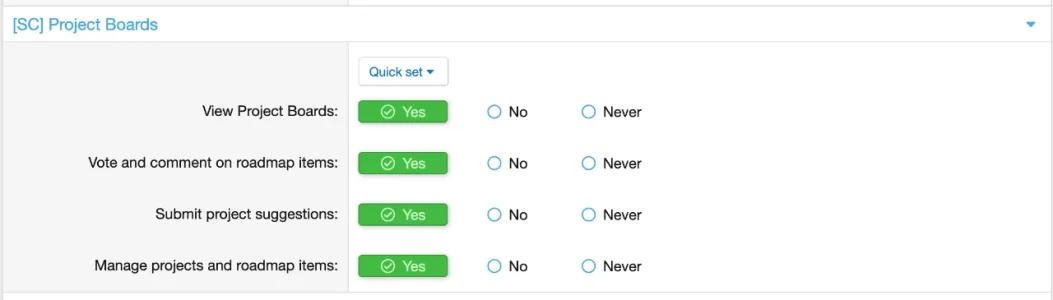
Dedicated permission section titled exactly:
[SC] Project Boards
Available permissions:
- View Project Boards
- Vote and comment on roadmap items
- Submit project suggestions
- Manage projects and roadmap items
Setting View to No or Never blocks the roadmap page, widget, and navigation link for that user group.
Administrators, moderators, and explicitly permitted roadmap managers retain management access.
Design and customization
- Premium light glassmorphism interface.
- Native XenForo light and dark style support.
- Smooth scroll-reveal animations.
- Animated icons and progress effects.
- Ambient hero effects.
- Reduced-motion accessibility support.
- Responsive desktop, tablet, and mobile layouts.
- Per-project accent colors.
- Ten coordinated brand-gradient presets:
- Ocean Glass
- Emerald Tide
- Sunset Coral
- Solar Ember
- Aurora
- Sapphire Frost
- Mint Circuit
- Cherry Bloom
- Neon Orchid
- Midnight Luxe
- Public interface contains no forced vendor watermark.
- No powered-by footer.
- No forced promotional link.
- No hardcoded public-facing site name.
License validation
This add-on requires a valid license and may contact Superchunes to verify activation. Please review the license terms before purchase.
Requirements
- XenForo 2.3.0 or newer
- PHP 8.0 or newer
- JavaScript enabled for interactive roadmap features
Upgrade support
Project Boards can be installed as a complete standalone add-on. Previous versions are not required.
Existing installations can upgrade directly without uninstalling. Existing projects, cards, releases, suggestions, votes, comments, followers, media, compatibility records, and activity history are preserved.
Ideal for
- XenForo add-on developers
- Theme and style designers
- Marketplace operators
- Software publishers
- Development communities
- Product-support forums
- Membership communities
- Agencies managing multiple XenForo products
- Site owners who want a professional public roadmap
Your customers should not have to search through forum threads to understand the future of your products.
[SC] Project Boards gives your XenForo site a complete, professional development portal where you can plan releases, organize work, publish progress, collect feedback, track issues, announce updates, and keep customers involved—all without leaving XenForo.
Replace scattered announcements and external roadmaps with one polished system built for your products, your community, and your brand.
![[SC] Chatbox](/community/data/resource_icons/10/10698.jpg?1790193989)
![[SC] Redacted](/community/data/resource_icons/10/10921.jpg?1792339641)
![[SC] Forum Statistics](/community/data/resource_icons/10/10756.jpg?1789066236)
![[SC] DBTech eCommerce QoL Improvements](/community/data/resource_icons/10/10863.jpg?1791054840)
![[SC] Disable Rightclick](/community/data/resource_icons/10/10812.jpg?1790195753)