- Compatible XF 2.x versions
- 2.3
- Visible branding
- No
What it does
This add-on adds two capabilities missing from XenForo's payment system:- Admin-initiated refunds — Issue full or partial refunds directly from the admin panel instead of logging into the provider dashboards (e.g. Stripe, PayPal, etc).
- Smart partial refund handling — Fixes a core XenForo behavior where partial refunds (e.g., a $15 discount adjustment on a $30 purchase) downgrades the user vs only refunds. Partial refunds now log as informational events without triggering a reversal. Full refunds continue to auto-downgrade as before.
Refund flow
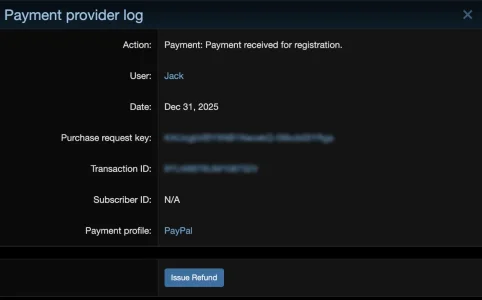
- Admin navigates to Logs → Payment Provider → [specific payment entry]
- Clicks "Issue Refund" (only visible for providers that support refunds)
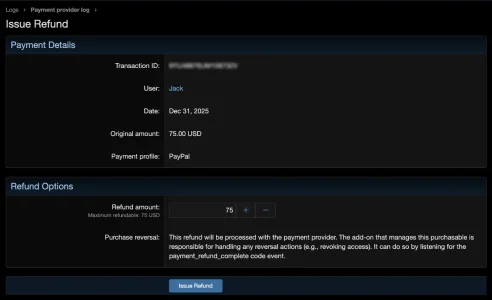
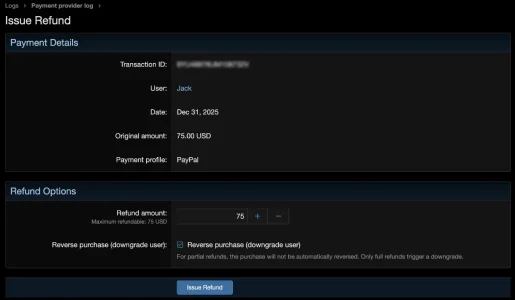
- Enters refund amount (pre-filled with remaining refundable balance)
- For user upgrades: option to reverse the purchase (downgrade user)
- For other purchasable types: the refund is processed with the provider, and the owning add-on handles reversal via the payment_refund_complete code event
- The add-on calls the provider's refund API, logs the result, and tracks the cumulative refunded amount
How it works
The add-on hooks into:- Stripe and PayPal REST Payment providers — Adds supportsRefunds() and refund() methods for API calls, plus overrides getPaymentResult() to detect partial vs full refunds on incoming webhooks.
- AbstractProvider — Adds a safe default supportsRefunds() returning false so legacy providers don't crash.
- LogController — Injects an "Issue Refund" button on payment log detail views and adds a refund form action.
- PaymentRepository — Adds helper methods for cumulative refund tracking and deduplication.
Extensibility
- Third-party payment providers can add refund support by implementing supportsRefunds() and refund() methods directly on their provider class — no dependency on this add-on required.
- Third-party purchasable add-ons can listen for the payment_refund_complete code event to handle refund-triggered actions (e.g., revoking access to a course).
How do I add refund support to my payment provider?
Step 1: Add supportsRefunds() to your provider
In your provider class (which extends XF\Payment\AbstractProvider), add:
PHP:
public function supportsRefunds(): bool
{
    return true;
}
Step 2: Implement refund()
Add the refund() method with this exact signature:
PHP:
public function refund(
    \XF\Entity\PaymentProfile $paymentProfile,
    \XF\Entity\PurchaseRequest $purchaseRequest,
    string $transactionId,
    ?float $amount = null,
    string $currency = 'USD'
): array
{
    // $paymentProfile - contains your API credentials in $paymentProfile->options
    // $purchaseRequest - the original purchase (has cost_amount, cost_currency, provider_metadata)
    // $transactionId - the transaction ID from the payment log entry being refunded
    // $amount - refund amount (null means full refund)
    // $currency - currency code

    // Call your provider's refund API here...

    // On success, return:
    return [
        'success' => true,
        'provider_refund_id' => 'your_provider_refund_id',
    ];

    // On failure, return:
    return [
        'success' => false,
        'error' => 'Human-readable error message',
    ];
}
Step 3: There is no step 3
That's it. The refund add-on uses method_exists() to detect these methods at runtime. If the refund add-on is installed, your provider will show the "Issue Refund" button on payment log entries. If it's not installed, your methods simply exist unused.How do I add refund support to my add-on?
If you have an add-on that allows purchases (not a payment provider) and want to react when refunds happen — e.g., revoke access to a course — register a code event listener forpayment_refund_complete:
PHP:
public static function onPaymentRefundComplete(
    \XF\Entity\PaymentProviderLog &$logEntry,
    \XF\Entity\PurchaseRequest &$purchaseRequest,
    float $amount,
    string $currency,
    bool $purchaseReversed,
    array $providerResult
): void
{
    // Check if this refund is for your purchasable type
    if ($purchaseRequest->purchasable_type_id !== 'your_purchasable_type')
    {
        return;
    }

    // Handle the refund (e.g., revoke access, send notification)
}
You'll also need to register this listener in your add-on's
_data/code_event_listeners.xml file:
XML:
<listeners>
    <listener event_id="payment_refund_complete"
              execute_order="10"
              callback_class="Your\AddOn\Listener"
              callback_method="onPaymentRefundComplete"
              active="1" />
</listeners>
Important notes
No dependency required: Do not use or require any classes from the Jack\PaymentRefund namespace. Your provider should have zero references to the refund add-on.Transaction ID resolution: The $transactionId parameter comes from the transaction_id column of the xf_payment_provider_log entry the admin is refunding. Depending on how your provider logs payments, this may or may not be the ID you need for your refund API. If it's not, look up the correct ID from the log entry's log_details or provider_metadata on the purchase request. See the resolveChargeId() method in the Stripe extension for an example.
Currency handling: The $amount is always a decimal value (e.g., 10.00). If your provider's API expects amounts in the smallest currency unit (like cents), convert it in your refund() method.
Partial refunds: The refund add-on handles cumulative tracking automatically. Your refund() method just needs to process whatever amount it's given. The add-on ensures $amount never exceeds the remaining refundable balance.
Webhook deduplication: When an admin issues a refund, the subsequent webhook from the provider (e.g., Stripe's charge.refunded) is detected as a duplicate and logged as informational — preventing double-reversals.