
![[MAG] Global Links Favicons](/community/data/resource_icons/10/10843.jpg?1790672960)
- Compatible XF 2.x versions
- 2.2
- 2.3
- License
- Commercial proprietary license — Single site use
- Updates duration
- The purchase includes 12 months of updates. Continued access to future releases is available for a $7.99 annual renewal.
- Visible branding
- No
Global Links Favicons adds recognizable website favicons next to eligible links in XenForo content.
Instead of showing every link as plain text, the add-on gives linked websites a visual identity, making links easier to recognize while browsing discussions.
Favicon acquisition is handled separately from normal page rendering. If an external favicon is not already cached, XenForo schedules a background job to retrieve it. Once available, the favicon is stored locally and reused on future page views.
No third-party favicon service is required. Favicons are retrieved directly by your XenForo server from the linked websites and stored in the local XenForo data storage.
Examples:
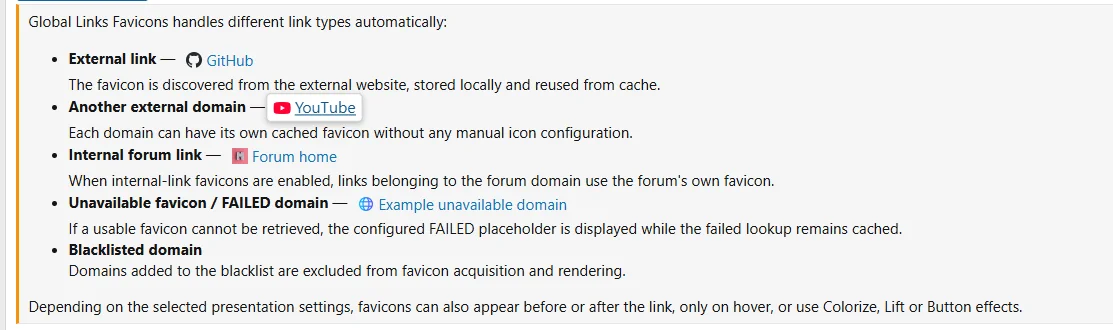
Features
Global Links Favicons is configured in two areas of the XenForo Admin Control Panel.
1. Setup → Options → [MAG] Global Links Favicons
This is the main configuration page for favicon rendering, caching, domain rules and presentation.
General display
Lift settings
When Lift is selected:
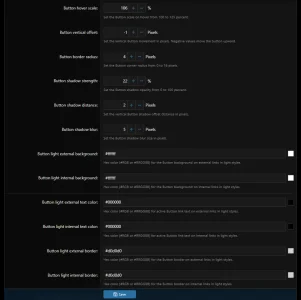
When Button is selected:
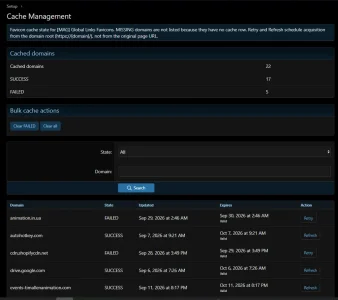
Global Links Favicons adds a dedicated Cache Management page under XenForo's Setup section.
Administrators can:
Security and validation
Remote favicon requests use XenForo's untrusted HTTP reader and its protections for external requests.
The add-on applies request time and download-size limits and validates downloaded image content before it is stored.
Favicons are stored locally as ICO or PNG files. Supported image formats may be normalized to PNG when required.
SVG favicons are not currently supported.
Requirements
Install or upgrade the add-on using the standard XenForo add-on installation process.
After installation, the main settings are available under:
Setup → Options → [MAG] Global Links Favicons
Cache administration is available under:
Setup → Cache Management
Instead of showing every link as plain text, the add-on gives linked websites a visual identity, making links easier to recognize while browsing discussions.
Favicon acquisition is handled separately from normal page rendering. If an external favicon is not already cached, XenForo schedules a background job to retrieve it. Once available, the favicon is stored locally and reused on future page views.
No third-party favicon service is required. Favicons are retrieved directly by your XenForo server from the linked websites and stored in the local XenForo data storage.
Examples:
Features
- Displays favicons next to eligible external links.
- Optional favicon display for internal links using your forum's own favicon.
- Local favicon caching with configurable SUCCESS and FAILED cache lifetimes.
- Background favicon acquisition using XenForo Jobs — normal page rendering does not wait for remote downloads.
- Smart favicon discovery from website HTML with a conventional
/favicon.icofallback. - Favicon position can be set before or after the link.
- Configurable favicon size from 8 px to 64 px.
- Optional hover-only display.
- Optional favicon entrance animation.
- Presentation effects: None, Colorize, Lift and Button.
- Configurable Lift and Button appearance.
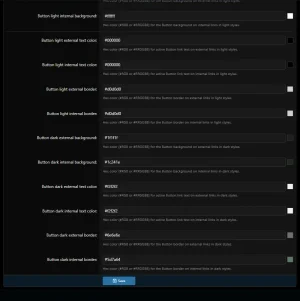
- Separate Button colors for internal and external links in light and dark styles.
- CSS-based presentation without custom frontend JavaScript.
- Domain blacklist with domain, subdomain and IP matching.
- Configurable placeholder for websites where a usable favicon cannot be retrieved.
Global Links Favicons is configured in two areas of the XenForo Admin Control Panel.
1. Setup → Options → [MAG] Global Links Favicons
This is the main configuration page for favicon rendering, caching, domain rules and presentation.
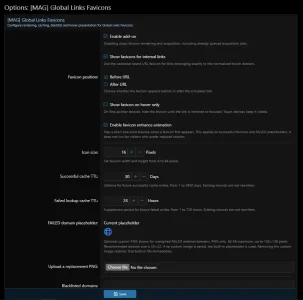
General display
- Enable add-on — globally enables or disables favicon rendering and acquisition.
- Show favicons for internal links — optionally uses the forum's own favicon for links belonging to the forum domain.
- Favicon position — display the favicon before or after the complete link.
- Show favicon on hover only — hides favicons until hover or keyboard focus on compatible pointer devices; touch devices keep them visible.
- Enable favicon entrance animation — plays a short appearance animation when a favicon or FAILED placeholder is shown.
- Icon size — configurable from 8 to 64 pixels.
- Successful cache TTL — controls how long successful favicon cache entries remain valid, from 1 to 3650 days.
- Failed lookup cache TTL — controls how long failed acquisition attempts are suppressed before another lookup may be attempted, from 1 to 720 hours.
- FAILED domain placeholder — upload an optional custom PNG for domains with an unexpired FAILED state. PNG only, maximum 64 KB and up to 128×128 pixels. If no custom image is configured, the built-in placeholder is used.
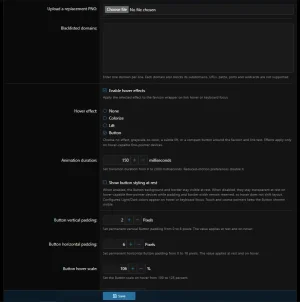
- Blacklisted domains — prevents favicon rendering and acquisition for selected domains. Enter one domain per line. A listed domain also blocks its subdomains.
- Enable hover effects — enables presentation effects for links.
- Hover effect — choose between None, Colorize, Lift and Button.
- Animation duration — controls transition duration from 0 to 2000 milliseconds.
Lift settings
When Lift is selected:
- Hover scale.
- Vertical offset.
- Shadow strength.
- Shadow direction.
- Shadow distance.
- Shadow blur.
When Button is selected:
- Show button styling at rest.
- Vertical and horizontal padding.
- Hover scale.
- Vertical offset.
- Border radius.
- Shadow strength, distance and blur.
- External-link background, text and border colors for light styles.
- Internal-link background, text and border colors for light styles.
- External-link background, text and border colors for dark styles.
- Internal-link background, text and border colors for dark styles.
Global Links Favicons adds a dedicated Cache Management page under XenForo's Setup section.
Administrators can:
- View the total number of cached domains.
- View separate SUCCESS and FAILED counts.
- Browse cached domain records.
- Filter records by SUCCESS or FAILED state.
- Filter records by domain.
- See when a cache entry was updated and when it expires.
- Retry a FAILED domain.
- Refresh an existing SUCCESS favicon.
- Clear FAILED cache records.
- Clear all managed favicon cache data.
Security and validation
Remote favicon requests use XenForo's untrusted HTTP reader and its protections for external requests.
The add-on applies request time and download-size limits and validates downloaded image content before it is stored.
Favicons are stored locally as ICO or PNG files. Supported image formats may be normalized to PNG when required.
SVG favicons are not currently supported.
Requirements
- XenForo 2.2.0 or newer
- Compatible with XenForo 2.2.x and 2.3.x
- PHP 8.1 or newer
Install or upgrade the add-on using the standard XenForo add-on installation process.
After installation, the main settings are available under:
Setup → Options → [MAG] Global Links Favicons
Cache administration is available under:
Setup → Cache Management
-
 Screenshot 2026-09-29 114807.webp
 -
 Screenshot 2026-09-29 114535.webp
 -
 Screenshot 2026-09-29 114452.webp
 -
 Screenshot 2026-09-29 114412.webp
 -
 Screenshot 2026-09-29 125656.webp
![[MAG] Doc&Guide](/community/data/resource_icons/10/10947.jpg?1792867396)
![[MAG] XF Unlocked](/community/data/resource_icons/10/10919.jpg?1792275241)
![[MAG] Beyond 3D Viewer](/community/data/resource_icons/10/10850.jpg?1790755241)
![[MAG] ACP Enhancements](/community/data/resource_icons/10/10847.jpg?1790693321)
![[MAG] Tag Synchronizer](/community/data/resource_icons/10/10848.jpg?1790705957)