
![[MAG] ACP Enhancements](/community/data/resource_icons/10/10847.jpg?1790693321)
- Compatible XF 2.x versions
- 2.3
- License
- Commercial proprietary license — Single site use
- Updates duration
- The purchase includes 12 months of updates. Continued access to future releases is available for a $29 annual renewal.
- Visible branding
- No
A more powerful workspace for XenForo add-on administration, diagnostics, package management and operational control.
Bring add-on management into one workspace
ACP Enhancements extends XenForo's add-on administration with a more capable operational workspace while continuing to rely on XenForo's native add-on lifecycle where it matters.
Manage installed and available add-ons, perform batch actions, run diagnostic sessions, monitor operations, review errors, organize packages and keep multiple add-on versions available for later installation or recovery.
Add-ons workspace
The enhanced Add-ons page brings frequently used administration tools together without replacing XenForo's underlying add-on system.
The workspace keeps XenForo's native add-on data and lifecycle as the authority instead of creating a separate add-on management system.
Package Catalog
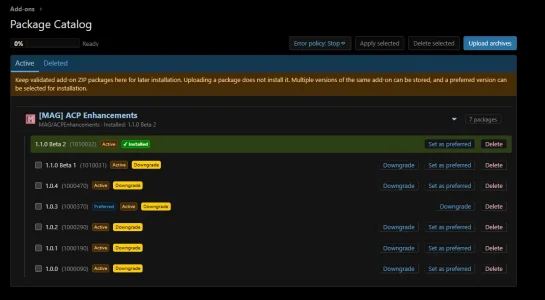
Version 1.1.0 introduces a dedicated Package Catalog for maintaining your own library of XenForo add-on packages.
Package Catalog is useful for administrators who maintain multiple add-ons, test different releases, or want a controlled local package library instead of repeatedly locating archive files.
Add and move local add-ons to Package Catalog
ACP Enhancements can also work with add-ons that exist on the server but are not currently installed.
This allows Package Catalog to become a practical library for locally developed or previously unpacked add-ons.
Batch operations and Queue Center
Longer operations are processed through the ACP Enhancements queue rather than being treated as one opaque request.
Supported workflows include:
Queue Center provides visibility into running, waiting and completed work, including individual operation results.
The current operation is also visible directly from the Add-ons and Package Catalog interfaces where appropriate.
Debug Session
Debug Session helps administrators investigate add-on conflicts without manually tracking every enabled and disabled add-on.
Start a session and work with a controlled snapshot of the current add-on state.
Available tools include:
Restore actions run directly on the ACP Enhancements page with visible operation status.
Debug Session also uses session-version protection so stale actions from another browser surface cannot silently overwrite newer Debug state.
Self-protection for ACP Enhancements
ACP Enhancements protects its own running administration environment from operations that would interrupt it while it is executing them.
If an operation includes ACP Enhancements together with other add-ons, it can be excluded and the operation can continue for the remaining targets.
If you intentionally need to disable, uninstall or otherwise manage ACP Enhancements itself, the interface directs you to XenForo's native Add-ons page.
This keeps deliberate XenForo administration available without allowing an ACPE workflow to take its own controller offline in the middle of an operation.
Error Watch
Monitor XenForo server errors without constantly switching to the full error log.
Error Watch reads XenForo's native error log. It does not maintain a second error store.
History and operational evidence
ACP Enhancements records operational history for supported workflows.
History is intended to make administration easier to review without replacing XenForo's own state.
Custom ACP shortcuts
Add your own compact shortcuts to the XenForo ACP header for frequently used administration pages.
The shortcuts remain available globally in ACP while Add-ons-specific controls stay on the Add-ons workspace.
Public Package Catalog integration
ACP Enhancements includes a supported same-install PHP integration contract for other XenForo add-ons.
Consumers can use the Package Catalog contract to:
The public contract keeps ACP Enhancements' private database entities and permanent package storage hidden from consumers.
It does not grant download entitlement, install packages automatically, or make product-specific versioning decisions for another add-on.
Native XenForo lifecycle where it matters
ACP Enhancements is designed around XenForo rather than around bypassing it.
Installation, upgrade, uninstall, package validation and related lifecycle operations continue to use XenForo's native services and rules wherever applicable.
That means ACP Enhancements adds workflow, visibility and organization while XenForo remains the underlying authority for add-on state.
Where to find it
After installation, open:
ACP → Add-ons → ACP Enhancements
The Package Catalog is available as a dedicated child page of the ACP Enhancements Add-ons workspace.
Additional options, permissions and presentation preferences are available through the normal XenForo ACP configuration.
Bring add-on management into one workspace
ACP Enhancements extends XenForo's add-on administration with a more capable operational workspace while continuing to rely on XenForo's native add-on lifecycle where it matters.
Manage installed and available add-ons, perform batch actions, run diagnostic sessions, monitor operations, review errors, organize packages and keep multiple add-on versions available for later installation or recovery.
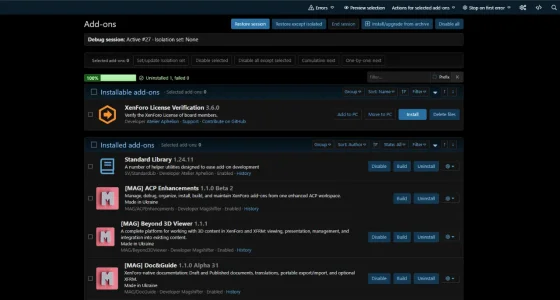
Add-ons workspace
The enhanced Add-ons page brings frequently used administration tools together without replacing XenForo's underlying add-on system.
- View installed, installable and upgradeable add-ons.
- Enable or disable individual add-ons.
- Perform selection-based actions on multiple add-ons.
- Build selected add-ons.
- Uninstall add-ons through managed operations.
- Delete eligible add-on files.
- Group and sort add-ons for easier administration.
- Filter the list by relevant add-on properties and state.
- Organize add-ons by author and custom catalogs.
- Use collapsible sections with per-administrator preferences.
- See operation status directly on the Add-ons page.
The workspace keeps XenForo's native add-on data and lifecycle as the authority instead of creating a separate add-on management system.
Package Catalog
Version 1.1.0 introduces a dedicated Package Catalog for maintaining your own library of XenForo add-on packages.
- Store multiple versions of the same add-on.
- Keep a preferred version for each add-on.
- See which package matches the currently installed version.
- Install a stored package directly from the catalog.
- Upgrade to a newer stored version.
- Downgrade to an older stored version using XenForo's native uninstall/install lifecycle.
- Manage packages in separate Active and Deleted views.
- Restore deleted packages.
- Permanently remove packages when they are no longer needed.
- Upload multiple package archives.
- See upload and operation progress directly on the catalog page.
- Apply selected package versions as a batch operation.
- Choose Continue on error or Stop on first error behavior.
Package Catalog is useful for administrators who maintain multiple add-ons, test different releases, or want a controlled local package library instead of repeatedly locating archive files.
Add and move local add-ons to Package Catalog
ACP Enhancements can also work with add-ons that exist on the server but are not currently installed.
- Add to PC — build and add the package to Package Catalog while keeping the source files in place.
- Move to PC — build and store the package in Package Catalog, then remove the source files after the stored package has been verified.
This allows Package Catalog to become a practical library for locally developed or previously unpacked add-ons.
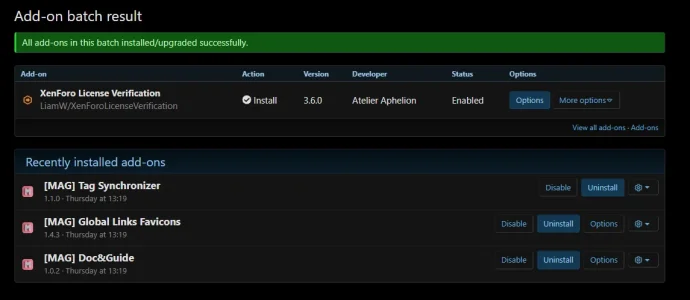
Batch operations and Queue Center
Longer operations are processed through the ACP Enhancements queue rather than being treated as one opaque request.
Supported workflows include:
- Batch install and upgrade.
- Build.
- Uninstall.
- Delete files.
- Optional file deletion after a successful uninstall.
- Continue on error or Stop on first error policies.
Queue Center provides visibility into running, waiting and completed work, including individual operation results.
The current operation is also visible directly from the Add-ons and Package Catalog interfaces where appropriate.
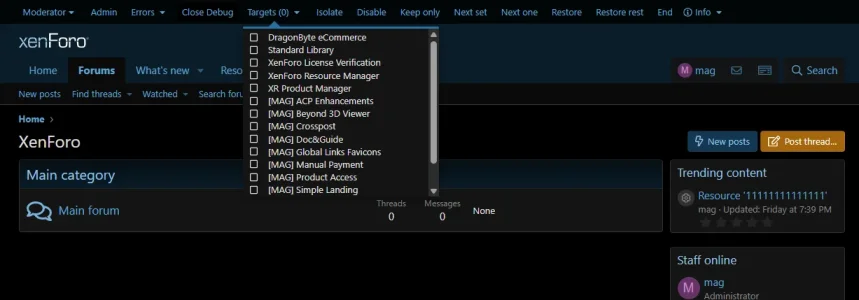
Debug Session
Debug Session helps administrators investigate add-on conflicts without manually tracking every enabled and disabled add-on.
Start a session and work with a controlled snapshot of the current add-on state.
Available tools include:
- Choose Debug targets.
- Create an Isolation set.
- Disable selected add-ons.
- Disable all except selected add-ons.
- Test add-ons cumulatively.
- Test them one by one.
- Undo the previous Debug action.
- Restore original state — return add-ons to the state captured when the session started.
- Restore, keep isolated disabled — restore the remaining add-ons while keeping the Isolation set disabled.
Restore actions run directly on the ACP Enhancements page with visible operation status.
Debug Session also uses session-version protection so stale actions from another browser surface cannot silently overwrite newer Debug state.
Self-protection for ACP Enhancements
ACP Enhancements protects its own running administration environment from operations that would interrupt it while it is executing them.
If an operation includes ACP Enhancements together with other add-ons, it can be excluded and the operation can continue for the remaining targets.
If you intentionally need to disable, uninstall or otherwise manage ACP Enhancements itself, the interface directs you to XenForo's native Add-ons page.
This keeps deliberate XenForo administration available without allowing an ACPE workflow to take its own controller offline in the middle of an operation.
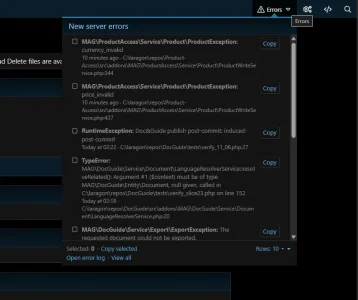
Error Watch
Monitor XenForo server errors without constantly switching to the full error log.
- See recent XenForo errors from the ACP header.
- Track which errors are new for the current administrator.
- Open error details without leaving the current workflow.
- Copy individual errors or selected errors.
- Choose how many rows are shown.
- Use the same error state across supported ACP and frontend Debug surfaces.
Error Watch reads XenForo's native error log. It does not maintain a second error store.
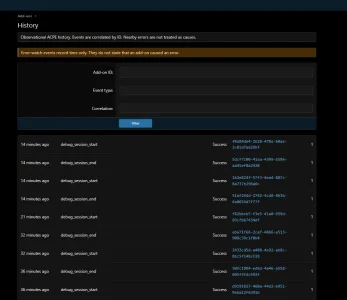
History and operational evidence
ACP Enhancements records operational history for supported workflows.
- Global History view.
- Per-add-on history.
- Correlation IDs for related operations.
- Observed enabled/disabled state changes.
- Debug actions and queue-related events.
- Configurable history retention with explicit purge.
History is intended to make administration easier to review without replacing XenForo's own state.
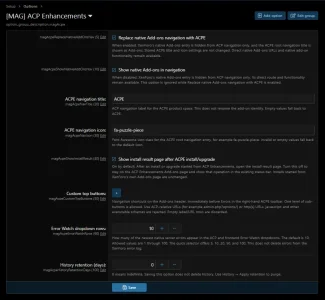
Custom ACP shortcuts
Add your own compact shortcuts to the XenForo ACP header for frequently used administration pages.
The shortcuts remain available globally in ACP while Add-ons-specific controls stay on the Add-ons workspace.
Public Package Catalog integration
ACP Enhancements includes a supported same-install PHP integration contract for other XenForo add-ons.
Consumers can use the Package Catalog contract to:
- Discover supported Package Catalog capabilities.
- Register a package.
- Resolve a stored package by durable identity.
- List stored versions of an add-on.
- Read its preferred package version.
- Temporarily materialize verified package bytes for an authorized workflow.
The public contract keeps ACP Enhancements' private database entities and permanent package storage hidden from consumers.
It does not grant download entitlement, install packages automatically, or make product-specific versioning decisions for another add-on.
Native XenForo lifecycle where it matters
ACP Enhancements is designed around XenForo rather than around bypassing it.
Installation, upgrade, uninstall, package validation and related lifecycle operations continue to use XenForo's native services and rules wherever applicable.
That means ACP Enhancements adds workflow, visibility and organization while XenForo remains the underlying authority for add-on state.
Where to find it
After installation, open:
ACP → Add-ons → ACP Enhancements
The Package Catalog is available as a dedicated child page of the ACP Enhancements Add-ons workspace.
Additional options, permissions and presentation preferences are available through the normal XenForo ACP configuration.
-
 Screenshot 2026-09-24 231221.webp
 -
 Screenshot 2026-10-03 134510.webp
 -
 Screenshot 2026-10-04 100054.webp
 -
 Screenshot 2026-10-04 102624.webp
 -
 Screenshot 2026-10-06 000232.webp
 -
 Screenshot 2026-10-06 000549.webp
 -
 Screenshot 2026-10-06 000448.webp
![[MAG] Doc&Guide](/community/data/resource_icons/10/10947.jpg?1792867396)
![[MAG] XF Unlocked](/community/data/resource_icons/10/10919.jpg?1792275241)
![[MAG] Beyond 3D Viewer](/community/data/resource_icons/10/10850.jpg?1790755241)
![[MAG] Global Links Favicons](/community/data/resource_icons/10/10843.jpg?1790672960)
![[MAG] Tag Synchronizer](/community/data/resource_icons/10/10848.jpg?1790705957)