

- Compatible XF 2.x versions
- 2.0
- 2.1
- 2.2
- 2.3
- License
- XenForo Community Custom License
- Visible branding
- No
ITD MP3 Player – Embed MP3 Audio [XF 2.1 – 2.3]
Easily embed remotely hosted MP3 audio files in your XenForo forum with a clean, responsive HTML5 player. Perfect for music communities, podcast discussions, audiobook forums, and language learning groups.
 Features
• Simple BB Code:
• Native HTML5 audio player with browser controls
• Download option for users (if server headers allow)
• Fully responsive & mobile-friendly
• Zero external dependencies or third-party libraries
• No branding, watermarks, or tracking
• Optional editor toolbar button
• Fully compatible with XenForo 2.1, 2.2, and 2.3
 Usage
Usage
[itdmp3]https://example.com/your-audio-file.mp3[/itdmp3]
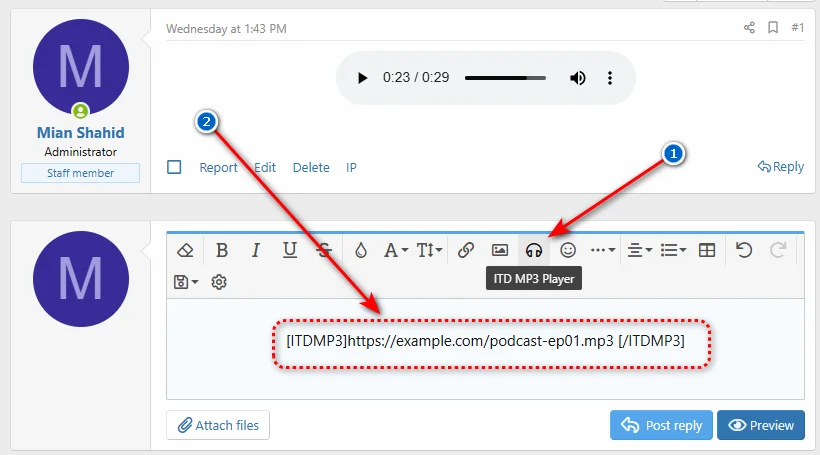
 Editor Toolbar Setup (Optional)
If you want the MP3 button to appear in the post editor, follow these two quick steps:
Step 1 – Assign an icon to the BB Code
1. Go to
2. Find
3. In the Editor icon field, select
4. Enter one of the following icon names (do NOT use hex codes like
•
•
•
•
5. Click Save
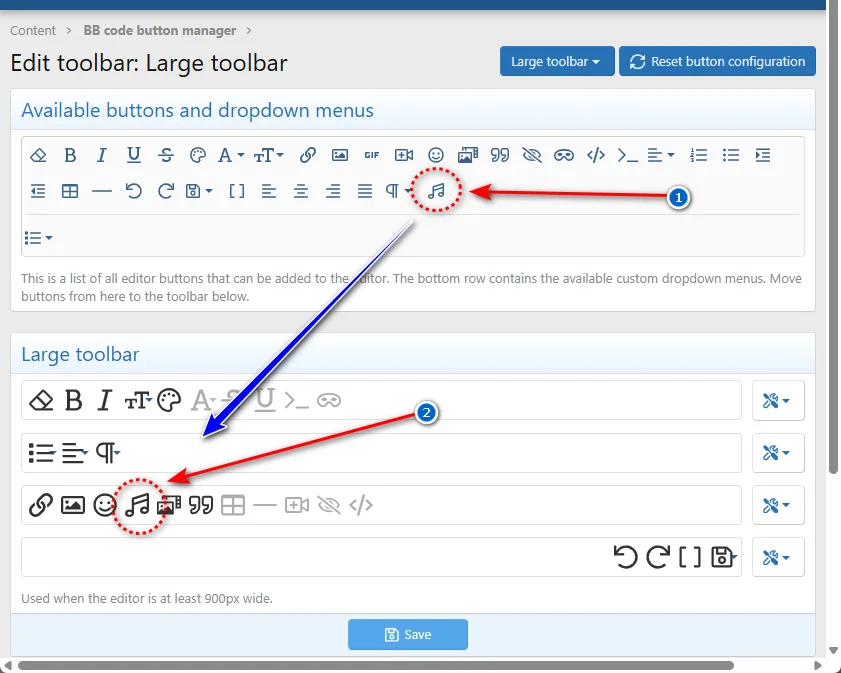
Step 2 – Add the button to the toolbar
1. Go to
2. Select the editor profile you want to modify (usually
3. Find
4. Drag & drop it into your desired position in the toolbar layout
5. Click Save
 The button will appear immediately in the editor. Rebuilding caches is optional, but recommended if you don't see changes right away.
 Installation
Method 1 – Archive Install (Recommended)
1. Download the add-on package
2. Go to
3. Click Install/upgrade from archive
4. Select the downloaded
5. Click Install
Method 2 – Manual Upload
1. Upload the contents of the
2. Go to
3. Click Install next to
That's it! No extra configuration required.
 Examples
[itdmp3]https://example.com/podcast-ep01.mp3[/itdmp3]
[itdmp3]https://example.com/audiobook-ch03.mp3[/itdmp3]
 FAQ
FAQ
Q: The editor icon isn't showing?
A: Ensure you entered a valid Font Awesome name (e.g.,
Q: Can I use locally hosted files?
A: Yes, as long as the file URL is publicly accessible (e.g.,
Q: Does it support OGG or WAV?
A: This version supports MP3 only. Additional format support may be added in future releases.
Q: Will this work on mobile?
A: Yes! The HTML5 player is fully responsive and works on all modern mobile browsers.
 Support
• Bug reports & feature requests: Please start a discussion thread or send a PM
• Documentation: See above
• Tested on XF 2.1.12, 2.2.14, and 2.3.0
 Version History
v2.1.0 – May 15, 2026
✓ XenForo 2.2 & 2.3 compatibility added
✓ Editor icon support via BB Code settings
✓ BB Code Button Manager integration guide
✓ Improved HTML5 player responsiveness
✓ Cache rebuild noted as optional
✓ Updated documentation & FAQ
v2.0.0 – Mar 14, 2020
✓ Initial release
✓ HTML5 audio player implementation
✓ Download option for users
✓ Simple BB Code implementation
License
✓ Free to use on your XenForo-powered forum (personal or commercial)
✓ Free to modify for your own forum's needs
✓ Credit to the original author appreciated but not required
✗ Cannot resell or redistribute as a standalone resource
✗ Cannot claim as your own original work
✗ Cannot use in a competing resource marketplace
This resource is provided "as is" without warranty of any kind.
© ITDarasgah. All rights reserved.
Easily embed remotely hosted MP3 audio files in your XenForo forum with a clean, responsive HTML5 player. Perfect for music communities, podcast discussions, audiobook forums, and language learning groups.
Features• Simple BB Code:
[itdmp3]https://example.com/audio.mp3[/itdmp3]• Native HTML5 audio player with browser controls
• Download option for users (if server headers allow)
• Fully responsive & mobile-friendly
• Zero external dependencies or third-party libraries
• No branding, watermarks, or tracking
• Optional editor toolbar button
• Fully compatible with XenForo 2.1, 2.2, and 2.3
Usage[itdmp3]https://example.com/your-audio-file.mp3[/itdmp3]
Editor Toolbar Setup (Optional)If you want the MP3 button to appear in the post editor, follow these two quick steps:
Step 1 – Assign an icon to the BB Code
1. Go to
ACP → Content → BB Codes2. Find
itdmp3 and click Edit3. In the Editor icon field, select
Font Awesome icon4. Enter one of the following icon names (do NOT use hex codes like
f025):•
music ( recommended)•
volume-up ()•
headphones ()•
compact-disc ()5. Click Save
Step 2 – Add the button to the toolbar
1. Go to
ACP → Content → BB Code Button Manager2. Select the editor profile you want to modify (usually
Default)3. Find
itdmp3 in the Available Buttons list4. Drag & drop it into your desired position in the toolbar layout
5. Click Save
The button will appear immediately in the editor. Rebuilding caches is optional, but recommended if you don't see changes right away. InstallationMethod 1 – Archive Install (Recommended)
1. Download the add-on package
2. Go to
ACP → Add-ons3. Click Install/upgrade from archive
4. Select the downloaded
.zip file5. Click Install
Method 2 – Manual Upload
1. Upload the contents of the
upload folder to your forum root directory2. Go to
ACP → Add-ons3. Click Install next to
ITD MP3 That's it! No extra configuration required. Examples[itdmp3]https://example.com/podcast-ep01.mp3[/itdmp3]
[itdmp3]https://example.com/audiobook-ch03.mp3[/itdmp3]
FAQQ: The editor icon isn't showing?
A: Ensure you entered a valid Font Awesome name (e.g.,
music), not a hex code. Then add the button via the BB Code Button Manager.Q: Can I use locally hosted files?
A: Yes, as long as the file URL is publicly accessible (e.g.,
https://yourdomain.com/audio.mp3).Q: Does it support OGG or WAV?
A: This version supports MP3 only. Additional format support may be added in future releases.
Q: Will this work on mobile?
A: Yes! The HTML5 player is fully responsive and works on all modern mobile browsers.
Support• Bug reports & feature requests: Please start a discussion thread or send a PM
• Documentation: See above
• Tested on XF 2.1.12, 2.2.14, and 2.3.0
Version Historyv2.1.0 – May 15, 2026
✓ XenForo 2.2 & 2.3 compatibility added
✓ Editor icon support via BB Code settings
✓ BB Code Button Manager integration guide
✓ Improved HTML5 player responsiveness
✓ Cache rebuild noted as optional
✓ Updated documentation & FAQ
v2.0.0 – Mar 14, 2020
✓ Initial release
✓ HTML5 audio player implementation
✓ Download option for users
✓ Simple BB Code implementation
License✓ Free to use on your XenForo-powered forum (personal or commercial)
✓ Free to modify for your own forum's needs
✓ Credit to the original author appreciated but not required
✗ Cannot resell or redistribute as a standalone resource
✗ Cannot claim as your own original work
✗ Cannot use in a competing resource marketplace
This resource is provided "as is" without warranty of any kind.
© ITDarasgah. All rights reserved.

![[ITD] Hide Avatar (Lite)](/community/data/resource_icons/10/10544.jpg?1781340353)
![[ITD] Remove User Signatures from Selected Nodes - XF 2.0 to 2.3](/community/data/resource_icons/6/6879.jpg?1780997193)
![[ITD] MEGA Video Embed Sharing](/community/data/resource_icons/7/7644.jpg?1584863620)
![[ITDْ] Embedded PDF II (BBCode)](/community/data/resource_icons/6/6659.jpg?1536994522)
![[ITD] Change User Online Indicator Icon & Color.](/community/data/resource_icons/7/7980.jpg?1598808717)