- Compatible XF 2.x versions
- 2.2
- 2.3
- Additional requirements
- - Goldnat AI Connect for XenForo (free) 1.2.41 or later — required, this add-on will not install standalone
- XenForo 2.2.0+
- PHP 7.2+
- An active licence from goldnat.ai
- License
- Commercial license - single site
- Updates duration
- 12 months of updates from date of purchase
84 tools, each with its own permission
Goldnat AI Connect Pro extends the free add-on with write access and forum discovery. Where the free add-on lets an AI agent read your forum, Pro lets it participate in it.
Every tool runs as the connected member. XenForo's own permission system does the enforcement — if a member cannot delete a post through the web interface, an agent connected as that member cannot either. You are not granting the agent power; you are lending it an account.
What this actually looks like
You create an account for the agent — call it Support Bot — and give it whatever permissions you would give a helpful member. Everything below happens under that account, and nothing it does exceeds those permissions.
Nothing happens on its own. The agent has no way to watch your forum or react to it. It acts when you ask it to, from Claude, ChatGPT or whichever assistant you use.
So you might say:
"Someone asked about SSL renewal in the support forum — did we answer this before?"
The agent searches, finds the thread from three years ago, and shows you the answer. If you tell it to, it posts that answer as a reply.
"Read the PDF attached to thread 4210 and summarise it for me."
It reads the document and summarises it. Posting the summary is a separate instruction.
"Which threads got busy this week?"
It tells you. If one has gone off the rails, you can then ask it to lock that thread.
You stay in the loop on every action. The add-on gives your assistant hands; it does not give it initiative.
Tool bundles
The 14 Pro bundles
| Bundle | Tools | What it does |
|---|---|---|
| Core_Pro | 6 | Identity + essential write: findUserByName, getForumList, createThread, replyToThread, editPost, sendConversation |
| Writing | 5 | Thread tags + conversation authoring: addThreadTags, removeThreadTags, replyToConversation, editConversationMsg, updateConversation |
| Engagement | 7 | Reactions, votes, polls: reactToPost, reactToProfilePost, reactToConversationMsg, votePost, votePoll, createPoll, markThreadRead |
| Profile | 6 | Profile posts + your profile: postProfileMessage, editProfilePost, commentOnProfilePost, editProfilePostComment, getProfilePosts, updateMyProfile |
| Conversation | 10 | Private conversations + alerts: getConversation, getConversationMessages, markConversationRead, starConversation, leaveConversation, inviteToConversation, listAlerts, getAlert, markAlertRead, markAllAlertsRead |
| Media | 9 | Attachments + avatar: uploadAttachment, deleteAttachment, listAttachmentsByKey, getAttachmentInfo, getPostAttachments, readAttachmentText, getAttachmentThumbnail, uploadMyAvatar, deleteMyAvatar |
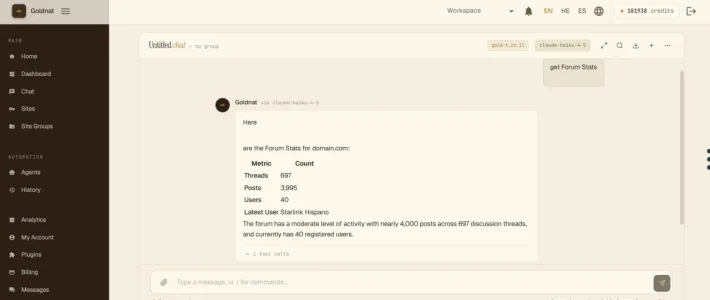
| Discovery | 11 | Nodes, stats, trending: listNodes, getNode, listNodesFlat, getForumNode, getForumStats, getRecentThreads, getTrendingThreads, getThreadTags, getThreadPoll, getPostReactions, getUserProfile |
| Users & Groups | 5 | User + usergroup lookup: listUsergroups, getUsergroup, getUsergroupMembers, listUsers, searchUsers |
| Watched & Bookmarks | 4 | Your watched/bookmarked/drafts: getWatchedThreads, getBookmarkedThreads, listDrafts, getDraftContent |
| Activity & Analytics | 5 | Activity metrics: getUserActivity, getForumActivity, getUnansweredThreads, getThreadReactions, getThreadWatchers |
| Thread Content | 4 | Posts + polls in a thread: getPostsByThread, getThreadsByForum, getThreadPollResults, getAttachmentsByPost |
| Notifications & Alerts | 2 | getNotifications, getUnreadNotificationsCount |
| User Content | 7 | Bookmarks/DMs/drafts + downloads: getUserBookmarks, getUserConversations, getUserDrafts, getUserWatchedThreads, getThreadAttachments, downloadAttachment, searchTags |
| Forum Watch | 3 | watchForum, unwatchForum, listWatchedForums |
Total: 84 tools / 14 bundles.
Permissions per tool, not per add-on
This is the part worth understanding before you point an agent at a live forum. Every one of the 113 tools has its own entry under Groups & Permissions, grouped into the 19 bundles above, and each bundle has a master switch that disables everything beneath it.
You can allow replying without allowing deletion. You can give a staff account the moderation set and give everyone else nothing but reading. New tools added in future updates default to denied until you explicitly enable them.
Highlights
Read PDF documents. An agent can read the text of a PDF attachment directly. Extraction is built in — nothing to install on your server. Scanned, image-only documents are detected and reported as such rather than returning noise.
Attach files while posting. Upload a file and attach it to a thread, reply or edit in a single action.
Permissions per tool, not per add-on. Every one of the 113 tools has its own entry under Groups & Permissions, grouped into the 19 bundles above. Each bundle also has a master switch. You can allow replying without allowing deletion, or reading the forum structure without allowing anything to be written.
Also new
Attach files while posting. Upload a file and attach it to a thread, reply or edit in a single action.
Search with syntax and ranking. Quoted phrases, required and excluded terms, results ordered by relevance, and paging that reports a true total.
Licensing
Licences are managed at goldnat.ai. Paste your key under Setup → Options → AI Connect Pro License and click Check licence now.
A licence is bound to one domain, matched against your boardUrl. If you move the forum or run staging separately, change the licensed domain from your account page.
Documentation
Full tool reference: https://plugins.goldnat.ai/xenforo/guide
Requires
The free Goldnat AI Connect for XenForo, version 1.2.56 or later. This add-on extends it and will not install standalone.