

- Compatible XF 2.x versions
- 2.3
- Updates duration
- 29$ renewal yearly, 1 domain
- Visible branding
- No
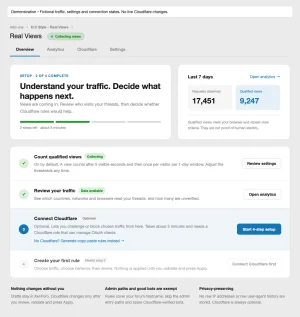
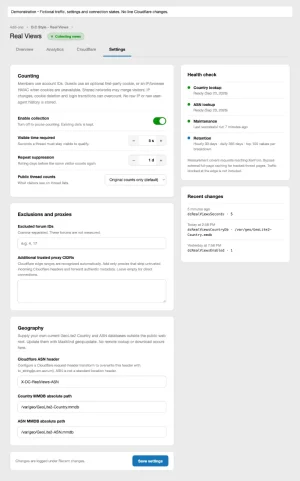
Understand the views behind your thread counter. Real Views measures qualified thread visits separately from XenForo’s original totals. By default, a visit qualifies after five visible seconds, once per visitor identity and thread within a rolling 24 hours. Both settings are adjustable.
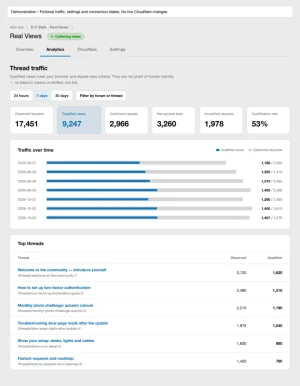
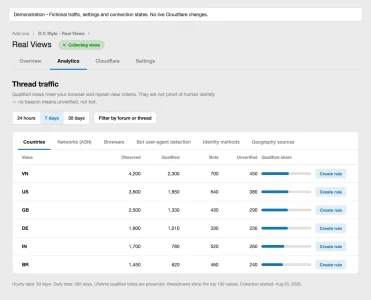
Compare qualified views, repeats, recognized bots and unverified requests. Explore trends and country, network and browser breakdowns. Collect privately, or show qualified counts alongside or instead of original counts on supported displays.
The guided Cloudflare setup walks you through creating a private OAuth client. Enter its Client ID and Secret, authorize access and confirm your forum’s zone. Required scope identifiers are supplied automatically; connecting applies no rules.
Choose countries and observed networks using searchable selectors, select Managed Challenge or Block, then preview, validate and explicitly apply. Save drafts for later and manage rule groups through Rule groups, Live rules, Activity and Connection. Manual copy-paste export remains available.
Analytics works independently, with an optional Most qualified views tab for Forum Statistics. Qualified views indicate browser activity meeting your criteria, not verified human identity. Measurement starts after installation and covers requests reaching XenForo; missing beacons remain unverified.
Compare qualified views, repeats, recognized bots and unverified requests. Explore trends and country, network and browser breakdowns. Collect privately, or show qualified counts alongside or instead of original counts on supported displays.
The guided Cloudflare setup walks you through creating a private OAuth client. Enter its Client ID and Secret, authorize access and confirm your forum’s zone. Required scope identifiers are supplied automatically; connecting applies no rules.
Choose countries and observed networks using searchable selectors, select Managed Challenge or Block, then preview, validate and explicitly apply. Save drafts for later and manage rule groups through Rule groups, Live rules, Activity and Connection. Manual copy-paste export remains available.
Analytics works independently, with an optional Most qualified views tab for Forum Statistics. Qualified views indicate browser activity meeting your criteria, not verified human identity. Measurement starts after installation and covers requests reaching XenForo; missing beacons remain unverified.
Features
Qualified views and reporting
- Separate qualified totals preserve XenForo’s original counts.
- Configurable 1–60 second visible-time threshold and 1–30 day repeat window.
- Distinct qualified, repeat, recognized-bot and unverified outcomes.
- 24-hour, 7-day and 30-day views with forum, thread and custom-date filters; country, ASN, browser and bot breakdowns.
- 30-day hourly and 365-day daily retention, plus lifetime qualified totals.
Identity, geography and display
- Member identity, consent-aware guest cookies and keyed IP/browser fallback; no raw IP or user-agent analytics history.
- Trusted Cloudflare metadata or customer-supplied Country/ASN databases; unavailable geography shows Unknown.
- Original, combined or qualified-only counts on supported displays.
- Optional Forum Statistics ranking by qualified views.
Guided setup and traffic selection
- Overview checklist and a four-step setup guide with illustrations, a copyable callback URL and two credential fields.
- Customer-owned private OAuth client, automatic scopes and explicit confirmation of one forum zone.
- Searchable country/network checkboxes with removable selection chips.
- 249 country codes; network choices from recent traffic and saved drafts, not a global ASN directory.
- Traffic counts beside observed choices; no automatic targets in fresh drafts.
- Responsive light/dark interface, keyboard controls and checkbox fallback.
Cloudflare rule management
- Managed Challenge or Block, any/all matching, hostname/path restrictions and verified-bot exceptions.
- Connected rules protect ACP/callback paths. Preview, validation and Apply remain separate.
- Drafts, explicit adoption, enable/disable, removal, restoration and managed-rule inventory.
- External-change detection and recovery for interrupted or partial operations.
- Encrypted credentials, separate administrator permissions and direct forum-to-Cloudflare communication.
- Manual export with 4,096-character splitting and slot checks; no connection required.
- Disconnecting and uninstalling retain remote rules.
Compatibility
- Declared: XF 2.3.0+ / PHP 7.2+; minimum-runtime checks pending.
- Admin CP interface reviewed locally: XF 2.3.13 / PHP 8.4.
- Cloudflare connection: HTTPS, OpenSSL, private OAuth client with refresh access.
- Optional: Forum Statistics and trusted geography sources.
- Thread HTML must bypass external full-page caching.
-
 01-overview-setup-hub.webp
 -
 02-traffic-analytics.webp
 -
 03-traffic-breakdowns.webp
 -
 04-counting-settings.webp
 -
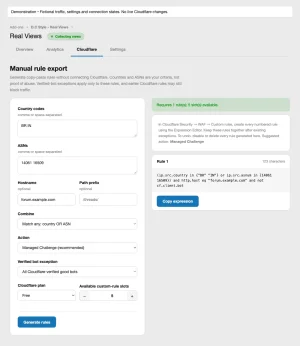 05-manual-cloudflare-rule.webp
 -
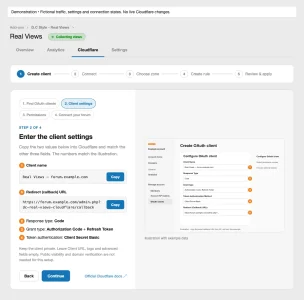 06-cloudflare-client-guide.webp
 -
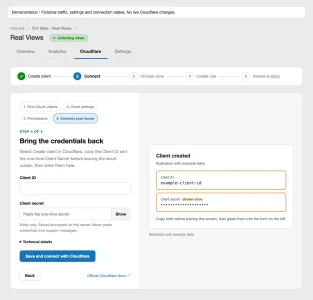 07-cloudflare-connection-setup.webp
 -
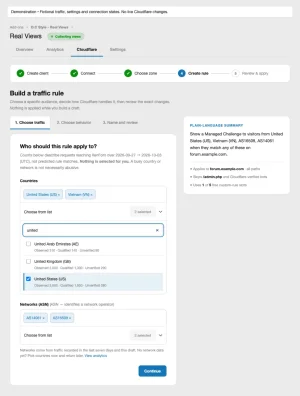 08-searchable-traffic-selectors.webp
 -
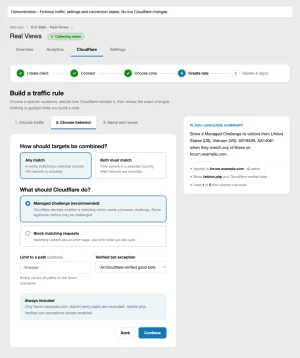 09-rule-behavior-and-summary.webp
 -
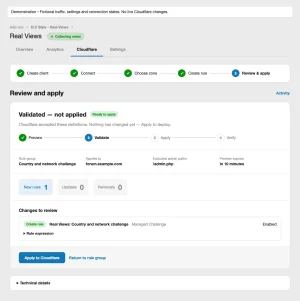 10-review-and-apply.webp
 -
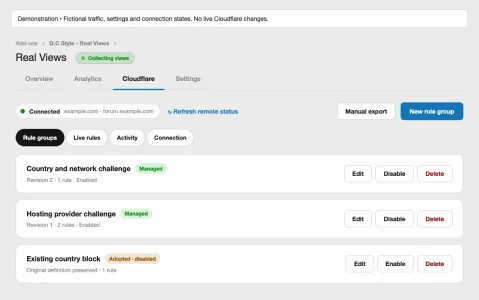 11-cloudflare-workspace.webp
 -
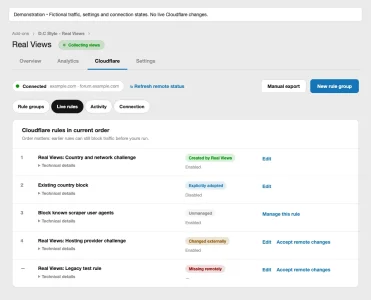 12-live-rules.webp


