

- Compatible XF 2.x versions
- 2.3
- Visible branding
- No
Adds a countdown timer and CAPTCHA verification before users can download attachments and resource files.
Each user group can have its own timer duration. If a user belongs to multiple groups, the shortest timer among all their groups is used.
Whether CAPTCHA is required is controlled per user group.
Note: If a user belongs to multiple groups with different timer values, the lowest value is used.




External Communications & Cloud API Notice
This add-on connects to our remote server (api.lutish.com) solely for license validation and user-initiated cloud features.
On-Demand Only: Data is transmitted only when actively triggered (e.g., license activation or when using a cloud service).
Minimal Data: Only the license key, site URL, and basic version info are sent. No user content or forum data is ever collected.
Graceful Degradation: If our server is unreachable, your forum continues to operate normally with no impact on stability or performance.
Features
Countdown Timer
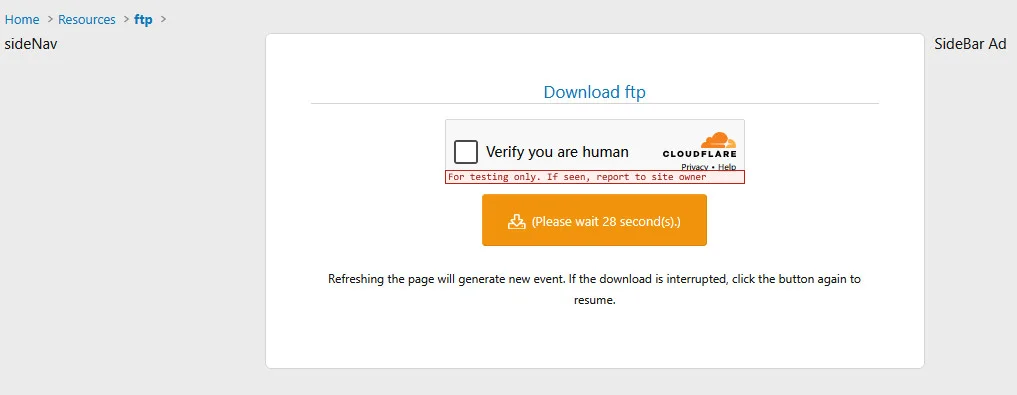
When a user clicks to download a file, they are shown a download page with a countdown timer. The download button remains disabled until the timer reaches zero.Each user group can have its own timer duration. If a user belongs to multiple groups, the shortest timer among all their groups is used.
CAPTCHA Verification
A CAPTCHA challenge can be required before downloading. The CAPTCHA appears on the same page alongside the timer. The user must complete both the CAPTCHA and the countdown before the download starts.Whether CAPTCHA is required is controlled per user group.
File Extension Exclusions
Certain file types (e.g., images) can skip the timer entirely and download immediately. You define which extensions are excluded in the options.Download Session Expiry
Each download page has a time limit. If the user waits too long before clicking download, the session expires and they must refresh the page to start over.Resource Manager Support
Works with both standard XenForo attachments and XenForo Resource Manager files, including external download URLs.Setup
1. Global Options
Go to Admin CP > Setup > Options > Jessy Attachment Count Down Timer:| Option | Description |
|---|---|
| Disable Timer attachment suffix | File extensions that skip the timer (one per line) |
| Expire Time | How long (in seconds) the download page remains valid |
2. User Group Permissions
Go to Admin CP > Groups & permissions > User group permissions, select a user group, and find the Jessy AttachDownloadTimer section:| Permission | Description |
|---|---|
| Require CAPTCHA before download | Enable CAPTCHA verification for this group |
| Count down timer (seconds) | Timer duration in seconds (0 = no timer) |
How It Works
- A user clicks a download link
- A download page appears showing file info, a CAPTCHA (if enabled), and a countdown timer
- The user completes the CAPTCHA and waits for the timer
- Once the timer reaches zero, the download button becomes active
- Clicking the button starts the file download
External Communications & Cloud API Notice
This add-on connects to our remote server (api.lutish.com) solely for license validation and user-initiated cloud features.
On-Demand Only: Data is transmitted only when actively triggered (e.g., license activation or when using a cloud service).
Minimal Data: Only the license key, site URL, and basic version info are sent. No user content or forum data is ever collected.
Graceful Degradation: If our server is unreachable, your forum continues to operate normally with no impact on stability or performance.
![Blacklist Cloud Risk System For Xenforo [Paid]](/community/data/resource_icons/10/10133.jpg?1763489116)


