[XTR] IP Threat Monitor

[XTR] IP Threat Monitor [Paid] 1.1.6

No permission to buy ($30.00)
Osman updated [XTR] IP Threat Monitor with a new update entry:

1.1.6

With this update, we are introducing important improvements based on your valuable feedback to enhance system stability, optimize background maintenance tasks, and expand integration capabilities for external add-ons.

First, an issue where GeoIP database updates could fail on certain server configurations has been resolved, ensuring background updates for country and network data run smoothly and reliably.

Log filtering in the control panel has been refined. Search engine crawlers such as...

Read the rest of this update entry...
 
Seeing several releases in a short period might lead some forum administrators to wonder: "Why is this add-on being updated so frequently?" We would love to share a few words about our philosophy and why this is essential.

1. Cybersecurity is a Living Target, Not a Static Script
IP Threat Monitor is not a static UI tweak or simple utility. It sits right on the frontline of your forum's defense. Crawlers, aggressive scrapers, bot signatures, and evasion tactics evolve constantly. In an environment where threats change every day, a security tool that sits untouched for months quickly becomes outdated. We stay active so your defenses never fall behind.

2. The Infinite Diversity of Server & CDN Ecosystems
Every XenForo installation lives in a unique environment: LiteSpeed, Nginx, Apache, Cloudflare, specialized host CDN engines, varied PHP configurations, and different database versions. As our community runs IPTM across hundreds of diverse setups, real-world edge cases naturally surface. When they do, we immediately adapt and optimize the code so every customer enjoys a bulletproof experience, regardless of hosting provider.

3. Agility, Developer Requests & Instant Support
We listen closely to our community. When a developer asks for a public rate-limiter API to protect their custom add-on, or when a customer identifies a specific crawler pattern, we don't leave them waiting for months. We test, harden, and ship solutions immediately.

Frequent updates are not a sign of instability; they are proof of active dedication, relentless attention to detail, and a commitment to keeping your forums fast, secure, and resilient at all times.

Thank you all for your trust, valuable feedback, and ongoing support!
 
Hi Elisabeth,

The issue isn't coming from your settings or IPTM. Your hosting provider (Hostinger) has an automatic image compression feature enabled in their CDN.

As soon as Hostinger stops resizing the flag image, all flags will immediately display crisp and clear across all your devices!
You are a genius!

Hostinger switched over to a CDN without my knowledge and indeed, image compression was enabled. Turned it off, cleared caches and we have flags again! Thank you so much!

Upgraded to 1.1.6 on both the live and test site and I am a very happy camper. ❤️
 
@Osman : As you say: The better and the more comprehensive the add on gets and the better the analytics part becomes the more
real-world edge cases naturally surface.
This is not at all a sign of bad quality and very fast release-sequences (as we have seen currently) are a sign of fast reaction. Way better than silence and having to wait for months for a new release.

However: In the meantime IP Threat Monitor has become so comprehensive that it could be helpful to have kind of a manual. What would specifically be helpful for identifying and analyzing potential hickups would be to know the order in which rules are executed. For the moment I assume something like:

whitelist -> blacklist -> ASN-block/challenge -> country-block/challenge -> protected users/search engines -> proxy-check API

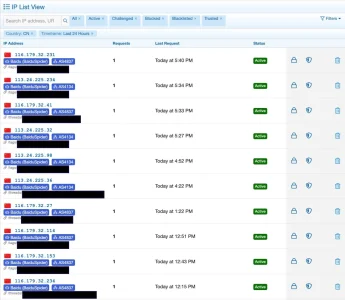
To me it seems, that specifically the "protected search engine" mechanism still has some unclear issues. I still suffer from the issue with Baiduspider I mentioned earlier: It is not protected, it comes from China (which is a blocked country) and the ASNs these requests come from are also blocked - yet quite a few get through, even with the latest version, which should not be the case.
Bildschirm­foto 2026-11-05 um 22.45.53.webp

I've therefor now reinstated user agent blocking via nginx, so that these get now again filtered out before they reach the application.

Another edge case I see is one specific bot that has been annoying for years:

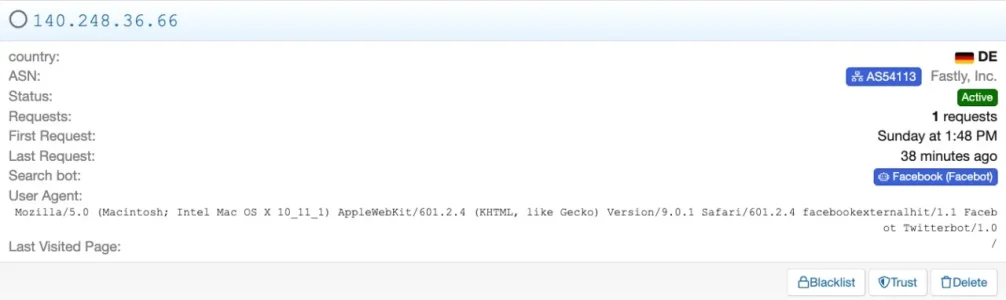
Mozilla/5.0 (Macintosh; Intel Mac OS X 10_11_1) AppleWebKit/601.2.4 (KHTML, like Gecko) Version/9.0.1 Safari/601.2.4 facebookexternalhit/1.1 Facebot Twitterbot/1.0
IP-Threat Manager labels it as "Facebot" and lets it pass. However: In my configuration neither Facebot nor Twitterbot are protected bots
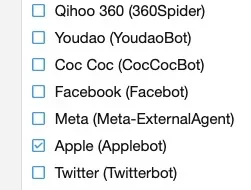
Bildschirm­foto 2026-11-06 um 09.22.59.webp

so based on this it should not pass. But it does:

Bildschirm­foto 2026-11-05 um 16.21.24.webp
Bildschirm­foto 2026-11-05 um 16.22.03.webp

The reason for passing may be that it also labels itself as "facebookexternalhit" which is not listed in IPTM's list of protected bots.
I had however considered this list a whitelist and implicitly assumed every bot not on that list would be getting blocked - but on second thought this is not precisely described, so maybe it is not the case.

When "Protect Search Engine Bots" is enabled, only selected bots will be exempt from rate limiting, ASN blocking, and country filtering. Unselected bots will be evaluated as regular traffic.

So how is the mechanism intended to work? And where does IPTM get the bot-definitions from? It clearly does see more bots than there are in the list and many of them are blocked. On the other hand, after deactivating user agent filtering via the web server, the "known bots" add on does see quite a bunch of bots that seem to reach XF that were filtered out before and that IPTM does not seem to block.

Does it use the user agent as primary source for identifying a bot?

With "Facebot" this may run into issues. This bot is a strange beast anyway as it refers to both, facebook and twitter at the same time and then "facebot", which does sound like Facebook but is not used by them as a bot name as far as I know. Yet still IPTM labels it as "Facebood(Facebot)", which is probably wrong. The bot typically connects from client-ips, not from server ranges, and a little research brought up a lot of confusion about it's background. However: It seems that it is made and used by Apple for rendering URLs for their iMessage System (there is a medium post from a couple of years ago where someone found this out experimentally). I find it hard to believe that this is a comprehensive explanation b/c this bot pops up far too often for that to be the only usage. And I find it a bit dirty if Apple really uses other companies bot identities for their own bot. Plus it often comes from countries where I don't have users, which makes the iMessage-theory even less likely.

However: The bot is identified most of the time but let through despite it should be blocked, same as with Baiduspider and some other bots, even when they come from countries that have been blocked anyway as here i.e. SG:
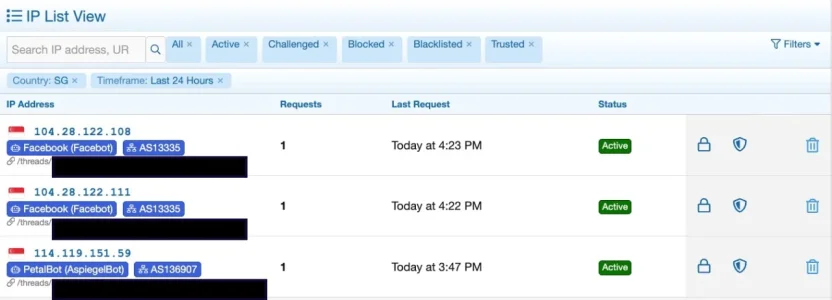
Bildschirm­foto 2026-11-05 um 19.12.03.webp

So clearly, something seems somewhat fishy regarding the bot protection mechanism.

Regarding the "Facebot" bot there may be another cause that may hit sometimes: Typically, it is embedded in a series of requests from the same IP, using a different user agent. As IPTM does work IP based for the most part it may be the case that this bot piggybacks on existing allowances for an IP sometimes. B/c sometimes it does get challenged, possibly when it comes alone (Germany is set to challenge for guests generally):

Bildschirm­foto 2026-11-05 um 16.18.36.webp
However: It should have been blocked anyway...

Other than that I still find some minor labeling issues in the analytics which make it sometimes hard to understand what has happend, even more as due to a lack of a manual it is not always clear what should happen anyway. I.e. here a guest user came via iCloud Private Relay from Germany. Germany as a country is set to "challenge", iCPR is protected. So should this guest be challenged or not, according to the ruleset?

Bildschirm­foto 2026-11-06 um 08.52.49.webp

On the other hand I do have connections via iCPR where a guest is not challenged and where a logged in user comes via iCPR thourgh the same ASN but this is only visible in detail view, not in the list view:

Bildschirm­foto 2026-11-05 um 16.24.33.webp


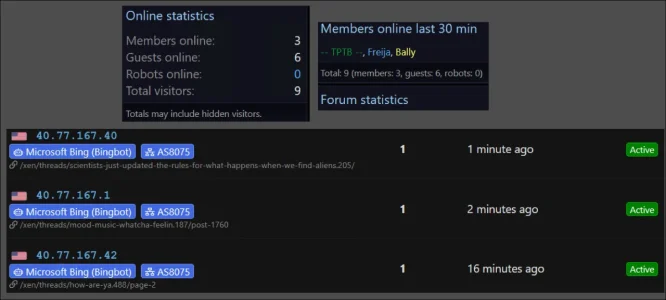
I do see requests from Microsoft's ASN (which is blocked) by Bingbot (which is protected) and along some requests by guests:
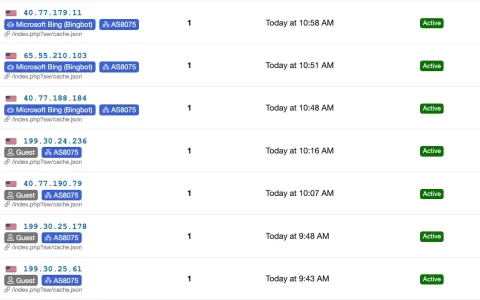
Bildschirm­foto 2026-11-05 um 13.08.58.webp

Detail view shows: These requests are labeled as "BingBot" in detail view, but not in list view. And from experience they are indeed requests by Bingbot, despite the user agent string does not state this:
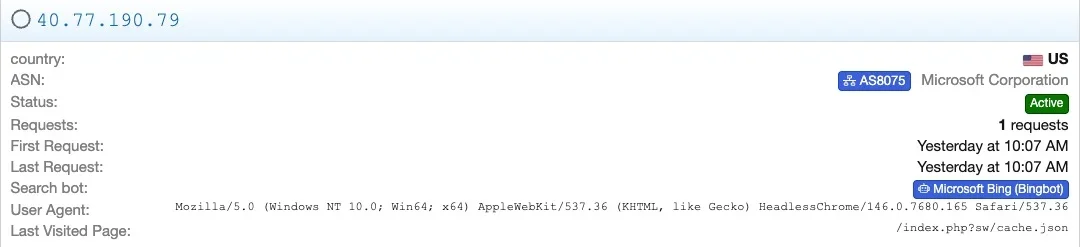
Bildschirm­foto 2026-11-06 um 10.05.55.webp

These labeling things are all minor issues, but can make life somewhat confusing sometimes.
 
Trying tp purchase this, but every credit card gives me "Payment has not been approved. (Please check card details)"
Their payment system is rather picky (or rather are the banks that issue credit cards picky regarding the payment system that XenTr use, sadly). With me it was the I think third credit card that finally worked. It is really a pity that there are no easy, simply working payment options for their add ons.
 
India for me seems the one that consistently sneaks through as active even though blocked as a country and by 4 or 5 different ASNs. (mostly AS55836).

Had a couple registered members today show up as guests and several that were challenged. Have 8 Bingbots that show up active in IPTM while the forum shows 0 robots. That's something I haven's seen before.

I also had several members today say they were happy country flags were working again. Me too thanks to our fearless developer figuring it out. :)
 
Trying tp purchase this, but every credit card gives me "Payment has not been approved. (Please check card details)"
I checked your payment attempt on PayTR. According to the information I received, the payment status is as follows:
  • Failed – The card-issuing bank did not approve the transaction.
  • Failed – Incorrect security (CVV) code.
This usually happens for one of these reasons:
  • The CVV code was entered incorrectly
  • Your bank declined the international transaction
  • The bank blocked it as a potential fraud attempt (very common with US cards)
What you can do:
  1. Carefully re-enter the card number, expiry date and especially the CVV code.
  2. Contact your bank and ask them to authorize the payment (tell them it is an international transaction from Turkey).
  3. Try a different credit/debit card if possible.
Unfortunately, PayPal is not available in Turkey, so we can only accept payments through PayTR.
 
Last edited:
I checked your payment attempt on PayTR. According to the information I received, the payment status is as follows:
  • Failed – The card-issuing bank did not approve the transaction.
  • Failed – Incorrect security (CVV) code.
This usually happens for one of these reasons:
  • The CVV code was entered incorrectly
  • Your bank declined the international transaction
  • The bank blocked it as a potential fraud attempt (very common with US cards)
What you can do:
  1. Carefully re-enter the card number, expiry date and especially the CVV code.
  2. Contact your bank and ask them to authorize the payment (tell them it is an international transaction from Turkey).
  3. Try a different credit/debit card if possible.
Unfortunately, PayPal is not available in Turkey, so we can only accept payments through PayTR.
Unfortunately I have tried four different cards, Mastercard, Visa, and Amex - none will process (UK and USA issued).
 
Hi Elisabeth,

Here is a quick look into the three things you observed:

1. India (IN) & AS55836 Showing as "Active"
Rest assured, those visitors are definitely not getting into your forum! They are stopped dead at the door with a 403 Forbidden error.
  • By default, IPTM applies a temporary block (5 minutes) to blocked countries/ASNs. Once that 5-minute block expires and the IP does not send any new requests, the log retains the historical record.
  • To fix this permanently: Simply check the box for Permanent Country & ASN Block under Options -> [XTR] IP Threat Monitor. Once enabled, any request from blocked countries or ASNs will be instantly and permanently marked as Blacklisted rather than expiring.
  • Also, make sure the Enable ASN Blocking toggle is switched on, and India is entered as the 2-letter ISO code: IN.
2. Registered Members Showing as Guests / Challenged
  • When a member arrives on your site before their login cookie is recognized (e.g. following a link in a fresh browser session), XenForo treats them as a guest on that first request. If you have dynamic route challenges (like /whats-new or /search) or captcha rules enabled for guests, they will be asked to complete a quick Turnstile/Captcha verification.
  • Because they hadn't logged in yet at the moment of the request, IPTM accurately logged that initial visit as a guest.
  • Please also double-check that Protect Registered Members is checked in IPTM options so logged-in members are completely exempt from all rate limiting.
3. The 8 Active Bingbots
This is actually fantastic news!
  • XenForo's built-in "Robots Online" widget only tracks visitors active within the last 15 minutes. If a bot visited 20 minutes ago, the forum counter displays 0.
  • In IPTM, an Active (Green) status on a search crawler means: "This is a verified legitimate crawler, and IPTM successfully protected it so it can index your forum for SEO without getting blocked."
  • With the 1.1.6 update, Microsoft's ASN (AS8075) is now recognized properly, meaning Bingbot is smoothly crawling your forum content just as it should!
 
Hi @smallwheels,

First off, great detective work! You hit the nail right on the head regarding the StackExchange thread.

Apple's iMessage indeed sends that hybrid User-Agent directly from real users' devices when a thread link is shared. Because the request originates from residential connections rather than Meta's datacenters, our strict reverse DNS checks were treating it as an unverified crawler and challenging it.

I have just integrated full native support for this into IPTM:
  • It is now cleanly recognized and labeled as Apple iMessage Link Preview in the threat logs and protected bot list.
  • Like Twitter, WhatsApp, and Telegram, it is treated as a decentralized social previewer, meaning genuine Apple users sharing your forum links won't have previews broken by Captcha challenges.
  • Any previously challenged iMessage IPs will also be automatically healed in the background.
Rather than pushing yet another version bump so quickly, I have quietly refreshed the 1.1.6 package. You can simply re-download version 1.1.6 from your account and overwrite the files.

Thank you so much for bringing this to my attention and sharing such thorough details!
 
With the 1.1.6 update, Microsoft's ASN (AS8075) is now recognized properly
The ASN was never the issue, it has been properly detected - if this whole ASN would get a free ride (despite being blocked) this would be really bad, as it is all of Microsoft incl. Azure which hosts countless nasty people that scan for vulnerabilities and scrape.
 
Rest assured, no free ride has been granted to AS8075 or Azure!

That update was strictly for the ACP log filter, addressing your earlier report where verified Bingbots were leaking into the "Guest" list when filtering logs. We updated the SQL filter condition so the log viewer distinguishes them properly.

Regarding security and firewall enforcement:
  • Azure & datacenter traffic is NOT exempt: A request from AS8075 is only treated as a bot if it strictly matches official Bingbot IP ranges or passes cryptographic Forward-Confirmed Reverse DNS (FCrDNS) verifying it genuinely belongs to *.search.msn.com.
  • Scrapers and vulnerability scanners on Azure: Anyone running a scraper or scanner on an Azure VPS will completely fail Bingbot verification. If you have AS8075 blocked, those malicious Azure scans will continue to be stopped dead at the door with a 403 Forbidden error, exactly as before.
 
Blocked countries and blocked ASNs ARE checked to be permanently blacklisted. India still gets through as active. Sometimes so does Bangladesh, also blocked by country and ASN.

1793985371185.webp

1793985181551.webp

I have the timeout to show online statistics set to 30 not 15. (Online status timeout and verbiage changed in the widget to reflect) These snapshots taken just now within a minute for all 3.

NoRobots.webp
 
Blocked countries and blocked ASNs ARE checked to be permanently blacklisted. India still gets through as active. Sometimes so does Bangladesh, also blocked by country and ASN.
Let me clarify both points:

Country & ASN Blocking vs. Permanent Blacklist Option: The setting highlighted in your screenshot ("Permanently blacklist blocked countries and ASNs") is a duration modifier—it tells the add-on to apply an indefinite block instead of a temporary 5-minute ban whenever a block is triggered. However, for a block to actually take effect, please double-check that:
Enable Country Blocking is switched ON and the 2-letter ISO country code (e.g., BD for Bangladesh, IN for India) is present in the Blocked Countries list.
Enable ASN Blocking is switched ON and the ASN (e.g., AS151781) is present in the Blocked ASNs list.

Also, please note that the log entry in your screenshot was recorded at 7:48 AM. The threat log is a historical record of events as they happened at that exact moment. Modifying settings or adding a country/ASN to the block list at a later time will not retroactively alter previously recorded log rows in the database. Any incoming requests from that point forward will be handled according to your updated rules.

Online Statistics Widget vs. Real-Time Threat Log: These two sections measure activity through two completely different layers:
The IP Threat Log acts as a real-time request logger at the HTTP boundary. Every incoming request hit (such as Bingbot crawling a thread) is logged instantly.
The Online Statistics widget pulls active sessions from XenForo's session table (xf_session_activity). Default XenForo core actually excludes robots from the guest and total counts, and XenForo only creates/updates session records for full, un-redirected controller views. For example, crawling a redirect URL (like /post-1760) or hitting cached content will not register an active session in XenForo, even though IPTM logs the raw request.

Additionally, online statistics are cached for short intervals to preserve server resources, which is why a transient crawler hit can appear immediately in the real-time threat log without showing up as a sustained active session in the widget.
 
Thanks for the reply @Osman but let me clarify a few things.
  • Country blocking and ASN blocking has been turned on since I initially installed IPTM v1.0.32 on August 18.
  • 154 countries are blacklisted (even though I am the one that requested a whitelist option)
  • 88 ASN are blocked. When I have seen a blocked country get through, I do a lookup and block their ASN
  • I've had six blocked countries in the active list today. 4 of them were also previously ASN blocked
  • I am also the one that requested the Permanently Blacklist Country/ASN checkbox so of course I am using it
  • Blocking countries is the main reason I purchased IPTM. I understand the settings and it works 98% of the time
Traffic has been low for the last 24 hours so we aren't getting swamped.

1794007285238.webp

Curiously, before detected VPNs were blocked and instead just blacklisted, I had tons of them detected and blacklisted daily. In the last three days, I have seen only 6 flagged as VPNs and temporary blocked.

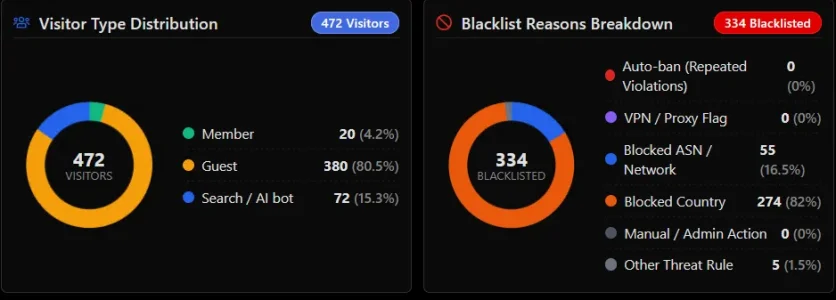
I've also manually blacklisted at least 6 IPs today. They used to show up in manual/admin action but none I've manually blacklisted , even during the last 30 days or All time show up under manual/admin action like they did before. I also don't have a clue what Other Threat Rules are but I'm guessing it is rate limiting? Even with aggressive settings for rate limiting, I've only ever seen this identified a time or two and only 1 has been auto-banned in all time.

On the plus side, 51 visitors today have been challenged with only 7 solving - 13.7% solve rate. All the new statistics are great.

I only allow Bing, MSNbot, DuckDuckGo, Yahoo slurp and various Google robots. Since I started looking this morning, I've had 46 allowed robots show up in IPTM as active listing the page they are looking at so I assume they are working correctly but I have seen ZERO robots show up in the online statistics or current visitors list for the last 9..5 hours I have been closely monitoring. Up until I noticed this yesterday, it was very rare to not see any robots online - there has always been at least a couple at all times.

I am also the one that requested "Count number only in Members Online widget" so I had it enabled. I have just now disabled it as a test and made sure Show only protected and Show bot brand logos are enabled.

I will give time for this change to take effect and see if it makes a difference. Currently have 5 Bingbots in the 30 minute time window. Forum still shows 0
 
Thanks for the reply @Osman but let me clarify a few things.

Hi Elisabeth,

Your observations are spot on, and let me clarify what is happening:

Manual / Admin Actions & "Other Threat Rule": You are completely right. When an IP is manually blacklisted from the Admin CP, the IP is blocked immediately, but the specific reason label was left unassigned in that action. Because the breakdown chart looks for a manual label and couldn't find one, it grouped those records under "Other Threat Rule". Those 5 entries showing in your chart are exactly your manually blacklisted IPs. I have already adjusted this in the codebase so they will be correctly categorized under Manual / Admin Action.

VPN Count in the Blacklist Chart: That specific chart only tracks records with permanent blacklist status (status = 'blacklisted'). Since recent updates treat detected VPNs with temporary blocks or Captcha challenges rather than permanent blacklists, they are not counted in that permanent blacklist breakdown, which is why it shows 0 there.

Robots Showing as 0 in Online Statistics / Visitors List: The real-time threat log confirms that allowed crawlers (like Bingbot) are visiting pages properly and being allowed through without hindrance. However, I am currently investigating why XenForo's session activity table (xf_session_activity) is not capturing or retaining those crawler sessions for the online statistics widget and the current visitors list. I am inspecting XenForo core's Members Online behavior right now to get this sorted out cleanly.

Thank you again for your patience and for helping refine these features!
 
Back
Top Bottom