[XTR] IP Threat Monitor

[XTR] IP Threat Monitor [Paid] 1.1.6

No permission to buy ($30.00)
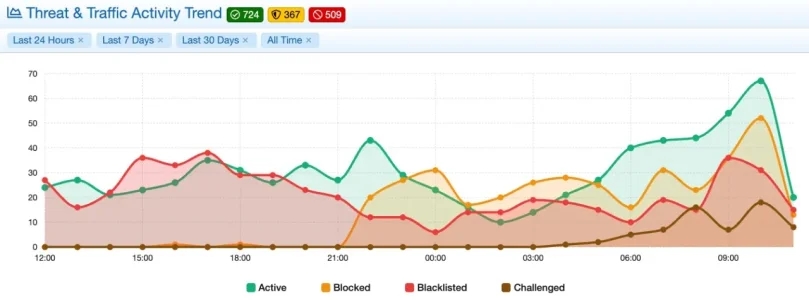
The experiences with 1.1.3 are (expectedly) positive until now. The number of temporary blocks went straight up after the update, as now most new blocking events seem to rather block than blacklist (which seems a good thing overall).
Bildschirm­foto 2026-11-03 um 11.25.09.webp


Existing blacklist entries are obviously still honored, so there is a lot of "blacklisted" still and once more a very old and long blacklist may trigger false positives. Still thinking about getting rid of the historical blacklist for the most part and give it a fresh start - the ASN and country blocking lists that I built up over time should avoid negative effects.

I found one entry that seems to hint at a potential but:

Bildschirm­foto 2026-11-03 um 09.04.28.webp

Akkoma/Plemora is whitelisted, yet the IP was blocked. It belongs to ASN 24940 (Hetzner) which is indeed blocked - but the block should be overridden by the whitelisting for the bot. Seems this is not the case, despite the checkbox to apply the whitelist has been set:
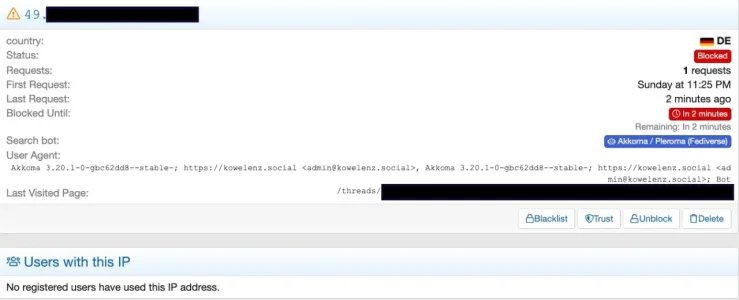
Bildschirm­foto 2026-11-03 um 09.04.55.webp

When trying to find out if this is a one-time event it turned out that it seems currently not possible to filter the IP list for parts of the user agent (using the search field) or the bot/service that was detected (i.e. also true for iCloud Private Relay).
 
Does this work if the forum is behind AWS CloudFront CDN? Thanks!
Hi,

Yes, absolutely! [XTR] IP Threat Monitor works completely behind AWS CloudFront (or any other CDN / Reverse Proxy like Cloudflare, Fastly, etc.).

How it works:The add-on does not rely on raw server variables; instead, it utilizes XenForo's native core IP resolution ($request->getIp()). As long as your XenForo installation is configured to recognize CloudFront as a trusted proxy and resolves the real client IP (via X-Forwarded-For), the add-on will accurately detect, log, challenge, and block real visitor IPs, ASNs, and countries.

Quick Tip for CloudFront:Ensure your origin server (Nginx/Apache) or XenForo's src/config.php is configured to trust reverse proxies. For instance, in XenForo's src/config.php:

$config['http']['trustedProxyHeaders'] = ['X-Forwarded-For'];

(Or configure real_ip in Nginx / mod_remoteip in Apache with CloudFront's IP ranges).

Once XenForo sees the actual visitor's IP, all rate limiting, bot verification, and threat mitigation features in IP Threat Monitor will work seamlessly.
 
I checked in today with half a dozen of these.


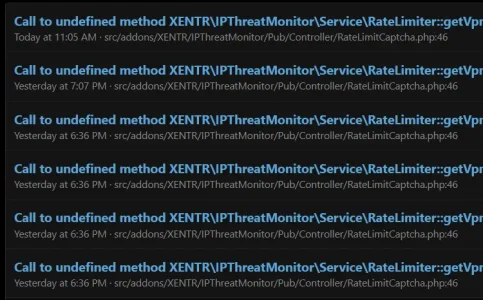
Error: Call to undefined method XENTR\IPThreatMonitor\Service\RateLimiter::getVpnOrProxyBlockReasonMessage()
src/addons/XENTR/IPThreatMonitor/Pub/Controller/RateLimitCaptcha.php:46
Generated by: Unknown account Nov 3, 2026 at 11:05 AM
Code:
#0 src/XF/Pub/Controller/AbstractController.php(51): XENTR\IPThreatMonitor\Pub\Controller\RateLimitCaptcha->preDispatchController('Index', Object(XF\Mvc\ParameterBag))
#1 src/XF/Mvc/Controller.php(140): XF\Pub\Controller\AbstractController->preDispatchType('Index', Object(XF\Mvc\ParameterBag))
#2 src/XF/Mvc/Dispatcher.php(363): XF\Mvc\Controller->preDispatch('Index', Object(XF\Mvc\ParameterBag))
#3 src/XF/Mvc/Dispatcher.php(266): XF\Mvc\Dispatcher->dispatchClass('XENTR\\IPThreatM...', 'Index', Object(XF\Mvc\RouteMatch), Object(XENTR\IPThreatMonitor\Pub\Controller\RateLimitCaptcha), NULL)
#4 src/XF/Mvc/Dispatcher.php(121): XF\Mvc\Dispatcher->dispatchFromMatch(Object(XF\Mvc\RouteMatch), Object(XENTR\IPThreatMonitor\Pub\Controller\RateLimitCaptcha), NULL)
#5 src/XF/Mvc/Dispatcher.php(63): XF\Mvc\Dispatcher->dispatchLoop(Object(XF\Mvc\RouteMatch))
#6 src/XF/App.php(2840): XF\Mvc\Dispatcher->run()
#7 src/XF.php(850): XF\App->run()
#8 index.php(23): XF::runApp('XF\\Pub\\App')
#9 {main}

Request state

Code:
array(4) {
  ["url"] => string(69) "/xen/rate-limit-captcha/?_xfRedirect=/xen/whats-new/posts/5566/page-3"
  ["referrer"] => string(23) "https://citadel-81.com/"
  ["_GET"] => array(1) {
    ["_xfRedirect"] => string(32) "/xen/whats-new/posts/5566/page-3"
  }
  ["_POST"] => array(0) {
  }
}

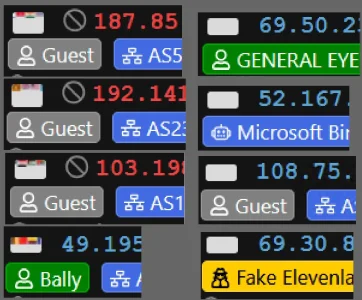
Country flags have all gone wonky

1793741937126.webp
- eta -

1793755446124.webp
 
Last edited:
Both of these issues have been identified and resolved for the upcoming v1.1.4 release:
  1. RateLimiter method error: The missing getVpnOrProxyBlockReasonMessage() method was a regression in v1.1.3 and has already been implemented in Service/RateLimiter.php. Updating to v1.1.4 will permanently eliminate this error log.
  2. Country flags display: The grey box and misaligned flag sprite issue in the ACP (particularly noticeable in dark mode and on high-DPI/Retina screens) was caused by a fallback CSS conflict in the core flag sprite path. We have updated the flag stylesheets with explicit image paths and 2x pixel-ratio scaling.
Once v1.1.4 is released and updated on your forum, both issues will be completely fixed. Thank you for reporting!
 
Osman updated [XTR] IP Threat Monitor with a new update entry:

1.1.4

This update elevates system stability, analytics accuracy, and user experience to the highest level. Based on valuable feedback from our community, background job processing on large databases has been optimized to prevent execution timeouts, and provider whitelisting has been made more flexible and independent.

Protection safeguards have been enhanced to prevent registered members from ever encountering challenge screens, and comprehensive visual breakdown reports covering top threat...

Read the rest of this update entry...
 
Wow! All the new stats and graph colors are great. Thank you for the amazing amount of work you have put into this

All of my country flags are still white though everywhere there is a flag. 😭

Tried an update of the GeoIP database, a rebuild and nothing. Addresses are being correctly identified by county and everything is working great except for the white flags.

However, if this is a sign the bots are just giving up, I won't mind! 🤣

I just noticed my member flags are all white too.
1793770960804.webp
 
Last edited:
Hi Elisabeth,

Thank you so much for the kind words and feedback!

Since countries are correctly identified, your GeoIP database and background processing are working perfectly. The "white box" issue is purely a CSS asset / browser caching matter (the browser displays a light gray/white placeholder box whenever the flag sprite image fails to load or uses an outdated cached stylesheet).

Could you please check the following:

Perform a hard refresh in your browser (Ctrl + F5 on Windows, or Cmd + Shift + R on Mac), or try opening the page in a Private/Incognito window to bypass the cached stylesheet.
If it still persists, right-click on one of the white flag boxes and select Inspect. Under the Network or Console tab, check if styles/default/xenforo/flags/flags.png is returning a 404 Not Found or CORS/permission error.
Ensure that the default XenForo flag assets exist on your server at /styles/default/xenforo/flags/flags.png.

Let me know how it goes!
 
@Osman thank you for your helpful suggestions.

It does this appears to be a browser problem. Tried a different one and the flags are working. I should have checked that before posting here. I apologize for the trouble.

I will figure it out.

I feel like I haven't paid enough for the great service and quick, responsive updates. Looked for ways to donate on XenTR but couldn't find anything.
 
Hi @Elisabeth_K,

Please don't apologize at all! I'm really glad to hear that the flags are working properly now and that the mystery is solved.

Your incredibly kind words and generosity truly mean a lot to me. I don't accept donations; your appreciation, your continued support, and the wonderful review you already shared are more than enough reward for me. Seeing happy members and knowing the add-on helps keep your community safe is what motivates me the most.

Thank you so much for being such a great customer and a valued part of our community. Enjoy the add-on, and please feel free to reach out anytime!
 
I AM getting to be the biggest pain in the rear!

First of all, thank you for the kind words.

Secondly, I was mistaken about it being a simple browser problem - there is something else going on and everything was fine until 1.1.3.

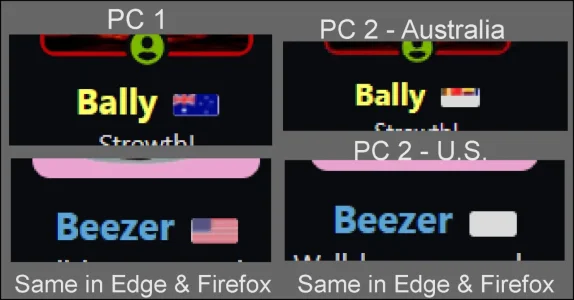
On my main computer (PC 1), flags are showing up perfectly in both Firefox and Edge. My initial report about the flags was from my second computer that I log into via remote desktop and where I do my admin and mod stuff from a second desktop monitor.

On PC #2, flags don't work in Firefox or Edge even when working from that system locally with a monitor attached rather than through RDP. There are some flags, about 4 or 5 from a few countries that try to display something. Most are completely white.

Some show multiple little flags. The rest are all white.

Flags1.webp

For the few countries that do display something, it looks like multiple flags crammed together? This supposed to be the Indonesian flag.

1793788790307.webp
I also verified files:
flagfiles.webp

If I download and looks at flags.png from the site and zoom in, I see the same sequence of flags. The flags in flags@2x.png are fine too.
1793789164835.webp

You can see how they display differently on each computer. Spent hours looking for differences between systems, drivers, etc. It doesn't depend on browser zoom level either.

Flags2.webp

1.1.1 and 1.1.2 worked great everywhere.

To me, this seems resolution dependent as both systems are at different screen sizes.

What is more concerning is this is what flags look like on mobile devices and tablets.


Flags3.webp
Phone 1544x720. Also checked at 3088x1440 in both mobile and desktop modes.

It might be 3:55 AM but I swear I'm not going blind. Crazy maybe but not blind. :D

Why flags work in one place but not in others is a mystery to me. I've done all I can to figure it out.
 
@Osman 1.1.4 is looking really good until now! Some glitches I had with the last versions with some bots like Baidu Spider slipping through despite expicitely not allowed and CN being blocked as well as the ASN where the spider came from are gone.

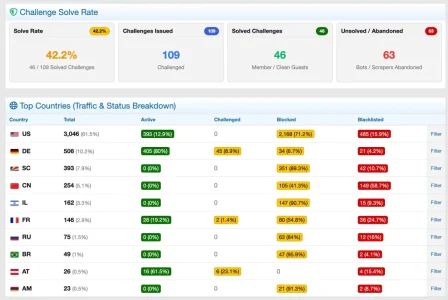
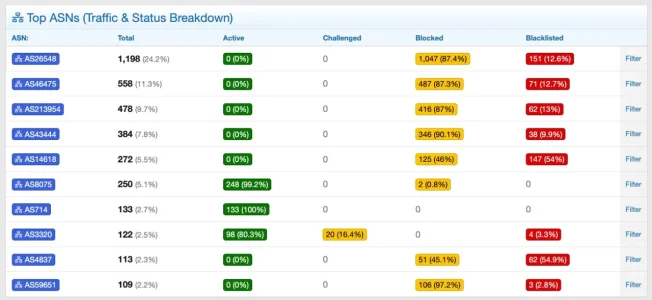
The new extended list views for Countries and ASNs are absolutely brilliant as is the captcha solve rate thingy!

Bildschirm­foto 2026-11-04 um 13.51.16.webp
Bildschirm­foto 2026-11-04 um 13.51.30.webp

Very tiny improvement request: If the ASNs would show their names on mouse over would be awesome!
 
Osman updated [XTR] IP Threat Monitor with a new update entry:

1.1.5

With this update, we are introducing several key improvements based on valuable community feedback, focusing on both visual refinement and stronger background protection.

Network badges now reveal their provider and organization names on hover, and country flags display consistently across various display scalings, remote desktop connections, and mobile devices without distortion. In addition, a standardized integration foundation has been introduced so companion add-ons can smoothly...

Read the rest of this update entry...
 
As I was typing, I got the notice that 1.1.5 had been released. I immediately downloaded and installed it. It is wonderful how this thing keeps getting better and better.

There has been no change to my flag problem after installing 1.1.5

As of this evening, after installing 1.1.5, flags are blank white in all desktop browsers on all of my computers. Firefox, Chrome, Edge - all flags are white. I even fired up my old laptop and they are white there too.

Mobile is still displaying a fuzzy blur of color. Logged in, not logged in, wifi, mobile data... regular member or admin or not logged in doesn't matter from any device mobile, tablet or desktop. Tested mobile in Chrome, Firefox and Samsung browsers. On tablet tested in Firefox, Chrome and Amazon Silk browser. Desktop - flags do not show in any browser.

I can no longer see flags at all. IPTM is still working great and doing everything it is supposed to be doing except showing flags.

NOFLAGS.webp
Some are still showing this:

NoFlags2.webp

Test configuration shows 100% passed. File health check says all 14,282 checked files are present and correct. xf v2.3.13.

Something somewhere is broken.

My main live forum is in a folder off the domain root, /xen. My test forum is in a separate subdirector /test with it's own database. Am I allowed to install IP Threat Monitor in my test forum? It is still the same domain.
 
Hi Elisabeth,

First of all, to answer your licensing question: Yes, absolutely! You are 100% permitted and welcome to install IP Threat Monitor on your test/staging forum (/test) on the same domain. Testing add-ons on a staging environment alongside or prior to live is standard practice and fully within our license policy.

Regarding the flag display: on our end, on default XenForo 2.3.13 installations, and across all our other clients, the flags are displaying crisply and cleanly. Because of this, what you are experiencing is almost certainly a server-level, CDN, or custom style asset-loading issue rather than an IPTM code problem.

Quick 1-minute test to confirm:
  1. On your desktop browser, open your live forum page and press F12 to open Developer Tools.
  2. Switch to the Network tab, type flags in the filter box, and refresh the page (Ctrl + F5).
  3. Look at the request for flags.png or flags@2x.png. What HTTP status code does it return (200, 404, or 403)? What is the exact URL the browser is trying to fetch?
  4. Also, try switching temporarily to XenForo's unmodified Default Style — do the flags render correctly there?

Let us know what the Network tab shows for the flag request and we will be happy to guide you on how to resolve the path or CDN optimization setting!
 
Thank you for helping @Osman. I realize this is a problem unique to me and you don't need to do that.

Prior to following your instructions, on my test forum I switched to the un-modified default style and installed IPTM, added in the API keys for proxycheck and maximind then ran the cron job to update the GeoIP database and received the following message. It might be relevant?

  • XF\Db\Exception: [XTR] IP Threat Monitor: GeoLite2-ASN update failed: MySQL query error [1406]: Data too long for column 'data_key' at row 1
  • src/XF/Db/AbstractStatement.php:225
  • Generated by: Administrator
  • Nov 4, 2026 at 10:47 PM

Stack trace​

INSERT INTO xf_data_registry
(data_key, data_value)
VALUES
(?, ?)
ON DUPLICATE KEY UPDATE
data_value = VALUES(data_value)

Code:
#0 src/XF/Db/Mysqli/Statement.php(207): XF\Db\AbstractStatement->getException('MySQL query err...', 1406, '22001')
#1 src/XF/Db/Mysqli/Statement.php(83): XF\Db\Mysqli\Statement->getException('MySQL query err...', 1406, '22001')
#2 src/XF/Db/AbstractAdapter.php(96): XF\Db\Mysqli\Statement->execute()
#3 src/XF/DataRegistry.php(207): XF\Db\AbstractAdapter->query('
            INSERT INTO...', Array)
#4 src/addons/XENTR/IPThreatMonitor/Repository/GeoIp.php(276): XF\DataRegistry->set('xentrIptGeoIpLa...', 1793857645)
#5 src/addons/XENTR/IPThreatMonitor/Repository/GeoIp.php(176): XENTR\IPThreatMonitor\Repository\GeoIp->updateMaxMindDatabase('GeoLite2-ASN', 'QOYoFz_eTd9pzuE...')
#6 src/addons/XENTR/IPThreatMonitor/Cron/GeoIpUpdate.php(11): XENTR\IPThreatMonitor\Repository\GeoIp->updateGeoIpDb()
#7 src/XF/Admin/Controller/CronEntryController.php(119): XENTR\IPThreatMonitor\Cron\GeoIpUpdate::run(Array)
#8 src/XF/Mvc/Dispatcher.php(364): XF\Admin\Controller\CronEntryController->actionRun(Object(XF\Mvc\ParameterBag))
#9 src/XF/Mvc/Dispatcher.php(266): XF\Mvc\Dispatcher->dispatchClass('XF:CronEntry', 'Run', Object(XF\Mvc\RouteMatch), Object(XF\Admin\Controller\CronEntryController), NULL)
#10 src/XF/Mvc/Dispatcher.php(121): XF\Mvc\Dispatcher->dispatchFromMatch(Object(XF\Mvc\RouteMatch), Object(XF\Admin\Controller\CronEntryController), NULL)
#11 src/XF/Mvc/Dispatcher.php(63): XF\Mvc\Dispatcher->dispatchLoop(Object(XF\Mvc\RouteMatch))
#12 src/XF/App.php(2840): XF\Mvc\Dispatcher->run()
#13 src/XF.php(850): XF\App->run()
#14 admin.php(15): XF::runApp('XF\\Admin\\App')
#15 {main}
Request state
array(4) {
  ["url"] => string(44) "/test/admin.php?cron/xentrIptGeoIpUpdate/run"
  ["referrer"] => string(43) "https://citadel-81.com/test/admin.php?cron/"
  ["_GET"] => array(1) {
    ["cron/xentrIptGeoIpUpdate/run"] => string(0) ""
  }
  ["_POST"] => array(1) {
    ["_xfToken"] => string(8) "********"
  }
}

Of course flags aren't working.

Doing as you suggest on my live forum, I get this from Edge
1793858993129.webp

If it matters, I'm on PHP 8.3.36

I have temporarily unblocked your country. Have a look for yourself. https://citadel-81.com/xen
 
Last edited:
Doing as you suggest on my live forum, I get this from Edge
1793858993129.webp
You should probably empty your browser cache and then try again - looks like it did not load anything from the server but used the local cache for the picture. As you suffer from the issue in various browsers it may needed there, too. If you are running a caching mechanism on your server it probably won't hurt to flush this, too or temporarily disable it during the test just to be sure.
 
@Osman : Looks like I was too overoptimistic regarding this:

Some glitches I had with the last versions with some bots like Baidu Spider slipping through despite expicitely not allowed and CN being blocked as well as the ASN where the spider came from are gone.

I can still see issues regarding that in 1.1.4 (and as the changelog for 1.1.5 does not mention anything in that direction I assume this will probably stay the same):

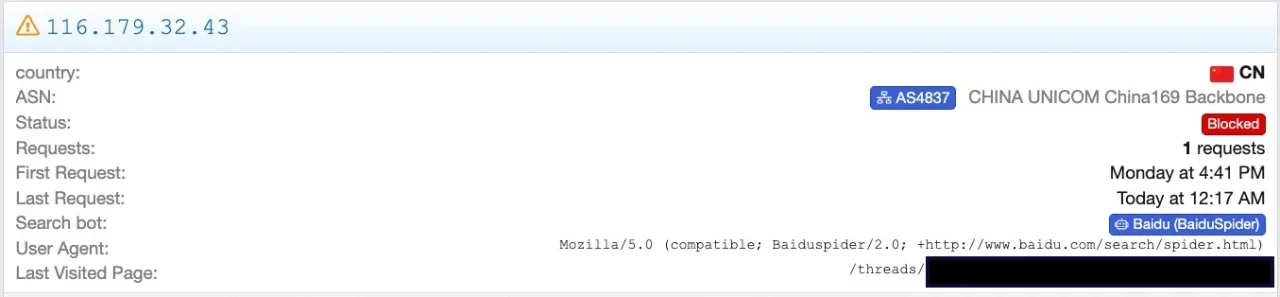
  • Baidu Spider is not checked as a protected Search Engine Bot
  • CN as a country is set to block
  • the three ASNs (4134, 4837, 58539) I see the spider coming from in the logs are blocked via ASN blocking.
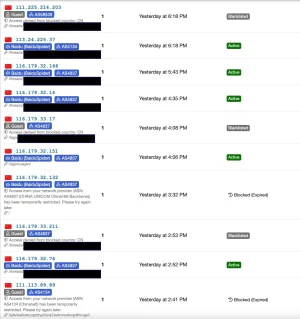
So basically three independent rules that each should stop these requests on it's own. Yet I see some of those requests slipping through. I.e.:

Bildschirm­foto 2026-11-05 um 12.05.05.webp


Bildschirm­foto 2026-11-05 um 12.04.15.webp


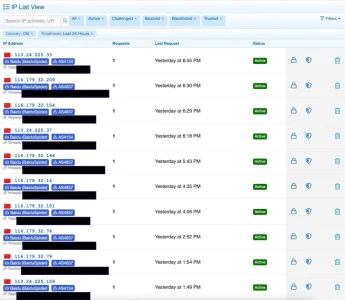
Filtering for "active" connections from China:

Bildschirm­foto 2026-11-05 um 10.16.37.webp


This happens somewhat randomly - there was no load at the server at that time and only few visitors, so this can't be the cause.


Bildschirm­foto 2026-11-05 um 10.22.45.webp

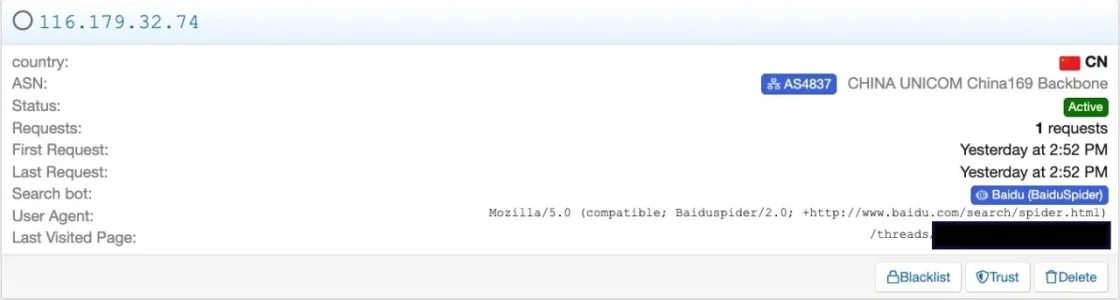
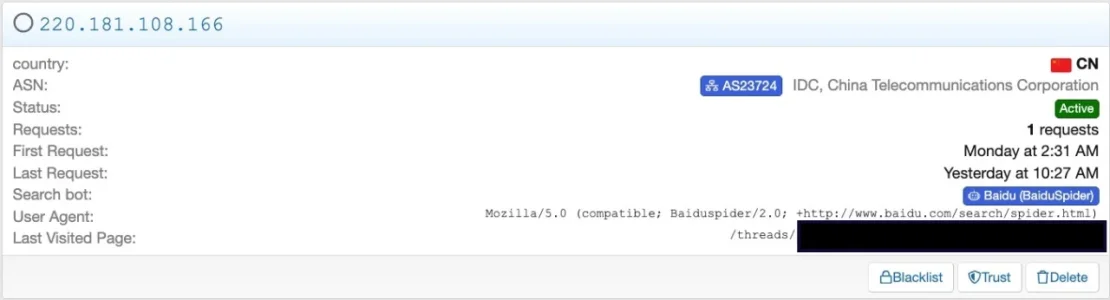
When comparing requests that pass with requests that were blocked the user agent seems identical:

Mozilla/5.0 (compatible; Baiduspider/2.0; +http://www.baidu.com/search/spider.html)
The bot has been correctly identified anyway in all cases:

Bildschirm­foto 2026-11-05 um 10.24.57.webpBildschirm­foto 2026-11-05 um 10.24.15.webp

Bildschirm­foto 2026-11-05 um 12.43.57.webp


So something seems somewhat fishy here. Clearly, those should not have passed, yet they have.
 
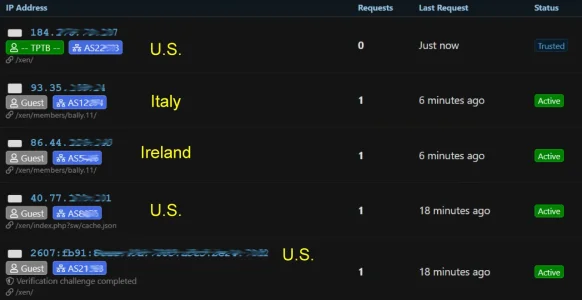
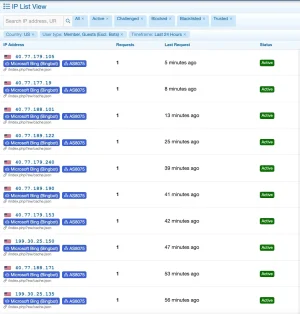
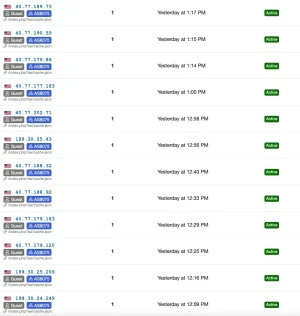
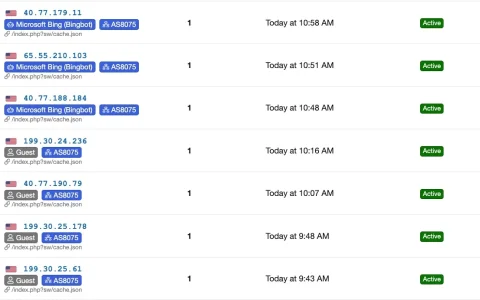
Other than that there is a problem with AS8075 (Microsoft), too, but on a different layer: AS8075 is blocked as are the US as a country, but BingBot is protected/allowed. This works fine so far, but there are issues with sorting and presentation in the logs:

1. Parts of the requests of Bingbot are shown when filtering for guests (and excluding bots) despite clearly having been identified as bots:​


Bildschirm­foto 2026-11-05 um 12.12.41.webp


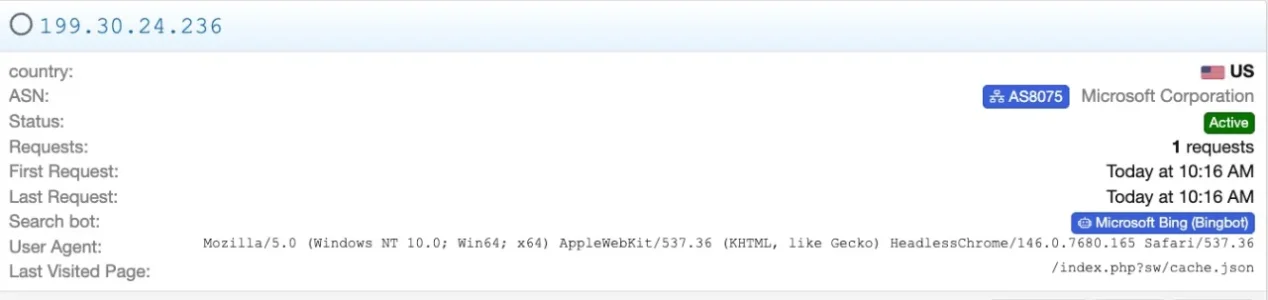
2. Potentially solved: Parts of the requests by Bingbot are not labeled as Bot but as normal guest, yet let pass (which should not happen with normal guests from the US and even less from AS8075):​


Bildschirm­foto 2026-11-05 um 12.09.31.webp

When looking at the detail view it becomes clear, that the bot has been correctly identified, it is just not shown in list view correctly:
Bildschirm­foto 2026-11-05 um 13.09.16.webp

However: This problem seems to have been probably solved in 1.1.5, as the behavior seems to have generally changed after upgrading to 1.1.5:

Bildschirm­foto 2026-11-05 um 13.08.58.webp

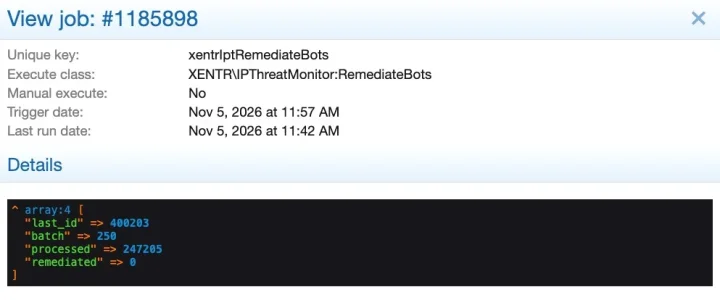
3. the issue with long running jobs seems not yet resolved - I still get these notifications:​


Bildschirm­foto 2026-11-05 um 11.41.43.webp
Bildschirm­foto 2026-11-05 um 11.42.28.webp
Bildschirm­foto 2026-11-05 um 11.43.17.webp

If it persists I'll probably trigger a run via CLI tonight and see if this solves the issue.

Other than that everything seems fine - the mouse-over for ASNs invented in 1.1.5 is incredibly helpful!
 
Hi Elisabeth,

The issue isn't coming from your settings or IPTM. Your hosting provider (Hostinger) has an automatic image compression feature enabled in their CDN.

As soon as Hostinger stops resizing the flag image, all flags will immediately display crisp and clear across all your devices!
 
Back
Top Bottom