XF Bot Guard

XF Bot Guard 1.4.1

No permission to download
Based on the positive reports I did indeed finally upgrade to 2.3.12p2 yesterday evening, so far no issues that I would have recognized.

FYI: I did however recognize (already before the update) that Bot Guard seems to miss quite a bunch of scrapers: Due to the relatively low amount of traffic of my forum and the country structure of my audience it is easy to identify "outliers" in the IP list of IP-Threat Monitor (that now has country flags) that get past it and then bump into Bot Guard. The country pressure map and table misses quite a bunch of those (the countries do not show up) while, when checking in the access.log of the web server for the requests for these IPs it is clear that these are indeed scrapers/resident proxies. So it seems quite an amount of bots manage to bypass Bot Guard.

On top of that I am somewhat suspicious that more and more bots may possibly be able to solve the integrated CF captcha as well as my captcha pass-rate (the maximum false positive ceiling) that was around 20% initially is now consistently around the 50% mark for weeks. However: In the same time the number of bot-requests in comparison to real user requests has been considerably lower as well over the last weeks, so not totally sure.

Nevermind: It was clear from the beginning that Bot Guard will not catch every bot and nothing else was promised, so absolutely fine. I will probably play around with the settings a bit to find out if I can tweak the numbers a little bit. Looking forward to the next version. :)
 
Based on the positive reports I did indeed finally upgrade to 2.3.12p2 yesterday evening, so far no issues that I would have recognized.

FYI: I did however recognize (already before the update) that Bot Guard seems to miss quite a bunch of scrapers: Due to the relatively low amount of traffic of my forum and the country structure of my audience it is easy to identify "outliers" in the IP list of IP-Threat Monitor (that now has country flags) that get past it and then bump into Bot Guard. The country pressure map and table misses quite a bunch of those (the countries do not show up) while, when checking in the access.log of the web server for the requests for these IPs it is clear that these are indeed scrapers/resident proxies. So it seems quite an amount of bots manage to bypass Bot Guard.

On top of that I am somewhat suspicious that more and more bots may possibly be able to solve the integrated CF captcha as well as my captcha pass-rate (the maximum false positive ceiling) that was around 20% initially is now consistently around the 50% mark for weeks. However: In the same time the number of bot-requests in comparison to real user requests has been considerably lower as well over the last weeks, so not totally sure.

Nevermind: It was clear from the beginning that Bot Guard will not catch every bot and nothing else was promised, so absolutely fine. I will probably play around with the settings a bit to find out if I can tweak the numbers a little bit. Looking forward to the next version. :)
Thanks for the detailed report, that is useful.

One important clarification first: the country pressure map/table is not a raw “all scraper countries seen in access.log” view. It is based on Bot Guard intervention pressure, mainly sessions that reached challenge/deny handling or browser-validation dead ends. So a country can be visible in the web server access log but not show in country pressure if those requests were allowed below threshold, outside protected scope, temporarily CAPTCHA-trusted, excluded, or simply did not create an intervention event.

To understand which case applies here, could you send a few concrete examples? Please do not post raw IPs publicly if you are not comfortable doing so; a private message/support bundle is better for that.

Most useful details

  • A few suspect IPs, or anonymised IPs plus exact timestamps/timezone.
  • The URLs/routes they requested, roughly how many requests they made, and over what time period.
  • The matching Bot Guard Raw event log rows around those timestamps, especially the event type, decision, score and reason codes.
  • Whether those rows show things like request_dynamic / allow, challenge_required, captcha_pass, captcha_trust_allow, known_crawler_allow, or any exclusion/suppression reason.
  • Your current Bot Guard threshold, CAPTCHA trust duration, protected scope, protected areas, and whether Observe-only or Light-DB runtime mode is active.
  • Whether Cloudflare Edge Enforcement is enabled or in dry run.
  • Which CAPTCHA provider Bot Guard is using.
  • Whether XenForo is definitely seeing the real visitor IP rather than a proxy/CDN/server IP.

The key question is whether these scrapers are:

  • not reaching protected Bot Guard scope;
  • being scored but allowed below threshold;
  • being challenged and abandoning;
  • being challenged and passing CAPTCHA;
  • being allowed because temporary CAPTCHA trust is still active;
  • or being affected by an exclusion/trusted-crawler/proxy/IP attribution issue.

If the examples show allow below_threshold, the answer is likely tuning score/scope/threshold, route pressure, forced challenge networks, or Cloudflare Edge handling.

If they show captcha_pass followed by captcha_trust_allow, then we can look at shorter trust duration, stricter handling for known bad networks, hard-deny for confirmed proxy ranges, or whether a different CAPTCHA posture makes sense.

So yes, I agree there may be room to strengthen it, but the next step is to identify which part of the decision path these requests are taking. A small set of specific IP/time/data examples should make that much clearer.
 
One important clarification first: the country pressure map/table is not a raw “all scraper countries seen in access.log” view. It is based on Bot Guard intervention pressure, mainly sessions that reached challenge/deny handling or browser-validation dead ends. So a country can be visible in the web server access log but not show in country pressure if those requests were allowed below threshold, outside protected scope, temporarily CAPTCHA-trusted, excluded, or simply did not create an intervention event.
Absolutely. Indeed we are talking about different possibilities here that have one common outcome: The bot reaches the forum content, either b/c it is not checked, passes the check w/o challenge or dying in the process or manages to solve the captcha (I use the CF captcha). I'll have a deeper look tonight and send you an update with the info you requested.
 
I'll have a deeper look tonight and send you an update with the info you requested.
Short update: I checked a bunch of cases, sadly with not too helpful outcome for the most part:
  • the requests to real threads had a code 200 but no log entry in BotGuard - due to database size I don't safe unsuspicious cases in the Bot Guard log, so they seem to have been unsuspicious and let pass
Bildschirm­foto 2026-09-27 um 17.55.08.webp

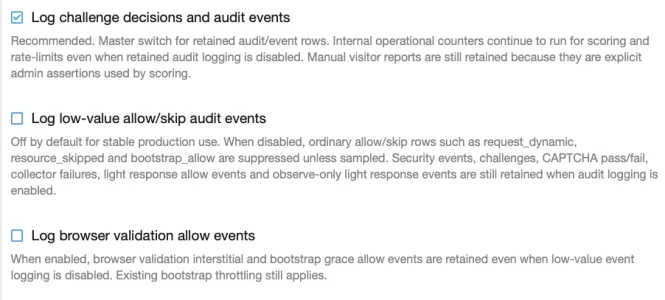
I am digging further. Sadly, in my current setup logging everything is not an option for reasons of database size and performance. This will change relatively soon, but there is currently not a date for that change.
 
So, yes - it is known... if your forum is busy, and you do not change default settings or use the Light DB mode, it will store a lot of data as there is a lot of data to sample and record. But there is an intentional Light DB mode for exactly this reason. You can find it in the quick settings area.

After about 2 hours, it found that the "Score confirmed hosting/datacenter reverse DNS" setting was causing the issue. I unchecked it and the site has been flying again.

So if your running into strange problems try turning this off and see if it helps you.

I haven't installed this yet, but on the download page I didn't notice any screenshots or instructions. Is there any documentation/tips on (known) issues such as these ones regarding what needs to be looked at and where post-install or in case of common problems? This thread is too long to read all the pages.

Edit: Ah, found the giga-docs at: https://xenforo.com/community/resources/xf-bot-guard.10508/field?field=faq

Hoping for a Cliff's Notes tips & tricks version now. ;)
 
I haven't installed this yet, but on the download page I didn't notice any screenshots or instructions. Is there any documentation/tips on (known) issues such as these ones regarding what needs to be looked at and where post-install or in case of common problems? This thread is too long to read all the pages.

Edit: Ah, found the giga-docs at: https://xenforo.com/community/resources/xf-bot-guard.10508/field?field=faq

Hoping for a Cliff's Notes tips & tricks version now. ;)

The next version includes a new type of quick setting:

A new Capacity Fit Profile at the top of the existing XF Bot Guard Quick settings page. Starts from Balanced production, measures the current install using lightweight in-product capacity/readiness signals, assign known feature costs, and preview/apply the strongest viable Bot Guard configuration within the server’s current constraints.

Basically the TL/DR quick setting that is intelligent in that it samples your current server load and suggests a custom profile that will hopefully work right out of the box for you.
 
Each of the new features coming have been tested and are fine. However, it is start of fire season here in Australia, so I am just working up my schedule before releasing the new version. I just want to make sure I have the available time to support everyone who needs it quickly.

Missing context: I am a firefighter. Hence the fire season relevance.
 
Bot Guard has been working great, combining with some cloudflare rules my guest count has gone down from spikes to 20,000 visitors to staying at a steady 500 or so. Site has remained fast and load remains very low.

On occasion I will get someone say they stay on the bot verification screen, in the last few days a user using Facebook. Running through Claude it suggests Bot Guard or Turnstile is having issues with the Facebook built-in browser. I'm not too familiar with that one, I haven't seen the issue with limited testing. Anyone run into something similar?

From Claude:
  • Browser: Facebook's built-in browser on iPhone (its User-Agent contains FBAN/FBIOS).
  • What happens: Turnstile keeps spinning on /bot-guard/ and never finishes.
  • Order of checks: she had already passed Cloudflare's own check before Bot Guard sent her to that page.
 
Last edited:
Bot Guard has been working great, combining with some cloudflare rules my guest count has gone down from spikes to 20,000 visitors to staying at a steady 500 or so. Site has remained fast and load remains very low.

On occasion I will get someone say they stay on the bot verification screen, in the last few days a user using Facebook. Running through Claude it suggests Bot Guard or Turnstile is having issues with the Facebook built-in browser. I'm not too familiar with that one, I haven't seen the issue with limited testing. Anyone run into something similar?

From Claude:
  • Browser: Facebook's built-in browser on iPhone (its User-Agent contains FBAN/FBIOS).
  • What happens: Turnstile keeps spinning on /bot-guard/ and never finishes.
  • Order of checks: she had already passed Cloudflare's own check before Bot Guard sent her to that page.

It does sound like a FB browser/cloudflare turnstile type of issue..
 
What is managed setup? I was following the setup steps at https://thestockexchange.com.au/docs/xf-bot-guard.html#section-26-3, and I got stuck at #7. I searched this thread and didn't find an answer.

I manually input the IDs and token, per steps 3 & 4, so I didn't think "managed setup" is the "Set up Cloudflare automatically" button, but I clicked that button anyway because I don't see anything else it could be, but it didn't do anything other than bring me to the Overview page. There's a "setup" button there, but it just brings me back to the previous page.

Warning Cloudflare Managed Challenge rule Missing Run managed setup or repair to create/find the XF Bot Guard Managed Challenge rule.

I clicked "repair" and it did the same thing - brought me to the overview page.

"Test connection" just refreshes the page. I don't see any "it worked/didn't work".
 
What is managed setup? I was following the setup steps at https://thestockexchange.com.au/docs/xf-bot-guard.html#section-26-3, and I got stuck at #7. I searched this thread and didn't find an answer.

I manually input the IDs and token, per steps 3 & 4, so I didn't think "managed setup" is the "Set up Cloudflare automatically" button, but I clicked that button anyway because I don't see anything else it could be, but it didn't do anything other than bring me to the Overview page. There's a "setup" button there, but it just brings me back to the previous page.


I clicked "repair" and it did the same thing - brought me to the overview page.

"Test connection" just refreshes the page. I don't see any "it worked/didn't work".

Thanks for the report, and sorry for the unclear wording there.

In that section, managed setup means the Set up Cloudflare automatically button under ACP > XF Bot Guard > Cloudflare Edge Enforcement > Setup. It is not the top-right Setup button on the Overview page; that button just opens the setup form.

The “automatic” part means Bot Guard creates/finds the Cloudflare resources after you provide the Account ID, Zone ID and API token. The sequence should be:

  1. Enter the Cloudflare Account ID, Zone ID and API token.
  2. Click Save.
  3. Click Test connection. That should return to Setup with a success/failure message.
  4. Click Set up Cloudflare automatically. That should return to Overview with a success/failure message.
  5. Check the Cloudflare Edge health rows again.

A redirect back to Overview after managed setup/Repair is expected. Not seeing any success/failure message is the part I’d like to investigate.

Could you please DM me the redacted XF Bot Guard support bundle from ACP > XF Bot Guard > Health check? Please review it before sending and don’t post your API token or Cloudflare credentials publicly. The bundle should show whether the token is stored/decryptable, whether Observe-only is suppressing Cloudflare writes, and any stored Cloudflare setup error.
 
What is managed setup? I was following the setup steps at https://thestockexchange.com.au/docs/xf-bot-guard.html#section-26-3, and I got stuck at #7. I searched this thread and didn't find an answer.

I manually input the IDs and token, per steps 3 & 4, so I didn't think "managed setup" is the "Set up Cloudflare automatically" button, but I clicked that button anyway because I don't see anything else it could be, but it didn't do anything other than bring me to the Overview page. There's a "setup" button there, but it just brings me back to the previous page.


I clicked "repair" and it did the same thing - brought me to the overview page.

"Test connection" just refreshes the page. I don't see any "it worked/didn't work".

Thanks for sending me the support bundle by DM. Replying here, as it may be helpful for others.

Your install currently has Observe-only overlay enabled. While Observe-only is active, XF Bot Guard keeps sensing/logging/reporting, but it suppresses visitor-altering responses and live Cloudflare Edge writes. That includes Cloudflare managed setup/repair, so the Managed Challenge rule will stay missing while Observe-only is on.

You do not need to disable Cloudflare Edge dry run for setup. Dry run can stay enabled. The setting to change first is Observe-only.

Please try this:

  1. Go to ACP > XF Bot Guard > Quick settings and use the Observe-only mode card to disable Observe-only.
  2. Alternatively, go to Options > XF Bot Guard and turn off Observe-only overlay.
  3. Then go back to Cloudflare Edge Enforcement > Setup.
  4. Click Test connection.
  5. Click Set up Cloudflare automatically, or Repair Cloudflare setup.
  6. Check the Cloudflare Edge health rows again.

After that, the managed setup warning should clear once Bot Guard has created/found the Cloudflare IP list and Managed Challenge rule.

You can leave Cloudflare Edge dry run enabled while testing. Only disable dry run later when you are ready for live Cloudflare list writes. If you re-enable Observe-only afterward, Cloudflare Edge writes will again be forced into effective dry run.
 
  1. Go to ACP > XF Bot Guard > Quick settings and use the Observe-only mode card to disable Observe-only.
  2. Alternatively, go to Options > XF Bot Guard and turn off Observe-only overlay.
  3. Then go back to Cloudflare Edge Enforcement > Setup.
  4. Click Test connection.
I did that, and "test connection" still just refreshes the page, and "repair" just brings me to the "overview" page.

The Health Check page did change:
Warning Cloudflare Edge Enforcement dry run Enabled Cloudflare Edge Enforcement writes are suppressed until dry run is disabled.
Warning Effective Cloudflare Edge Enforcement sync mode Dry run Cloudflare Edge Enforcement writes are suppressed by the saved dry run setting.
 
I did that, and "test connection" still just refreshes the page, and "repair" just brings me to the "overview" page.

The Health Check page did change:

Thanks, that is actually progress.

The two warnings you quoted are expected while Cloudflare Edge Enforcement dry run is still enabled:

Cloudflare Edge Enforcement dry run: Enabled
Effective Cloudflare Edge Enforcement sync mode: Dry run

That means Observe-only is no longer forcing Cloudflare writes off. Dry run is a separate Cloudflare Edge safety setting, and it is normal to leave it enabled while testing.

The key question is whether the earlier warning is gone:

Cloudflare Managed Challenge rule Missing

or:

Cloudflare managed setup: Incomplete

If that warning is gone, then managed setup/repair has likely succeeded. In that state, “Repair” returning to the Overview page is expected. “Test connection” also returns to the Setup page after running.

Please check Cloudflare Edge Enforcement > Overview. If setup completed, the health/status rows should show the Cloudflare IP list and Managed Challenge rule as configured. You may also see the Cloudflare list named xf_bot_guard_edge_ips and the custom WAF rule in Cloudflare.

Dry run does not mean setup failed. It only means Bot Guard will not write live candidate IP changes to Cloudflare yet. Leave dry run enabled until you are happy with the candidates/sync log, then disable dry run only when you are ready for live Cloudflare writes.

If the Managed Challenge rule / managed setup warning is still present, please send me a fresh redacted support bundle now that Observe-only is disabled, and include any Last error shown on the Cloudflare Edge Enforcement Overview page.
 
The key question is whether the earlier warning is gone:
Yes, it changed to this:
OK Cloudflare managed setup Configured Cloudflare Edge Enforcement has the required local configuration.

In that state, “Repair” returning to the Overview page is expected. “Test connection” also returns to the Setup page after running.
This is the odd part. We're told to click those things, and they seemingly do nothing. I would say that the directions here https://thestockexchange.com.au/docs/xf-bot-guard.html#section-26-3 could use some clarification about what we're supposed to be clicking, and what we should expect after doing so.

Eg: Apparently, after setting up Cloudflare manually, we're supposed to click "Set up Cloudflare automatically", and then simply get redirected to another page. And "test connection" gives us no feedback on the result of the test.

Please check Cloudflare Edge Enforcement > Overview. If setup completed, the health/status rows should show the Cloudflare IP list and Managed Challenge rule as configured.
I see long string IDs listed for "Cloudflare Edge Enforcement IP list ID" and "Managed Challenge rule ID".
You may also see the Cloudflare list named xf_bot_guard_edge_ips and the custom WAF rule in Cloudflare.
I don't see it.
 
Yes, it changed to this:


This is the odd part. We're told to click those things, and they seemingly do nothing. I would say that the directions here https://thestockexchange.com.au/docs/xf-bot-guard.html#section-26-3 could use some clarification about what we're supposed to be clicking, and what we should expect after doing so.

Eg: Apparently, after setting up Cloudflare manually, we're supposed to click "Set up Cloudflare automatically", and then simply get redirected to another page. And "test connection" gives us no feedback on the result of the test.


I see long string IDs listed for "Cloudflare Edge Enforcement IP list ID" and "Managed Challenge rule ID".

I don't see it.

Thanks, that confirms setup has completed on the XF Bot Guard side.

If Health now says:

OK Cloudflare managed setup Configured

and the Overview page shows long IDs for both:

  • Cloudflare Edge Enforcement IP list ID
  • Managed Challenge rule ID

then XF Bot Guard has created/found the Cloudflare resources through the API.

You’re also right about the docs/UX. The wording needs to be clearer, status messages have some bug (depending on current enablement) which should be clearer during dry-run stage. I’ll fix these.

For where to look in Cloudflare:

  • The IP list is account-level, not inside the zone WAF page. In Cloudflare, check the account-level Settings/Configurations > Lists area for xf_bot_guard_edge_ips. Make sure you are in the same Cloudflare account as the Account ID saved in XF Bot Guard.
  • The WAF rule is zone-level. Check the zone’s Security rules / WAF custom rules area for a rule named/described as XF Bot Guard - managed challenge listed IPs.
  • The rule expression should reference $xf_bot_guard_edge_ips, and the action should be Managed Challenge.

The list may be empty until Bot Guard has local candidates to export, especially while dry run is still enabled. Dry run is safe to leave on while reviewing setup; disable it only when you are ready for live Cloudflare list writes.
 
Leave dry run enabled until you are happy with the candidates/sync log
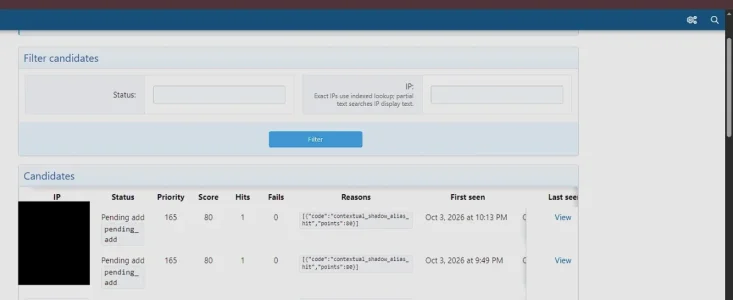
There's not really much for a novice like me to be happy or unhappy with on those pages, so I just enabled it. But I noticed a UI problem:

bot ui 01.webp

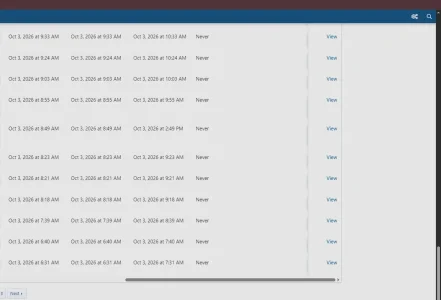
The right side of the table is completely cut off unless you scroll all the way down:
bot ui 02.webp

But once you do that, the header row isn't visible.

I also have a question. The reason I installed this addon is this: https://community.centminmod.com/th...ring-the-xenforo-forum-search-endpoint.33033/ - my forum access logs are showing bots hitting the /search/ endpoint, which they don't need to be doing, and it causes heavy load on the server.

Is this addon an appropriate tool/solution for that? I'm not seeing an option to specifically protect the /search/ endpoint. I only see the "Protected areas" option, and there's only the option to switch from "all public threads" to "custom path/route". That makes it seem like I'd have to give up most of the protection this addon provides if I want to specifically, and more so, protect the /search/ path.

And from what I can tell, it can't really hide the /search/ path from the bots or stop them from pinging it; it can only punish them for doing so. Most of the bots pinging it seem to be legit, and are welcome to the rest of the forum; I just don't want them hitting that one unnecessary and costly endpoint.
 
Back
Top Bottom