Many forum systems include a forum jump menu. This is usually a popup-menu that allows you to jump directly from one area of the site to another, when normally it would require several navigational steps.
The forum jump menu tends to be implemented as a <select> element with javascript behaviour attached to it so that when you release the menu, you jump to the selected forum or site area.
However, doing it like this has a few of fairly major down-sides.
Firstly, in order to build the forum jump menu, the system needs to load theentire forum tree into memory and output it. On a board with a lot of forums, this can be quite an overhead.
Secondly, the use of a <select> means that you are not able to choose how to access the areas listed in the menu. They will be loaded into the same browser window/tab as you are currently using.
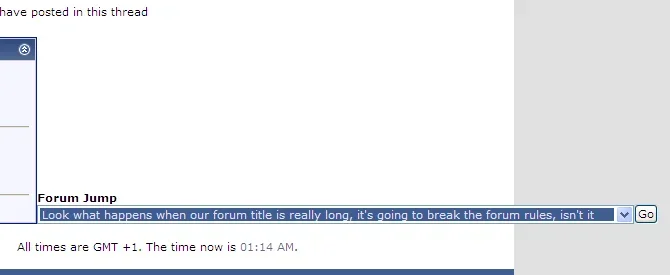
Thirdly, from a design stand-point, a <select> will expand to be as wide as the longest element in its menu, even when it is closed. This means that if you have a forum with a long name, or a particularly deeply-nested forum, your <select> may appear extremely wide, to the point of interfering with other page elements.
XenForo provides an enhanced version of the old forum jump, and in the process, gets around both of the issues described above.
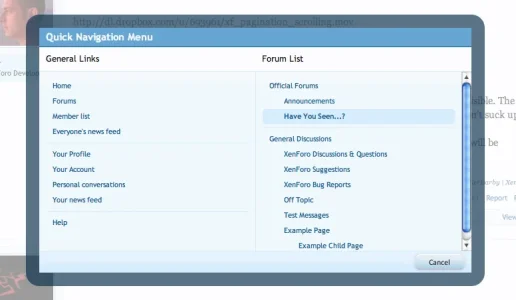
Firstly, we only build the forum jump (or Quick Navigation Menu as we call it) when you need it. We don't waste time constructing the menu on every page, we wait until you ask for it.
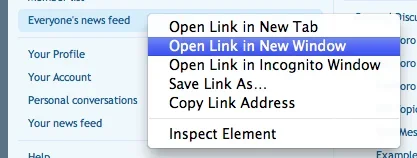
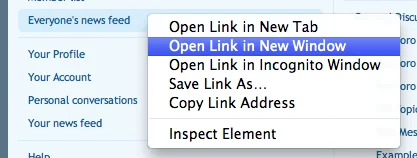
Secondly, all of the links in our Quick Navigation Menu are actually regular <a href> links. This means that you can right-click them, middle-click them or work with them however you like in order to load the linked content the way you want it.
Thirdly, the Quick Navigation Menu is built with a standard template, so if you want to customize its contents and add links to non-XenForo areas of your site, or add-on functionality, it's as easy as a template edit.
Finally, we place the Quick Navigation Menu in an overlay that sits on top of the content. This allows us to work with a lot more screen real estate without interfering with the rest of the design.
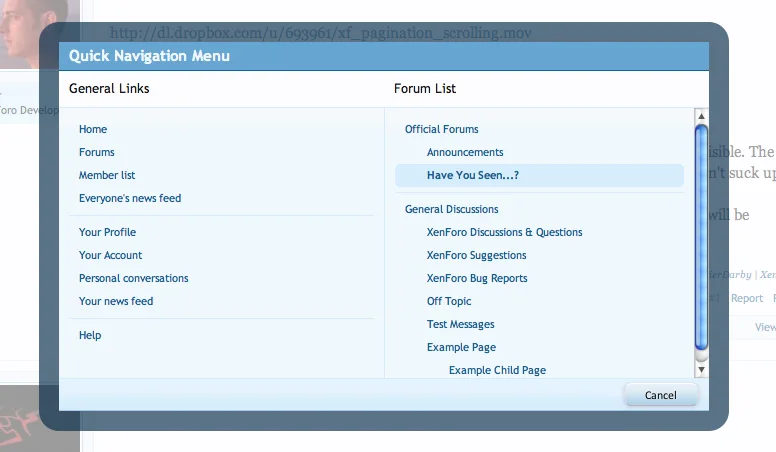
And how do you access the Quick Navigation Menu? You just click the diminutive little gadget that sits at the right of the top and bottom breadcrumb units.

Job done.
The forum jump menu tends to be implemented as a <select> element with javascript behaviour attached to it so that when you release the menu, you jump to the selected forum or site area.
However, doing it like this has a few of fairly major down-sides.
Firstly, in order to build the forum jump menu, the system needs to load theentire forum tree into memory and output it. On a board with a lot of forums, this can be quite an overhead.
Secondly, the use of a <select> means that you are not able to choose how to access the areas listed in the menu. They will be loaded into the same browser window/tab as you are currently using.
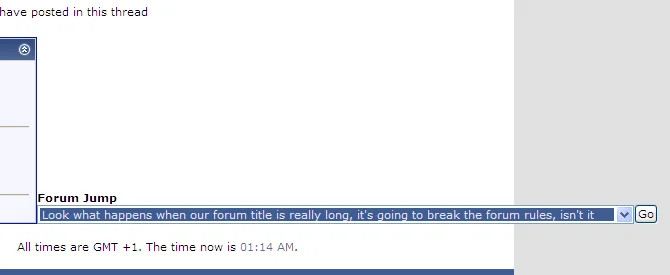
Thirdly, from a design stand-point, a <select> will expand to be as wide as the longest element in its menu, even when it is closed. This means that if you have a forum with a long name, or a particularly deeply-nested forum, your <select> may appear extremely wide, to the point of interfering with other page elements.
XenForo provides an enhanced version of the old forum jump, and in the process, gets around both of the issues described above.
Firstly, we only build the forum jump (or Quick Navigation Menu as we call it) when you need it. We don't waste time constructing the menu on every page, we wait until you ask for it.
Secondly, all of the links in our Quick Navigation Menu are actually regular <a href> links. This means that you can right-click them, middle-click them or work with them however you like in order to load the linked content the way you want it.
Thirdly, the Quick Navigation Menu is built with a standard template, so if you want to customize its contents and add links to non-XenForo areas of your site, or add-on functionality, it's as easy as a template edit.
Finally, we place the Quick Navigation Menu in an overlay that sits on top of the content. This allows us to work with a lot more screen real estate without interfering with the rest of the design.
And how do you access the Quick Navigation Menu? You just click the diminutive little gadget that sits at the right of the top and bottom breadcrumb units.
Job done.