

-
This forum has been archived. New threads and replies may not be made. All add-ons/resources that are active should be migrated to the Resource Manager. See this thread for more information.
- Home
- Forums
- Development help
- Development tutorials and resources [1.x]
- Development tutorials [Archive]
You are using an out of date browser. It may not display this or other websites correctly.
You should upgrade or use an alternative browser.
You should upgrade or use an alternative browser.
Creating a beautiful looking SPOILER tag...
- Thread starter Jaxel
- Start date

sparky5693
Active member
Looks really nice Jaxel.

zaiger
Active member
I am having a problem with this, if you could help me I would really appreciate it. I uploaded the files to their respective spots on the server and installed the XML. It created the spoiler_template and spoiler shows up in the addons page, however it doesn't parse at all, I just getAwesome, thank you very much.
For all non-developers, including myself that took more than an hour to get this working, I will attach the add-on.
text

Saarbruecken
Active member
Remove the spoiler_template you just created and re-import the add-on, that should fix the problem, also don't forget to upload all files.

AceOfDeath
Member
Did a little tweaking of my own and it works great  Thanks!!!!
Thanks!!!!
Saarbruecken
Active member
What exactly did you change?
AceOfDeath
Member
nothing worth mentioning haha I'm not really good at tweaking things, I just got the Spoiler stuff out of there and made it so it only showed the title I entered after the equals sign. Oh and changed show spoiler to Show Content

Daracon
Member
I installed this, and it kind of works. When I load or refresh a page with a spoiler, I can see the hidden text while the page loads, and it's only hidden when it has finished loading.
try to add in your extra.css
Code:
.bbCodeSpoiler .spoilerContent
{
    display: none;
}
Jaxel
Well-known member
Thats absolutely intended. If you made the spoiler text hidden by default, then someone who doesn't have javascript enabled on their browser will NEVER be able to see the spoiler text. This way, the text is shown by default, and then hidden after it is confirmed that the user has javascript.I installed this, and it kind of works. When I load or refresh a page with a spoiler, I can see the hidden text while the page loads, and it's only hidden when it has finished loading.
This is something called graceful degradation and it is something very important to good design.

Dismal Shadow
Active member
How did you rename them and using only one button?Yup. You can see my test of it HERE.

Digital Doctor
Well-known member
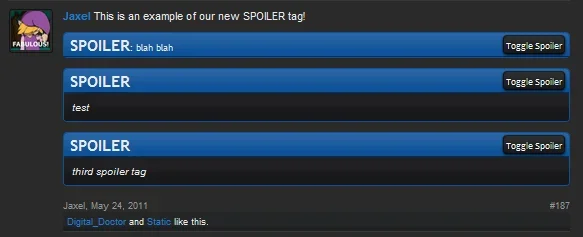
looks great.

John L.
Well-known member
Thats absolutely intended. If you made the spoiler text hidden by default, then someone who doesn't have javascript enabled on their browser will NEVER be able to see the spoiler text. This way, the text is shown by default, and then hidden after it is confirmed that the user has javascript.
This is something called graceful degradation and it is something very important to good design.
Jaxel, any chance you can release this as a small addon with the installation included. You new style is nice and would love to implement this on my board. Have you been able to add this BB code to the TinyMCE editor?
Digital Doctor
Well-known member
It would be easy to add this to Minorin.Have you been able to add this BB code to the TinyMCE editor?
Adding to TinyMCE - http://xenforo.com/community/threads/cel-editor-button-management.19991/

yavuz
Well-known member
Jaxel, any chance you can release this as a small addon with the installation included. You new style is nice and would love to implement this on my board. Have you been able to add this BB code to the TinyMCE editor?
Creating a beautiful looking SPOILER tag...

John L.
Well-known member
That install doesn't have the phrases pre-installed or Jaxel's latest CSS work.
Jaxel
Well-known member
I've updated the first post with my new HTML and CSS.That install doesn't have the phrases pre-installed or Jaxel's latest CSS work.
